


+4
more
more

This item is no longer available.
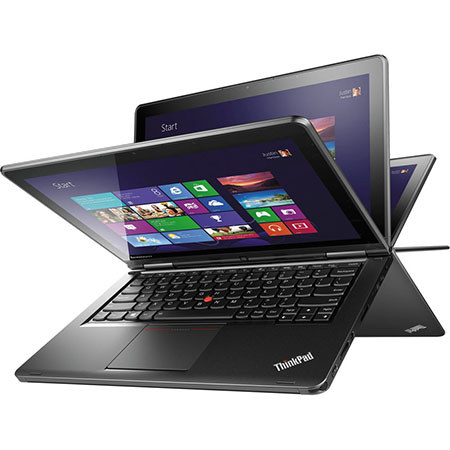
The Lenovo ThinkPad Yoga 20CD00CHUS 12.5" Touchscreen Ultrabook Computer from Lenovo features a unique 360deg. multi-mode design. Laptop Mode features the traditional layout of a laptop where you use the keyboard and touchpad to navigate the screen. Stand Mode is where you can watch videos and view photos with little to no touch interactions with the computer. Tablet Mode is when you push the screen all the way back, transforming this Ultrabook into a tablet. Tent Mode is when you stand the Yoga up, resembling a tent. This mode is best suited for PowerPoint presentations.
The 12.5" widescreen touchscreen features an in-plane switching (IPS) panel for wide viewing angles and 10-point touch support. You'll be able to utilize the multi-touch gestures of Windows 8.1 and transition from touch to keyboard to touchpad. The screen features a 16:9 aspect ratio and a 1366 x 768 native resolution, which allows you to play back 720p HD content without upscaling. The screen also has an anti-smudge finish to minimize smudges and fingerprints.
The system is powered by a dual-core 4th generation Haswell 1.6 GHz Intel Core i5-4200U processor. It also has 4GB of 1600 MHz DDR3L RAM, a 500GB 5400 rpm hard drive with a 16GB M.2 card solid state drive, a 4-in-1 media card reader, 802.11ac Wi-Fi, Bluetooth 4.0, an integrated webcam and microphone. There are also built-in stereo speakers with Dolby Home Theater v4 technology.
Windows 8.1 Pro (64-bit) improves the user experience of Windows 8 with several additions and changes. Windows 8.1 Pro rolls out the Start button (although its functionality differs from its predecessor) and you will also be able to boot directly to the traditional desktop screen instead of the Windows 8 Start Screen. Windows 8.1 Pro introduces a redesigned Start screen with tiles that update in real-time. Windows 8.1 Pro focuses on cloud storage and various apps are available through the Windows Store. Windows 8.1 Pro also focuses on data security. BitLocker drive encryption helps protect corporate data. SmartScreen services help protect you from malicious sites and software on the Internet. Windows 8.1 Pro provides a unique and secure user experience that differs from previous versions of Windows.
Lenovo ThinkPad Yoga
4th-Gen Haswell Intel Core Performance
The Lenovo ThinkPad Yoga houses a 4th generation Haswell Intel Core i5-4200U processor. Its dual cores can reach a stock speed of 1.6 GHz. The processor can also be overclocked up to 2.6 GHz, thanks to Intel Turbo Boost 2.0 technology. The 4th generation Haswell processor uses low voltage to extend battery life without sacrificing performance. With a dedicated 3MB L3 cache, 4GB of 1600 MHz DDR3L RAM and Intel Hyper-Threading technology, you'll be able to push the dual cores up to four virtual cores for quick and efficient multitasking.
12.5" Widescreen IPS Touchscreen
The 12.5" widescreen touchscreen features an in-plane switching (IPS) panel for wide viewing angles and 10-point touch support. You'll be able to utilize the multitouch gestures of Windows 8.1 and transition from touch to keyboard to touchpad. The screen features a 16:9 aspect ratio and a 1366 x 768 native resolution. The resolution also allows you to play 720p HD content without upscaling. The screen also has an anti-smudge finish to minimize smudges and fingerprints so you'll be able to use the touchscreen with ease. You can also output video to an external display via the mini-HDMI port.
Multi-Mode Design
Thanks to its unique 360deg. hinge, this Lenovo ThinkPad Yoga can transform into four unique modes for a variety of interactive options, which are:
Laptop Mode is the traditional notebook layout with the screen in the normal position and you use the keyboard and touchpad to navigate through Windows 8.1 Pro.
Stand Mode is when you push the screen past 180deg. and have it come up the other side, but not all the way to 360deg. In this mode, the screen resembles a TV or a picture frame, from which you can watch videos and view photos with little to no touch interactions.
Tent Mode is when you stand the Lenovo Yoga 13 on its two edges with its hinge in the highest position. As you can gather from the name of the mode, the Lenovo ThinkPad Yoga should resemble a tent in this position. Tent Mode is best utilized for presentations, such as for graphs and PowerPoint slides.
Tablet Mode is when you push the screen 360deg. back so it is resting on the backside of the keyboard. This mode makes the Lenovo ThinkPad Yoga resemble a tablet and you can use its 10-point supported capacitive touchscreen to tap, swipe and rotate your way around Windows 8.1 Pro.
802.11ac Wi-Fi & Bluetooth 4.0 The Lenovo ThinkPad Yoga supports 802.11ac Wi-Fi, which provides a high-speed connection to your home or office wireless network. There is also Bluetooth 4.0 technology for connecting to Bluetooth-compatible devices, such as a wireless mouse.
USB 3.0 - 10x Faster than USB 2.0
USB 3.0 can reach data transfer speeds of up to 5 Gbps, which is up to ten times faster than USB 2.0. USB 3.0 is also backwards compatible with USB 2.0 devices so you don't have to worry about losing access to your older peripherals. Also, one of the USB ports is powered so you can charge your portable device for added convenience.
4-in-1 Media Card Reader
The Lenovo ThinkPad Yoga has a 4-in-1 media card slot that can read Secure Digital (SD), Secure Digital High Capacity (SDHC), Secure Digital extended Capacity (SDXC) and MultiMediaCard (MMC).
Windows 8.1 Pro (64-bit)
The Return of the Start Button
After many requests from Windows users, the Start button makes its triumphant return in Windows 8.1 Pro. While it may not be exactly the same as its predecessor in Windows 7, the Start button has two core functions. A left click on the Start button will take you to the Windows 8 Start screen featuring live tiles. A right click on the Start button brings up an advanced menu where you can access the Device Manager, Control Panel, Network options and more.
Boot Directly to the Desktop
Windows 8.1 Pro gives you the choice of booting to the Windows 8.1 Pro Start screen with live tiles or booting to the familiar desktop screen of Windows 7. Users can also boot directly into an app or app view if they choose to.
Seamless Integration of Multi-Touch Gestures
Windows 8.1 Pro supports multi-touch gestures. Now, you can use your keyboard, mouse or the touchpad using simple gestures. Whether you're browsing apps, reading a book or typing on the go with touch, you'll be able to seamlessly switch between all three interactive components. With the touchpad, Windows 8.1 Pro allows you to use multi-touch gestures, such as swipe, drag, tap, slide, pinch-to-zoom and more.
To the Cloud
With Windows 8.1 Pro, when signed in using your Microsoft account, you'll have instant access to your personal Start screen, themes, language preferences, browsing history and browser favorites. You can also connect to services such as Microsoft Outlook, Facebook, Linkedin, Twitter and more.
Windows Store
In the Windows Store, you can search for or browse thousands of apps. Choose from the featured apps or grab one of the most frequently downloaded apps to see what all the hype is all about. You can also see how other people rate apps. For certain apps, you can try it out before you buy it so you can make sure you absolutely want an app before you spend your hard-earned money on it.
BitLocker
BitLocker drive encryption helps protect corporate data on mobile PCs that include a trusted platform module (TPM) chip. BitLocker now encrypts hard drives more quickly, helping to keep your data safe without interrupting your productivity. BitLocker also supports encrypted drives.
SmartScreen
SmartScreen services help protect you from malicious sites and software on the Internet. It checks the reputation of any new app or website in order to keep you safe no matter what browser you're using. This helps prevent malware and other viruses from infiltrating your PC or your corporate network.
DirectAccess
DirectAccess allows remote users to more securely and seamlessly access resources inside of a corporate network without having to launch a separate virtual private network (VPN) connection.
Windows Media Center
Windows Media Center lets you turn your PC into a home entertainment system that can play and record high-definition TV (if you have additional tuner hardware), DVDs and CDs. It also has a software DVR that can play photo slideshows and Internet TV content.