Orders placed during Passover Holiday (Wed 4/1 after 4PM ET – Thurs 4/9) will ship Fri 4/10. View our holiday shipping schedule.
This item is no longer available.
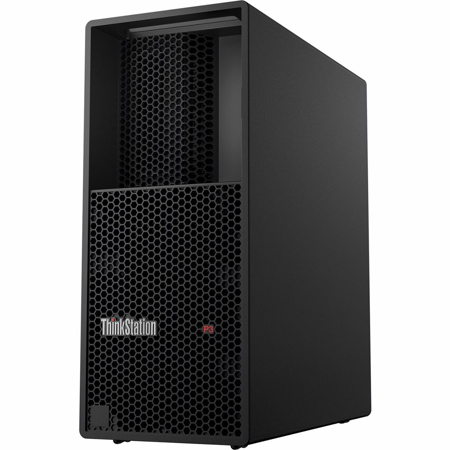
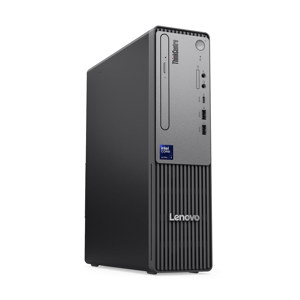
The Lenovo ThinkStation P3 Tower Workstation is powered by a 13th Gen Intel Core i9-13900 2.0GHz processor.
The ThinkStation P3 Tower Workstation comes with an NVIDIA RTX A2000 12GB graphics card.
The ThinkStation P3 Tower Workstation has a 1TB SSD for storage.
The ThinkStation P3 Tower Workstation can support up to 12 independent displays.
The ThinkStation P3 Tower Workstation has ThinkShield protection, a discrete Trusted Platform Module (TPM) 2.0 for data encryption, and supports Windows firmware updates.
Review Summary
2025-02-16T19:00:00
It is a quick computer, meets all the needs I have for running software.
Rodc87

2025-02-16T19:00:00
So far we are very pleased. We use it for graphic designs and it is super fast. Also the colling fans are much quieter than expected. We've only been using it for a little over a week now, but so far we are impressed, especially for what it costs.
Champee

2025-01-27T19:00:00
Sleek, sturdy, well-built, and a real screamer. I only wish it came with a 2nd SSD mounting kit, which delayed my installation of an additional 4TB SSD. Imagine-- a screaming fast machine with 6TB fast SSD and 128GB of RAM. Wow! What do I need such a powerful machine for? "Fiddlin' around". I want to re-learn Linux after 20 years of not doing any coding, and write my own code for various purposes, sometimes with HUGE data sets/images. In another life, I developed pattern detecting code and my thesis was on digital imaging. Now, I have the tools to pursue it
BP2day

2025-01-12T19:00:00
The computer Rocks! But Windows 11 inspires hatred and fury. Windows 11 hijacks, no steals your files and puts them on OneDrive, without any notice. And after you spend HOURS getting rid of OneDrive you have a messed up file system that still isn't up to par. There are no clear, concise instructions/directions on removing OneDrive that I could find anywhere. So, I am very impressed with the computers performance (Autocad runs great on it) but I detest, detest, detest Windows 11. If I could change it to Windows 10 I would give it more than 5 stars.
Marchitect

2024-12-28T19:00:00
I've been loving the P3 especially at the price point I got it at. It's performing pretty well so far. I had a Legion 5i with 60bg of RAM that was starting to breath a bit hard with all the apps required for my line of work. And so far with the P3 I'm opening all the apps and I can barely hear it. I'm excited to start this journey with the P3 and I hope it can serve me for a long time with no issues.
Arri B.

2024-12-18T19:00:00
Solid work horse for Solidworks sheetmetal. Zero lag and quick response in an affordable form.
Jay W.

2024-10-09T20:00:00
The computer system shipped rapidly and was received with four days of ordering. It was relatively easy to set up and transfer from my old system to this company. I have run into no problems with the system and it is amazingly fast and well designed to keep the components cool.
Steven S.

2024-10-01T20:00:00
The ThinkStation P3 Tower Workstation is a high-performance machine designed for demanding tasks like 3D rendering, AI workloads, and data analysis. It offers robust build quality, efficient cooling, and flexible expandability with a range of configuration options for professionals. The workstation is praised for its reliability, though some users may find it on the pricier side compared to other models with similar specs.
Pelltessa

2024-06-02T20:00:00
The P3 Tower Workstation is perfect! Fast, stylish, and compact
MGM39

2024-02-07T19:00:00
Set up was easy and its working great about a month in. Runs Solidworks great. Fixed all my graphic glitches I was having on my previous pc.
Sam 5.

2023-12-25T19:00:00
This is a very nice workstation that is replacing a dual Xeon system I had that was showing its age. I bought it for doing Mathematica calculations and it is very nice for that! I also use it for occasionally running a game server, and it is outstanding.
George H.

Accidents happen where life happens. Protect your favorite Adorama products and purchase a protection plan to stay covered from accidental damage, mechanical or electrical failure, and more.
If we can’t fix it, we’ll replace it at no additional cost.
Protect your product from drops, spills, and more.
Enjoy your gear without fear. We have you covered!
When regular use of your product over time results in mechanical or electrical failure.
We will never charge you a deductible after the purchase of a plan.
Our claims process is simple & easy and our customer service team is happy to help.
Adorama Protect powered by Extend is available for purchase to customers in the United States. Not available for purchase Internationally or in U.S. Territories.
Browse our FAQ
Intel Core i9-13900, 24C (8P + 16E) / 32T, Max Turbo up to 5.6GHz, P-core 2.0 / 5.2GHz, E-core 1.5 / 4.2GHz, 36MB
1x FCLGA1700
Integrated Intel UHD Graphics 770
1x NVIDIA RTX A2000 12GB
Intel W680 Chipset
1x 32GB UDIMM DDR5-4400 Non-ECC
4 DDR5 DIMM slots, 2 channels capable
Up to 128GB (4x 32GB DDR5 UDIMM)
Integrated NVMe Controller
1x 1TB SSD M.2 2280 PCIe 4.0x4 Performance NVMe Opal
Onboard Intel RSTe SATA RAID
None
Up to five drives (4x HDD + 1x M.2 SSD) or six drives (3x HDD + 3x M.2 SSD)
3.5" HDD up to 6TB each
2.5" HDD up to 1TB each
M.2 SSD up to 4TB or 2TB each (see Storage Type)
None
High Definition (HD) Audio, Realtek ALC897Q-CG codec
750W Platinum Fixed
USB Traditional Keyboard, Black, English
USB Calliope Mouse, Black
Supports four PCIe slots with two PCIe 4.0 x16 and two PCIe 3.0 x1.
Slot 1: PCIe 4.0 x16, full height, full length, 75W, double-width
Slot 2: PCIe 3.0 x1, full height, half length, 25W
Slot 3: PCIe 4.0 x16 (x4 lanes), full height, half length, 25W
Slot 4: PCIe 3.0 x1, full height, half length, 25W
Up to 3x M.2 SSD:
2 via onboard slot, can't be available when 4th HDD is selected
1 via Single M.2 to PCIe adapter
One M.2 slot (for WLAN)
Up to four disk bays:
Bay 1 supports one 3.5" / 2.5" HDD, standard
Bay 2 supports one 3.5" / 2.5" HDD, optional
Bay 3 supports one 3.5" / 2.5" HDD, optional
Bay 4 supports one 3.5" / 2.5" HDD, optional
Front Access HDD Bay supports one 3.5" / 2.5" HDD, optional, occupies Bay 3 location
Intel I219-LM, 1x GbE RJ-45
None
None
SD Card Reader
1x USB-C 3.2 Gen 2 (support data transfer)
2x USB 3.2 Gen 1
2x USB 3.2 Gen 2
1x headphone / microphone combo jack (3.5mm)
1x microphone (3.5mm)
4x USB 3.2 Gen 1 (one supports Smart Power On)
1x HDMI 2.1 TMDS
2x DisplayPort 1.4
1x Ethernet (RJ-45)
1x line-out (3.5mm)
1x DP (Flex IO)
Discrete TPM 2.0, TCG certified, FIPS 140-2 certified
Kensington Security Slot, 3 x 7 mm
Padlock Loop
None
No Cable
Chassis Intrusion Switch
Intel vPro Enterprise with Intel AMT 16
ENERGY STAR 8.0
EPEAT Gold Registered
ErP Lot 3
RoHS compliant
TCO Certified 9.0
Windows 11 Pro, English
None
7.09 x 14.57 x 16.34" (180 x 370 x 415mm)
30 lbs (13.61kg)
196804913773
P3 is a workhorse
By Arri B.
I've been loving the P3 especially at the price point I got it at. It's performing pretty well so far. I had a Legion 5i with 60bg of RAM that was starting to breath a bit hard with all the apps required for my line of work. And so far with the P3 I'm opening all the apps and I can barely hear it. I'm excited to start this journey with the P3 and I hope it can serve me for a long time with no issues.
P3 Workstation
By Jay W.
Solid work horse for Solidworks sheetmetal. Zero lag and quick response in an affordable form.
Workstation might, desktop price
Designed by engineers for engineers, the Lenovo ThinkStation P3 Tower offers all the workhorse capabilities of a workstation for the price of a desktop. Built for tasks that require superior power and performance, it's equipped with the latest 13th Gen Intel Core processors, and supports professional NVIDIA discrete graphics.
Delivering power & performance
The ThinkStation P3 Tower's chassis has an advanced thermal design to promote extra power and performance, without overheating. Featuring the latest professional graphics technology from NVIDIA to accelerate your workflow, the P3 gives you the compute power to execute your visions, time and time again.
Configure it any which way
With three onboard DisplayPorts, plus the ability to configure up to eight more, the ThinkStation P3 Tower can support up to 12 independent displays. And with heaps of speedy memory and SSD storage, plus five open PCIe slots for a variety of network and special purpose add-in-cards, this workstation can be configured to tackle your most exacting workflows.
Mission-critical performance, made easy
At the heart of every Lenovo ThinkStation is reliability. Proven to run in extreme conditions, the ThinkStation P3 Tower also boasts an array of independent software vendor (ISV) certifications. It's the perfect workstation for designers, engineers, and students looking for versatility, flexibility, and breakthrough performance to breeze through heavy workloads.
Security you can count on
The ThinkStation P3 Tower is protected with ThinkShield, a suite of hardware and software that work together to safeguard your workstation and data. This includes the discrete Trusted Platform Module (TPM) 2.0 to encrypt sensitive data, as well as various programs to prevent unauthorized access to the BIOS, plus self-healing software if the BIOS is corrupted or maliciously attacked. For extra peace of mind, it also supports Windows firmware updates.