2019-05-18T20:00:00
Tablet is a bit bulky. Doesnt start up well all the time. I bought a warranty and have not been able to get through to anyone. The pen is in but the chromebook thinks its out for the last month
Mmkk
Originally posted at

2019-04-21T20:00:00
Rated 5 out of 5
Nailed It!
Fed up with Microsoft Windows and the all-too-frequent waiting while updates process, I decided it was time to make the switch to Chrome for my routine computer use: checking email, online shopping, checking the news, etc. I also wanted a device that would allow me to take hand-written notes in meetings and make annotations while making presentations in small group settings. After a fair amount of comparative research, the Lenovo e500 came out as the clear winner.
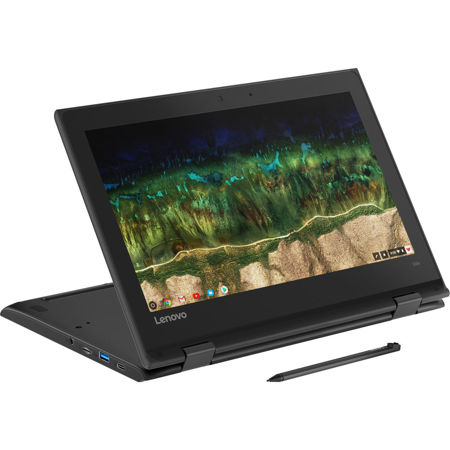
I ordered directly from Lenovo (which incidentally had the best price!), and received my new Chromebook within a week. After unboxing it, I was up and running within 10 minutes. This thing is a breath of fresh air after enduring MS Windows for years. It boots in seconds, and is so simple to use! I had a Kindle HD 10 that I'd been trying to use for some things, but was frustrated by the lack of a keyboard when I needed one. Tried a Bluetooth keyboard, but it was more bother than it was worth. With the e500, I can fold the display back and use it like a tablet when I want, but quickly fold it back into a laptop configuration when I need the keyboard. The active pen that comes with the e500 is a joy to use after trying to write with a stylus on the Kindle. No false triggering from the palm of the hand touching the screen-only the pen registers.
The e500 is a bit heavier than other two-in-one units, but that's because it's buillt to take some abuse. The corners are wrapped in a hard rubber, making it able to withstand a drop from a table (not that I've tried that, but "stuff happens"). The hinges are very sturdy and the keyboard has a nice balance between rugged and responsive feel to it. The nearly-unbreakable gorilla glass on the display rounds out the ruggedness of this little gem.
I'm glad I did the research, and I'm very happy with the Lenovo e500. I highly recommend it if you're looking for a well-equipped mobile computing device (with a decent-sized keyboard and a big enough screen to actually see what you're doing!), that can take the spills and thrills of life along with you.
RBarber
Originally posted at
2019-04-14T20:00:00
Rated 5 out of 5
Great product.
I love the laptop so much. It is so small and nice. I love the fact that I can carry it around with me and it work very fast.
Diana O.
Originally posted at
2019-04-10T20:00:00
Rated 5 out of 5
Elementary and middle school students approved!
We bought 500e chrome book for our children who are 5th and 7th graders. We actually purchased apple Mac mini first for our oldest daughter, however it was too complicated for her as there are so many apps and updates, and it was just sitting on her desk, unfortunately. The reason we picked for the kids were because they have already know how to operate from their schools, portable/foldable and its price! It is amazingly simple concept and kids friendly! Thank you!
Tomtom221
Originally posted at
2019-03-29T20:00:00
Rated 5 out of 5
Just as Described
Perfect for my school needs as well as my kids. Battery lasts for my kids to complete homework
SANTOS
Originally posted at
2019-03-28T20:00:00
Rated 5 out of 5
Fantastic
Fantastic, well built computer. Chrome OS runs fast and smooth. The hinges are smooth when converting from laptop to tablet mode. Keyboard doesn't exactly have the kind of feedback I like it a keyboard but it works. Only complaint about the laptop is the included pen is really hard to remove, sort of a good thing though because it means it won't fall out and get lost.
Patrick A.
Originally posted at
2019-03-28T20:00:00
Rated 5 out of 5
Sturdy and fast
The computer works fast, is sturdy, and is everything we need in a portable computer.
Shawn1986
Originally posted at
2019-03-22T20:00:00
Rated 5 out of 5
Handy dandy and virus free
Perfect size for travel. I decided to switch to Chromebook because I it is such a challenge to keep up with all the malware software. I can do everything I need when traveling on this little laptop. I love that it is so flexible and can be used as a tablet.
Binan
Originally posted at
2019-03-20T20:00:00
Rated 5 out of 5
Compact, Durable and Long-Lasting!
Great little machine. Rugged and lasts all day! Has survived small drops and the battery life is more than enough to get me through a full day’s work.
Chris V.
Originally posted at
2019-03-19T20:00:00
Rated 5 out of 5
Great for my needs
I use mine primarily for writing. It has fantastic battery life and the linux implementation allows me to expand the way I use it (backing things up into other word processors and providing alternatives to GoogleDrive apps should you need them. Screen resolution isn't anything to write home about but I can't complain. The only thing I wish I'd known was that v2 would be out shortly after I purchased the v1 model.
Kris J.
Originally posted at
2019-03-17T20:00:00
Rated 5 out of 5
Lenovo 500e Chromebook 2-in-1
My daughter loves her new Chromebook. It is very similar to the Lenovo 300 she uses at school, so we chose to get something that she was familiar and comfortable with for doing Google Classroom type assignments at home. The 2-in-1 feature and included stylus make it a complete homework experience for her. I only wish the keyboard was backlit, but it is otherwise a great little machine.
M V.
Originally posted at
2019-03-14T20:00:00
Rated 5 out of 5
Happy with purchase
I Love my new Chromebook 500e laptop. Does everything I need. Just needed something to help manage photos other than my phone. Also doing basic things like emails, watching movies and surfing the web. Charges quickly and battery live is better than expected. Sound is adequate could be a little better. Bonus that It can also be use as tablet and propped up. The included stylus works is a nice addition. However was difficult to remove the first time I tried to get it out. Good But now it is removed easily. Touchscreen works good love that it has both keyboard and touch screen which makes it very versitslr. Would definitely recommend to others who need. Happy with my purchase.
Lazz
Originally posted at
2019-03-11T20:00:00
Rated 5 out of 5
Exactly what I needed!
Exactly what I needed for school. I didn't want to buy an expensive, delicate laptop to cart around in my backpack on campus, but I needed a touchscreen and a stylus for note taking in class. This fits the bill perfectly, had everything I need to get me the rest of the way through college.
Chele42
Originally posted at
2019-03-11T20:00:00
Rated 5 out of 5
Great for teaching
I am loving my new Chromebook but still learning how to work with it and my promethean panel
Reynolds1
Originally posted at
2019-03-03T19:00:00
Rated 4 out of 5
Charging problem
Easy to use, but was not charging properly after purchase. Had to contact company for a new charger. Waiting to see if this fixes the problem
Slist
Originally posted at
2019-02-14T19:00:00
Rated 5 out of 5
Great for school.
I use this primarily for my online college classes and it works great. It’s great for videos and the google docs save as Microsoft documents just fine. It’s plenty fast for what I need. The pen is great for high lighting ebooks. Overall I’m very happy.
Anonymous 1.
Originally posted at
2019-02-14T19:00:00
Rated 5 out of 5
Does it all
This multi faceted computer/notebook/tablet was just what I needed. Thanks Lenovo for a great product
Eltropo
Originally posted at
2019-02-14T19:00:00
Rated 5 out of 5
Great chromebook with Pen and durable perfect size
Great chromebook with Pen and durable. Fast browsing and application running for my child
Jake L.
Originally posted at
2019-02-10T19:00:00
Rated 5 out of 5
Perfect for what I need
I've had the chromebook for about a month now and I have no complaints at all. The battery life is great, and it never overheats. Start up time is quick and things load fast. I have only really used this laptop for typing papers, school work, and searching, but it has been super helpful and just what I need. I am excited to take it to college with me. I think it is a wonderful laptop.
T J.
Originally posted at
2019-01-31T19:00:00
Rated 5 out of 5
Bought for my mom - kinda want one now, too!
I bought this for my mom to replace her iPad (which was completely not right for her). She loves the computer. I showed her how to use it and I loved the simplicity of it but it has everything she needs to comfortably surf the internet, read and write emails, and watch movies. Very happy with purchase.
NatalieK
Originally posted at
2019-01-26T19:00:00
Rated 5 out of 5
Great choice for kids who are excited about learni
Purchased for my 7 year old. Perfect for learning, my daughter uses it for abc mouse and a few other learning apps. She absulutly loves it. I did alot of reserch on this device as well as others trying to find the right fit for her and im so happy i decided to purchase the 500e.
Frances m.
Originally posted at
2019-01-25T19:00:00
Rated 5 out of 5
Perfect for school
Simple and easy to use with everything I need/want without a bunch of what I don’t.
Back s.
Originally posted at
2019-01-25T19:00:00
Rated 5 out of 5
Absolutely perfect
My 9 yr old daughter absolutely loves her chromebook!!! Its absolutely perfect for her!!!
Mshaw
Originally posted at
2019-01-25T19:00:00
Rated 5 out of 5
Grest music reader
I bought the Lenovo 500e because i needed something small and light. Price was slso a consideration. I use the 500e to store music and on in pdf format a d using a music reading and a pedal switch I can use it for performing. I like the 500e so much I use for much more than my music
FingerMade
Originally posted at
2019-01-23T19:00:00
Rated 5 out of 5
Convenient! Very comfortable around hands, sound i
Efficient all around
Can place in many different positions
Jason M.
Originally posted at
2019-01-21T19:00:00
Rated 5 out of 5
Tough little Chromebook
We bought this Chromebook as a gift for my daughter and she loves it! We specifically wanted something a little tough as she can sometimes be a little hard on electronics. So far, it is doing well and is used on a daily basis.
Luckicj
Originally posted at
2019-01-21T19:00:00
Rated 5 out of 5
My grandson LOVES this Chromebook!!!
My grandson is ten years old and loves this Chromebook. It’s the preferred one to be used in their school. Very nice and reasonably priced.
Patti M.
Originally posted at
2019-01-17T19:00:00
Rated 5 out of 5
Lenovo 500e
Had this for a month now and really enjoy it. Keyboard works great. System run amazing, i dont have any complaints it does everything i want.
Jag6510
Originally posted at
2019-01-16T19:00:00
Rated 5 out of 5
Excellent chrome book
Excellent product, very pleased with product. Our son received this for Christmas and is enjoying it very much.
Tussing F.
Originally posted at
2019-01-13T19:00:00
Rated 5 out of 5
A Great Buy (with a couple reservations)
The 500e is a great laptop for the price. I purchased this for three reasons: to be my first Chromebook, for the tablet mode, and because of the stylus. The hardware on this laptop is capable enough to run multiple applications and tabs in Chrome OS with little to no lag. This is my first Chromebook device and I don't foresee going back anytime in the near future. It really is better than any other OS I've used (once I got used to it).
Tablet mode is pretty good as well but the screen ratio and the weight of the laptop make using as a tablet a bit awkward. Tablet mode works best when you have a surface to rest the laptop on. Additionally, when switching from tablet mode to laptop mode, you'll find it takes an unfortunately long amount of time to turn the keyboard back on again. With that said, the screen is responsive and tablet mode is as good as you could reasonably expect.
The stylus was a requirement for me because I intend to use it for note taking at school. For most note-taking apps, the stylus lags. However, Squid is an except to this and makes the stylus worth it. Having the stylus garaged in the actual laptop is a huge plus. I don't worry about losing it. The stylus itself is on the thin side and comes with no features other than a pressure sensitive nib. That's to be expected on a device this affordable and is good enough.
Overall, I love this laptop and it's become my main machine both at work and at home. There is more to review (keyboard, IO, trackpad, webcam, screen, build quality) but for the sake of everyone's time, I'll just say that all those things are good.
David S.
Originally posted at