2023-10-12T20:00:00
Rated 1 out of 5
Not Worth
This is one of the worst Chormebooks/laptops ever can't run anything. It should be burned its so slow and laggy that its price should be only half. This "thing" should not of been made. There is way better laptops for a price a little higher.
Jacob G.
Originally posted at

2023-03-23T20:00:00
Rated 1 out of 5
TERRIBLE!!??
this laptop nevermind i wouldnt even call this discrace a laptop it is terrible i hate it will never use it again i might even throw it off the grand cannyon very dissapointed worth the money but it only like 100 bucks and also my school district got this chromebook because they are cheap
Nick 2.
Originally posted at
2022-12-15T19:00:00
Rated 5 out of 5
Excellent Lightweight and Compact Laptop
This laptop is a great value for those looking for a small, lightweight, and functional browsing laptop. The main purpose of this laptop is as an internet browsing device and platform for Google Docs, Sheets, etc. For this it runs perfect. The Chrome operating system run great for these purposes. I take this laptop on my work trips and leave my work laptop at home because it is too big and heavy.
Those people not happy with the device seem to be doing games and unsupported type Microsoft programs. If you need Office 365 compatibility this is not the device for you. Just go buy a Windows laptop.
DougNC
Originally posted at
2022-12-07T19:00:00
Rated 1 out of 5
Insanely Bad and Slow
This thing is a piece of trash and is the worst laptop I have ever used. The quality is terrible and is a downgrade from any kind of laptop you've used. I've been using one for a long time and it can't run if there are more than 5 tabs open at one time. It is really bad, so please save your money from this $400 piece of trash
chromebooks_are_terrible
Originally posted at

2022-05-30T20:00:00
Rated 1 out of 5
Horrible device
the processing power of this "laptop" couldn't even be compared to that of a 5 year old think pad which the school board decided to upgrade from. this computer barely runs day to day operations and is completely incapable of running graphic and 3d design programs. I wanted to mention that these and all Chromebooks run chrome os which is an extremely restrictive operating system that doesn't allow software downloads of any kind. my advice: get a cheap Macbook if you are just browsing the web and streaming videos or a high powered laptop that runs windows 10 for more serous software. this worthless piece of trash cant even pass its own stress test.
BuffGlobal
Originally posted at
2022-04-17T20:00:00
Rated 2 out of 5
Bad Chromebook
While durable it is slow and the keyboard is very flat. Wouldn't recommend
22Stephen
Originally posted at
2022-03-13T20:00:00
Rated 5 out of 5
Simple and basic laptop - excellent
I have been using this laptop for nearly 2 years and it's one of my favourites. Very simple laptop, best suited for basic tasks - emails, streaming, video chat, productivity apps, and light multitasking. No issues at all - recommend it to everyone!
Emjeezy
Originally posted at
2022-02-10T19:00:00
Rated 5 out of 5
Best Educational Device For Public School Systems
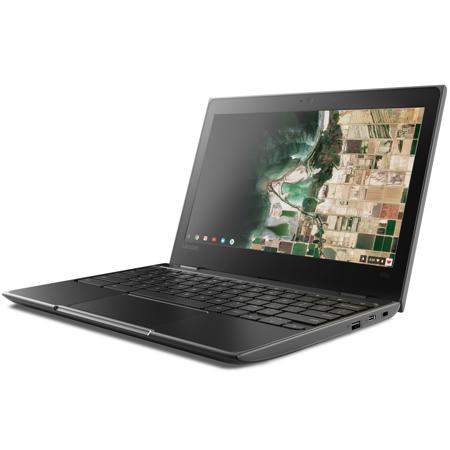
The Lenovo 100e 2nd Gen (11.6?) Chromebook is the ultimate educational device for student use in schools. The device is inexpensive, lightweight, vandal resistant, and runs Chrome OS, a fast and secure operating system which is easy to monitor and maintain while providing students with an easy to use user interface. The device has a dual core Intel®? Celeron®? N4020 Processor (1.10 GHz, up to 2.80 GHz Burst, 2 Cores, 2 Threads, 4 MB Cache) which has a base clock speed of 1.10 GHz and a 2.80 GHz boost, providing students with plenty of power to perform work while providing all-day battery life via a 42 Whr battery. The device also has Integrated Intel®? UHD Graphics 600. The device also has 4GB LPDDR4 memory and 32GB of embedded flash storage, allowing students to multitask while providing enough space to store any local data such as photos and videos. The device is also drop and vandal resistant with a hard and durable military-specification plastic shell with rubber feet and edges, reinforced ports and hinges, and a spill resistant keyboard, reducing maintenance and repair costs in an educational setting. The device also has a 720p video camera, allowing students to use the device for conference calls or use the device as a camera and record high quality photos and videos for school. The device is 11.42" long, 8.03" wide, and 0.78? deep and has 2 USB-C 3.2 ports as well as 3 USB-A 3.1 ports.
fordfan05
Originally posted at