
Orders placed during Passover Holiday (Wed 4/1 after 4PM ET – Thurs 4/9) will ship Fri 4/10. View our holiday shipping schedule.

Overview
Compare
Specs
Protection

Reviews about this item

Review Summary

2020-05-28T20:00:00

Rated 2 out of 5

uneasy purchase

I like the printer and its abilities, what I don't like is the cost of the ink, its like you have to go to another website to learn what the price of the toner cartridges are before you make a purchase with dell.

GRIVERA

2020-05-25T20:00:00

Rated 3 out of 5

large order

like this printer- however, whenever printing large amounts of 2-sided paper, printer jams. Only does this if it is a large order.

MS

2020-05-10T20:00:00

Rated 3 out of 5

Scanning is less than desirable.

Works great except the scanning feature. The scanner works best with the Windows scanning app. To use the function "Scan to computer" on the printer appears to do nothing. There is no file of the scanned document on the computer and there is a copy of my scanned document in the output try. It wasted paper making a copy I didn't want. I've updated the firmware and installed the latest drivers from the Lexmark website.

ColDan

2020-04-18T20:00:00

Rated 1 out of 5

Not happy

I've been in-touch with both Dell and Lemark IT personnel and no one can make it function wireless. MALFUNCTION piece of equipment.

Carmelia

2020-03-31T20:00:00

Rated 5 out of 5

As advertized

So far this printer has all the bells and whistles that I need and all have worked as advertised. It was easy to set up and meshed with my Dell computer with minimal difficulties. The directions were adequate but I personally like a little more detail as I as most people are not super techs and what is obvious to them isn't always obvious to an average user.

BRS

2020-03-11T20:00:00

Rated 5 out of 5

Lexmark MC2425adw Color Duplex Laser Printer - Mul

So far we haven't used it much but what we have we love the outcome.

Santa S.

2019-11-22T19:00:00

Rated 5 out of 5

Printer

It was easy to setup and operate and I like how it operates.

Nick

2019-09-05T20:00:00

Rated 1 out of 5

Great Multifunction - worst possible setup

ok, so now that I have this bad boy up and running it works just great. Getting it up and running was literally a nightmare. I have never had a device (in the past 5-6 years that doesn't just plug in and with a few minutes of handshaking and driver setup isn't up and running. This machine is far far from that. ZFirst, the instruction they give you are horrible and very VERY incomplete. After trying everything for hours including scanning the web for help , this printer simply would not work. I called customer service and first found out that although it's not mentioned anywhere, you have to download a special program that will allow you to connect to the printer over your network in order to mess with the settings. This is not mentioned ANYWHERE! After doing that they simply told me that I had to set up my security settings but then failed to tell me how. It took a customer service guy 8 hours of being connect to my machine to find out that a user had to be set up and then security assigned etc etc none of this info is anywhere and it was clear that the service guy had to figure this all out as well. If you are looking for a nice home office, small business machine AND have an IT guy willing to spend a lot of time on the phone to get this working, then this might be for you. otherwise steer clear One last note, the service from Lexmark was not great . they got the job done but they stood me up on phone appointments to fix this. it was very fustrating

Bob

2019-01-30T19:00:00

Rated 1 out of 5

Lexmark Printer

Dell old me a printer not compatable with computer

None

2018-12-25T19:00:00

Rated 1 out of 5

Worst experience ever

I bought a brand new computer the printer didnt work dell would not help me at all and lexmark did finally replace my faulty printer but it took 3 months and i will never order anything from dell again.worst customer service ever

Mrswalter7

Lexmark MC2425adw Specifications

About Lexmark MC2425adw

FEATURED REVIEWS

As advertized

By BRS

So far this printer has all the bells and whistles that I need and all have worked as advertised. It was easy to set up and meshed with my Dell computer with minimal difficulties. The directions were adequate but I personally like a little more detail as I as most people are not super techs and what is obvious to them isn't always obvious to an average user.

Lexmark MC2425adw Color Duplex Laser Printer - Mul

By Santa S.

So far we haven't used it much but what we have we love the outcome.

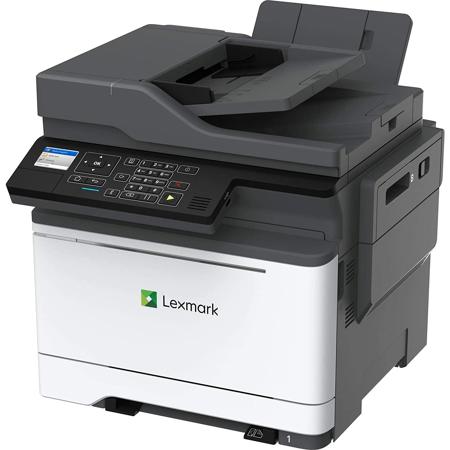
The Lexmark MC2425adw packs reliable, productive and secure color multifunction performance into a small-footprint package with output up to 25 pages per minute.

Full-spectrum security
Lexmark's comprehensive approach to product security is a design and engineering mandate across our entire product portfolio. Our security features help keep your information safe-in the document, on the device, over the network and at all points in between. That's why Keypoint Intelligence - Buyers Lab honored Lexmark with a prestigious BLI PaceSetter award for Document Imaging Security. And this Lexmark product enables you to be GDPR ready.

Interact with ease
With its small footprint, the MC2425adw is easy to find a place for. And the new front-panel power button and direct-print USB port, 2.4-inch color LCD with keypad and secure browser-based device management make it easy to interact with.

Color that only looks expensive
Thanks to PANTONE calibration, embedded color sample pages and Lexmark color Replacement, you'll get accurate, professional color in-house. And you'll save toner with included tools that let you choose when and how much color to print, including mono-only print drivers, user-based color print permissions and quotas, global color density control, object-specific color Saver, proof before printing and more.

Classic connections, wireless convenience
Beyond included USB and gigabit ethernet, this device lets you connect wirelessly via built-in Wi-Fi, as well as AirPrint, Google Cloud Print, and Mopria on any network with existing Wi-Fi access. And with Lexmark Mobile Print, printing's as easy as hitting print, choosing your printer and picking up your job.

Energy efficiency
Make every watt count with energy management features that reduce power consumption whether the device is active or in sleep mode. Lower fusing temperature, automatic management of processor cores based on workload, and standard two-sided printing all help it achieve EPEAT Silver rating and ENERGY STAR (2.0) certification. That benefits the planet and your budget.

Engineered to perform-and last
Driven by a 1.2GHz quad-core processor, the MC2425adw prints up to 25 pages per minute and can scan up to 50 images per minute. With its steel frame, long-life imaging system, ease of upgrades and robust paper feeding system, it's ready for lasting performance in any environment.
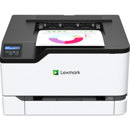
Lexmark MC2425adw Features

  • Color Laser
  • Duplex (2-sided) Printing: Integrated Duplex
  • Print Speed: 25 ppm
  • Recommended Monthly Page Volume: 800 - 6500 pages

Key Features

  • Color Laser
  • Duplex (2-sided) Printing: Integrated Duplex
  • Print Speed: 25 ppm
  • Recommended Monthly Page Volume: 800 - 6500 pages

What's in the box:

  • MC2425adw Color Laser Multifunction Printer
  • Photoconductor Unit
  • 4 Developer Units (K/C/M/Y)
  • Cartridge Collection Program Information
  • 1400 Page Starter Black Toner Cartridge
  • 750 Page Color (CMY) Toner Cartridges
  • Power Cord(s)
  • Software and Documentation CD
  • Setup Guide or Sheet (Network and Local Attachment)
  • (Ethernet/USB/Parallel Cable Not Included)
  • Lexmark 1 Year Limited Warranty