
This item is no longer available.
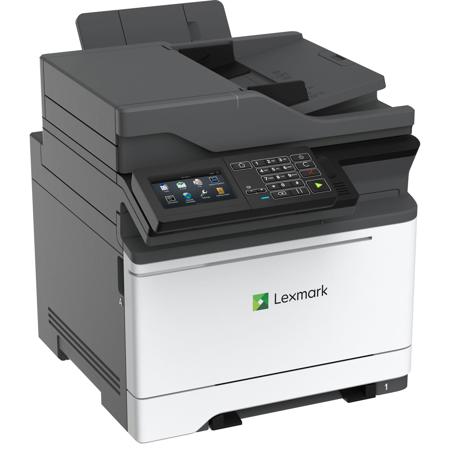
The Lexmark MC2640adwe Color Laser Multifunction Printer can print up to 40 pages per minute.
Yes, the Lexmark MC2640adwe supports wireless printing through built-in Wi-Fi, AirPrint, Google Cloud Print, and Mopria.
The Lexmark MC2640adwe has an EPEAT Silver rating and an ENERGY STAR (2.0) certification.
The Lexmark MC2640adwe offers comprehensive security features that protect your information on the document, the device, over the network, and at all points in between.
Yes, the Lexmark MC2640adwe features a 4.3-inch e-Task color touch screen with a responsive, tablet-like user interface.
Review Summary
2021-01-20T19:00:00
This is a great printer. Fast, quiet and loaded with features. Lexmark’s telephone support is excellent.
Johnb

2020-02-20T19:00:00
I bought this printer to replace a prior 10 year old Lexmark color laser printer which was no longer supported. I needed the scan to email function more than anything else. I like the one pass duplex printing and scanning. So far it has been reliable and fast. Print quality is good but average for color lasers. Like many comparable printers it has a poor touch screen control. It is very sensitive and prone to errors like clicking a button instead of swiping right or left. I wish printer manufacturers would use smartphone quality input devices. The problem comes in the set-up which is nearly impossible without technical expertise. I had to hire a professional IT person who took 4.5 hours to get this to scan to both a Windows and Mac computer. It was incredibly complex and arcane. The online software support and information is outdated and did not match this printer's functions or set-up screens. You are flying blind on set-up. Perhaps this breaks the threshold of being an "enterprise" machine where you have IT support. It is not reasonable for the home office or average consumer unless you have advanced computer skills. Many other brand devices have a default simple set-up that can be immediately installed and run all the basic functions. This does not. Instructions are two pages of pictures. Reference to online support and drivers is summarized by a picture of a CD and an exclamation point. Lexmark really needs to keep up their support to match the rapid production of new machines. There are no drivers for current Mac OS which is not a surprise. It is built well, and I will be happy if it matches the reliability and ease of replacing toner as my previous Lexmark. It is too soon to tell. Dell was great regarding shipping and notification. It even arrived a day or two early and the box was not damaged. I was surprised that it was dropped off by FedEx in a driveway unannounced without a required signature though. I would recommend this printer due to features and quality with the caveat that you need to anticipate difficult set-up.
RRM855

Accidents happen where life happens. Protect your favorite Adorama products and purchase a protection plan to stay covered from accidental damage, mechanical or electrical failure, and more.
If we can’t fix it, we’ll replace it at no additional cost.
Protect your product from drops, spills, and more.
Enjoy your gear without fear. We have you covered!
When regular use of your product over time results in mechanical or electrical failure.
We will never charge you a deductible after the purchase of a plan.
Our claims process is simple & easy and our customer service team is happy to help.
Adorama Protect powered by Extend is available for purchase to customers in the United States. Not available for purchase Internationally or in U.S. Territories.
Browse our FAQ
Color Laser
Color Copying
Color Faxing
Color Printing
Color Scanning
Small-Medium Workgroup
Lexmark e-Task 4.3" (10.9 cm) color touch screen
A6, Oficio, 7 3/4 Envelope, JIS-B5, A4, Legal, A5, Hagaki Card, Letter, B5 Envelope, Statement, C5 Envelope, Executive, Universal, DL Envelope, Folio, 10 Envelope
Integrated Duplex, Single-Sheet Manual Feed, 150-Sheet Output Bin, 250-Sheet Input
Gigabit Ethernet (10/100/1000), Front USB 2.0 Specification Hi-Speed Certified port (Type A), Rear USB 2.0 Specification Hi-Speed Certified Port (Type A), 802.11b/g/n Wireless, USB 2.0 Specification Hi-Speed Certified (Type B)
18.2 x 17.4 x 23.1 (46.2 x 44.2 x 58.6cm)
60 lb (27.21kg)
Up to:
Black: 40 cpm (Letter)
Color: 40 cpm (Letter)
Up to:
Black: 20 spm (Letter)
Color: 20 spm (Letter)
As fast as:
Black: 8 seconds
Color: 9 seconds
25 - 400 %
Max is 33,600 bps, V.34 Half-Duplex Kbps
< 3 seconds per page
Black: 40 ppm (Letter)
40 ppm
Up to:
Black: 20 spm (Letter)
Color: 20 spm (Letter)
As fast as:
Black: <8 seconds
Color: <8 seconds
Black: 1200 x 1200 dpi, 4800 Color Quality (2400 x 600 dpi)
Color: 4800 Color Quality (2400 x 600 dpi), 1200 x 1200 dpi
2-sided Printing:
Integrated Duplex
0.167" of the top, bottom, right and left edges (within)
Flatbed scanner with ADF
DADF (single pass Duplex)
8.5 x 14" (Maximum)
Up to:
Black: 47 / 50 sides per minute
Color: 30 / 32 sides per minute
47 / 50 sides per minute
30 / 32 sides per minute
Up to:
Black: 94 / 100 sides per minute
Color: 60 / 64 sides per minute
94 / 100 sides per minute
60 / 64 sides per minute
CIS
up to 1200 X 600 ppi (black)
up to 600 X 600 ppi (color)
Send as:
XPS, TIFF, Highly compressed PDF (1GB RAM and hard disk required), Archival PDF (A-1a, A-1b), BMP, Secure PDF, Searchable PDF (optional OCR with 1GB RAM and hard disk required), PDF, JPEG, JPG
e-mail, Lexmark Document Solutions Suite (LDSS), USB or Network connected computer, USB Flash drive, FTP
100-Sheet Automatic Document Feeder
Up to: 100 pages 20 lb or 75 gsm bond
Vinyl Labels, Paper Labels, Card Stock, Plain Paper, Refer to the Paper & Specialty Media Guide
No
Standard: 2
Maximum: 5
Standard: 250+1 pages 20 lb or 75 gsm bond
Maximum: 1450+1 pages 20 lb or 75 gsm bond
250+1 pages 20 lb or 75 gsm bond
Up to:
Standard: 150 pages 20 lb or 75 gsm bond
Maximum: 150 pages 20 lb or 75 gsm bond
24,1 - 28 lb. (Standard Tray)
Cover - 200 gsm (74 lb) (grain long)
Index Bristol - 200 gsm (110 lb) (grain long)
Tag -200 gsm (122 lb) (grain long)
650-Sheet Duo Tray, 550-Sheet Tray
1500 - 10000 pages
Up to: 100000 pages per month
up to:
1,000-page Black and Color (CMYK) Cartridges
6,000-page Black Extra High Yield Cartridge
2,300-page Color (CMY) High Yield Cartridges
3,000-page Black High Yield Cartridge
3,500-page Color (CMY) Extra High Yield Cartridges
8,000-page Black Ultra High Yield Cartridge
3,000 -page Black Starter Return Program Toner Cartridge, 1,400 -page Color (CMY) Starter Return Program Toner Cartridge
Quad Core, 1200 w/ GPU MHz
Standard: 2048 MB
Maximum: 6144 MB
Option available
Standard:
PCL 5c Emulation, PCL 6 Emulation, Microsoft XPS (XML Paper Specification), Personal Printer Data Stream (PPDS), PostScript 3 Emulation, PDF 1.7 emulation, Direct Image, AirPrint
2 PCL bitmap fonts, 158 scalable PostScript fonts, OCR-A, OCR-B scalable PCL 5e fonts, For more information, refer to the Technical Reference., 84 scalable PCL fonts, 3 of 9 scalable PCL 5e fonts in Narrow, Regular and Wide, 5 PPDS bitmap fonts, 39 scalable PPDS fonts
Yes
Yes
Yes
Yes
TCP/IP IPv6, TCP/IP IPv4, AppleTalk, TCP, UDP
LPR/LPD, Direct IP (Port 9100), Pull Printing, Microsoft Web Services WSD, Telnet, FTP, TFTP, Enhanced IP (Port 9400), ThinPrint .print integration, IPP 1.0, 1.1, 2.0 (Internet Printing Protocol)
DHCP, APIPA (AutoIP), BOOTP, RARP, mDNS, IGMP, Bonjour, WINS, DDNS, SNMPv3, SNMPv1, SNMPv2c, Telnet, NTP, ICMP, HTTP, DNS, ARP, HTTPs (SSL /TLS), Finger
IPSec, SNMPv3, 802.1x Authentication: MD5, MSCHAPv2, LEAP, PEAP, TLS, TTLS
Marknet N8372 WiFi Option
Windows 10, Windows 8.1, Windows 8, Windows 8 x64, Windows 7 x64, Windows 8.1 x64, Windows 7
Apple OS X (10.6, 10.7, 10.8, 10.9, 10.10, 10.11, 10.12, 10.13)
Debian GNU/Linux 7.0, 8.0, Ubuntu 16.04 LTS, Fedora 23, 24, openSUSE Linux 42.3, Red Hat Enterprise Linux WS 6, 7, openSUSE Linux 13.2, SUSE Linux Enterprise Server 10, 11, 12
Microsoft Windows 2000 Server running Terminal Services with Citrix MetaFrame XP Presentation Server or Citrix MetaFrame Presentation Server 3.0., Microsoft Windows Server 2012 with Citrix XenApp 6.0, 6.5, Microsoft Windows 2000 Server running Terminal Services with Citrix Presentation Server 3.0, 4.0, Microsoft Windows 2000 Server running Terminal Services with Citrix Presentation Server 4.0
Novell Open Enterprise Server on SUSE Linux Enterprise Server, Novell NetWare 5.1(SP 6+), 6.0(SP 3+) with Novell Distributed Print Services (NDPS), Novell Open Enterprise Server 2 SP2 on SuSE Linux Enterprise Server 10 SP3 3, Novell NetWare 6.5 Open Enterprise Server, Novell Open Enterprise Server 11 on SUSE Linux Enterprise Server 11, Novell Open Enterprise Server 2 on SUSE Linux Enterprise Server 10 SP4
Sun Solaris x86 10, 11, Sun Solaris SPARC 10, 11, IBM AIX 6.1, 7.1
Yes
Operating:
Inaudible dBA (Idle)
52 dBA (Print)
55 dBA (Copy)
51 dBA (Scan)
Operating:
54 dBA
Humidity: 8 to 80% Relative Humidity
Altitude: 0 - 3048 Meters (10,000')
Temperature: 50 to 90 Degree F (10 to 32 Degree C)
ENERGY STAR, Blue Angel RAL-UZ-171, ICES-003 Class A, BSMI Class A, VCCI Class A, US FDA, UL 60950-1, FCC Class A, cUL CAN/CSA-C22.2 60950-1, CB EN/IEC 60950-1, CB EN/IEC 60825-1, CE DoC (EN 62301 Class A, EN 62311, CE EN/IEC 60950-1, CE EN/IEC 60825-1, EN 61000-3, EN 55022 Class A, EN 55024, UL), EFTA (CE), KCC, CCC, CECP, CEL, C-tick DoC, UL-AR, KC mark, UL GS mark, EC 1275, MET-I, ISO 532B, ECMA-370, GOST-R, SII, TER
734646678186


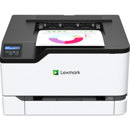
Lexmark MC2640 color laser MFP
By Johnb
This is a great printer. Fast, quiet and loaded with features. Lexmark’s telephone support is excellent.
An advanced and high-tech solution for all your printing needs, the Lexmark MC2640adwe Color Laser Multifunction Printer is a powerhouse of efficiency and reliability. This multifunctional device combines rapid color output at an impressive speed of 40 pages per minute (ppm) with high-speed scanning that can process up to 100 images per minute, delivering exceptional performance for both home and office use.
The Lexmark MC2640adwe stands out with its professional color accuracy, thanks to the PANTONE calibration, embedded color sample pages, and Lexmark color Replacement. This ensures you get precise, professional-grade color right in your workspace. Moreover, the printer comes with smart tools that allow you to control your color usage, including mono-only print drivers, user-based color print permissions and quotas, global color density control, and object-specific color Saver.
This Lexmark printer offers classic wired connections via USB and gigabit ethernet, as well as the convenience of wireless connectivity. You can easily connect to your network via built-in Wi-Fi, and print effortlessly using AirPrint, Google Cloud Print, Mopria, or Lexmark Mobile Print.
Designed with a focus on energy efficiency, the Lexmark MC2640adwe features energy management tools that minimize power consumption, whether the device is active or in sleep mode. Its lower fusing temperature, automatic management of processor cores based on workload, and standard two-sided printing contribute to its EPEAT Silver rating and ENERGY STAR (2.0) certification.
Security is a top priority for Lexmark, and this printer is no exception. Its comprehensive security features help protect your information at every stage - in the document, on the device, over the network, and at all points in between.
Engineered to perform and last, the Lexmark MC2640adwe is powered by a 1.2GHz quad-core processor and equipped with a single-pass, two-sided scanner. Its robust steel frame, long-life imaging system, ease of upgrades, and sturdy paper feeding system ensure lasting performance in any environment.
The printer features a 4.3-inch e-Task color touch screen that offers a precise, responsive, tablet-like user interface with multi-touch capabilities. This interface opens a world of convenience and productivity apps, making your printing tasks easier and more efficient. The new front-panel power button and direct-print USB port, plus secure browser-based device management, further enhance its user-friendliness.