2022-06-09T20:00:00
Rated 1 out of 5
It keeps on freezing
I have had this for the past one year and the chrome book just freezes at random. I was taking an online exam today and it froze so I couldn't continue with the exam and had to email my professor.
Eloise
Originally posted at

2019-02-26T19:00:00
Rated 5 out of 5
Pleasantly surprised
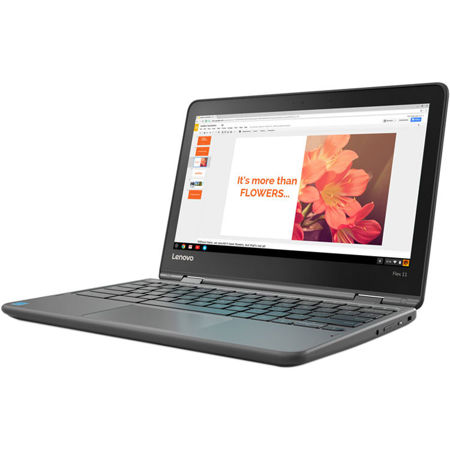
I am very pleased with the Flex 11 Chromebook. I bought it for light web use and writing. But I can have over 20 web tabs open and run HD YouTube videos to a 4k tv without problems.
Schweiss
Originally posted at
2018-09-02T20:00:00
Rated 5 out of 5
Love my Chromebook!
Highly functional, durable laptop with long life. Especially enjoy learning to use Google Chrome's cloud-based applications and features.
Healthcare c.
Originally posted at
2018-07-12T08:50:57
Rated 5 out of 5
Great small chromebook!
I have been happy so far with the chromebook I received. It is a bit bigger/heavier than some of its competitors, but it is more rugged. Great keyboard, fine touchpad.
Alan F.
2018-06-14T20:00:00
Rated 4 out of 5
Good value
I bought this a few weeks ago. The battery life is great and it runs Google OS, so you're all set. Would be great if there were more cases availabe for it. Quick shipping and great pricing.
Tarheel77
Originally posted at
2018-06-09T20:00:00
I got the Flex 11 a month back. To date, I have had no problems with it. I wanted it so that i would not have the issues associated with Windows, that the OS would be kept easily updated, that the OS would be light. Chrome works well. With the new ability to run the Android apps, I can do almost anything i could with Windows with a real speed increase.
All told, I believe i came out way ahead.
Don25136695
Originally posted at
2018-05-07T20:00:00
Rated 2 out of 5
Not what I expected
This laptop is good for a child. I guess I expected it to have more to it. Very basic. I returned it.
Ayr7610
Originally posted at
2018-05-03T20:00:00
Rated 5 out of 5
Beyond Excellent
The money I spent for this chrome book was well worth it. Beyond happy.97
Dubba
Originally posted at
2018-05-02T20:00:00
Rated 5 out of 5
Great Computer
It is just the best it is. And for the price outstanding
Anthonyi
Originally posted at
2018-04-25T20:00:00
Rated 5 out of 5
Perfect for a personal device
I bought this to have laptop functionality in a small form. It does everything that I need it to and I also find the touchscreen very convenient!
Hiltongirl
Originally posted at
2018-04-09T20:00:00
Rated 5 out of 5
Great features!
This is my first laptop after my mac book and I've never been happier! It's so easy to use, it's fast and the best part was the price!! I'm a student and it has absolutely everything I need and you don't need to pay for any of the features. All of the important stuff is free in the chromebook webstore.
Becca95
Originally posted at
2018-03-19T20:00:00
Rated 5 out of 5
I Love This Chromebook
I compared all the Chromebooks. I wasn't looking to spend real computer money, but I needed to get on the internet and not have it be a clunky, slow, buffering process. The specs on this are OP for Android, but a comparable model running Windows 10 would most likely drag. After this spec point, the prices increase substantially and you're looking at actually buying a computer money.
This is the optimal balance of everything, and it's a substantial amount cheaper than the prominent competitor (that's not ruggedized that runs literally the exact same components, but with some sort of supposed graphic enhancement? (I've done a side by side and the difference is negligible)
Basically, stop looking. Buy this one.
Jprizay
Originally posted at
2018-03-11T20:00:00
Rated 3 out of 5
Good computer. Service is questionable.
I bought the chromebook over a month ago. It has been exactly what I was hoping for, however, I had to immediately apply an update just to be able to download apps from Google Play. And my purchase has been pending in my checking account for over a month! Annoyed.
atucker
Originally posted at
2018-03-05T19:00:00
Rated 5 out of 5
Perfect for what I want
This is a great product. Sturdy, fast, utility and all that matter. The only improvement could be the keyboard. Other than that, it is perfect.
niragreg
Originally posted at
2018-02-25T19:00:00
Rated 5 out of 5
Works great
Had this Chromebook for a week now, took some time to get use too ChromeOS, coming from a windows and mac os background. The Chromebook is pretty well built with a good looking screen and fast boot time. The only gripe I have is when you open the laptop it automatically cuts on.
reggie90
Originally posted at
2018-02-12T19:00:00
Rated 4 out of 5
Seems OK - Def a learning curve vs. Windows
I bought this because I was looking for something more portable and mobile that I could take with me versus a laptop. It is that. For the price can’t be beat. It works great. I have not experienced any issues or problems with it. The only thing I can say that’s taking time to adjust to and get used to is the Google OS is a lot different than Microsoft windows. So expect a learning curve and that you have to use Google OS apps and programs to do tasks that are similar to using Microsoft Word and such. You are not able to take Microsoft documents that I am aware of and manipulate them in such as you would with another window-based product. So this can get a little tricky. There’s also some differences in saving pictures to your desktop and right clicking on the picture perhaps to make it your desktop picture and such.
personally I find using Microsoft software and operating system a lot easier than this. I’m kind of stuck in my old ways and don’t like change I must admit.
HunterArchery
Originally posted at
2018-02-09T19:00:00
Rated 4 out of 5
Solid laptop that's great for writing
I bought this laptop to write with, and it's been wonderful. The Chromebook is solidly built, turns on quickly, and the keyboard is very good. Google docs is more than sufficient for writing online or offline.
TomBuhrman
Originally posted at
2018-02-09T19:00:00
I don’t like the fact that theres no button to capitalize my words and im not a big fan of google i prefer interntet explore
Mrfj
Originally posted at
2018-02-07T19:00:00
Rated 5 out of 5
Great for my need!
I bought the Chromebook as a tablet for internet searching only when I don't want to "fire up" the desktop. The performance has been great so far.
Vickie719
Originally posted at
2018-01-26T19:00:00
Rated 4 out of 5
Small device with sharp hd screen
I like taking my chromebook traveling with me. It weighs little and the screen shows me more and better than a phone can.
Daniel B.
Originally posted at
2018-01-11T19:00:00
Rated 5 out of 5
Great for my 6 year old. Durable, fast.
Bought several months ago after doing extensive research. My 6 year old's elementary school uses Lenovo, very similar model to this. Download children's learning Apps. and games from Google Play. We use is for educational purposes and limited games.
MBO12
Originally posted at
2018-01-09T19:00:00
Rated 5 out of 5
Lenovo Chromebook tablet
I am still learning how to use my tablet but so far I really like it.
Baadet
Originally posted at
2018-01-01T19:00:00
After extensive research on chrome book brands, I decided on Lenovo and I’m so glad I did. Hands down the best computer I ever had! It boots up super fast and is very user friendly. Highly recommend
Ms1derful1
Originally posted at
2017-12-19T19:00:00
Rated 4 out of 5
It is everything I wanted
When I decided to buy a Chromebook, it was for the flexibility and price. I didn't need the hard drive of a computer, but I wanted more than a tablet. I chose the Chromebook Flex 11 because of size, it flips to become a tablet, has a touch screen and full size keyboard. I can connect it to my external Monitor, and wirelss keyboard and mouse. I love all of those features. I also selected this model since it is a little more sturdy than others. The only reason I didn't give it 5 stars is the weight.
I knew it was going to be heavier than I would like, but since I ordered it online I had no good sense of just how heavy it was. It is a little much as a table, but it is not unworkable. (I assume the added weight is a trade off for its durability.
The Flex 11 has lived up to my expectations. I love that it boots up so quickly, I can get android apps and access online versions of MS Office as well as Google docs. It is exactly what I expected and in some ways better.
gin61
Originally posted at
2017-12-17T19:00:00
Rated 5 out of 5
Really the best value in Chromebooks out there!
This thing is designed to withstand drops, and believe me, laptops will get dropped (like my old one), especially with children around, so this feature alone is worth the money, as one drop will break other Chromebooks into pieces and you have to buy a new one. The touchscreen and the multiple positions are also nice features, and more memory than other basic Chromebooks is also nice. Did I mention Lenovos just feels more robustly built and better to use? At this price, it just cannot be beat. Great job Lenovo!!
Wazzupyall
Originally posted at
2017-12-12T19:00:00
Rated 4 out of 5
Excellent functionality
I've had this flexbook for over a month now and it is regularly used with my students whom i tutor. I love it's quick startup and it's ability to use apps from the play store. My only complaint would be that the touch screen could be as little more responsive and sometimes the space bar is a little unresponsive as well. Other than that, great product, especially for the price.
Jessec411
Originally posted at
2017-09-01T20:00:00
Rated 5 out of 5
Better and better
I updated from a 4 year old ultra book
I am so pleased with all the features love the look hinges a great add. Resolution is great,
KH58
Originally posted at
2017-08-02T20:00:00
Rated 5 out of 5
Durable, flexible & affordable!
I made the foray into Chromebooks in late 2016 when Android apps were looming. I had an Acer 14 which was great, but I knew I really wanted a touch screen and something convertible for when Android apps would roll out. I got my hands on the Flex 11 in the spring & within a week had sold my Acer This little Chromebook is a dream!
I like the smallish size of the Flex 11 and find the keyboard decent. The trackpad is large, though it is a pain to push down to click - you need to exert some real force (tap to click works fine, though). I'd love the keyboard to be backlit, but on a sub-$300 laptop I really can't complain. The water resistant keyboard and drop durability were real selling points for me at this price point. So what about Android apps? I'm currently on the Beta channel and have Android apps running without issue. Skype, messaging apps, office apps, music apps, and even Android games (some using my Bluetooth game controller) have all worked well. I've been an Android tablet and phone user for some time, but about the only time I use my tablet now is as an e-reader. The Flex 11 is a little bit heavy and bulky for that. For everything else, when I am in tablet mode and put the Flex 11 on my lap or a table, it has been just right. And the price is much better than other convertibles which offer similar features.
Ovidius
Originally posted at
2017-07-19T20:00:00
Rated 3 out of 5
Not Sure I Would Make This Purchase Again...
I bought the Lenovo Flex 11 Chromebook a few weeks ago and have spent a lot of time with it. I did a decent bit of research before deciding which Chromebook to go with. I've had good experiences with Lenovo products in the past and needed a Chromebook for school. I'd like to start with the issues that have taken the review of this from 5 stars to 1 star. The most vexing issue that I have with this is that the spacebar on the keyboard is not very responsive. First of all, you have to hit the spacebar square in the middle for it to respond. If you hit it to the left of middle or right of middle, it won't respond! There have been complaints about this keyboard being too sensitive and the keys being to flush with the keyboard. None of those things bother me. What does bother me is having to constantly go back and correct my typing because the spacebar didn't respond. It's gotten to where I'm ready to return, exchange, sell, toss into a river...whatever I have to do! The last thing I want to do is go through the headache of shipping it to a repair center...anyone who'sbeen through that ordeal before knows what I mean. It's sad that this one glaring defciency has to ruin what would otherwise be a decent buy. The other problem, which is minor in comparison, is that the battery life isn't that great for a Chromebook. I get roughly 8 hrs on a full charge. Not that great. All of the other features, as described by Lenovo, are pretty good. Too bad the spacebar sucks. It's like making a nice car and furnishing it with a lackluster and unresponsive steering wheel. :(
SHamm
Originally posted at
2017-07-19T20:00:00
Rated 1 out of 5
Not Sure I Would Make This Purchase Again...
I wrote the earlier review regarding the spacebar that basically ruins the keyboard and anything having to do with typing on this Chromebook. Anyways, I meant to give it the ONE STAR it deserves and accidentally gave it three. Since I didn't see an option to edit, I'm submitting another review. Avoid this Chromebook, there are better ones out there. Now I'm stuck with this $300.00 paper weight.
SHamm74
Originally posted at