
more
See Options
Need help? Ask our experts.
Review Summary
2025-12-18T19:00:00
Terrible fringing on text in Windows 11 with and without ClearType on. Tried using MacType to adjust the font, but there aren't tools made for RGWB panels. Microsoft doesn't seem to care about addressing this issue. I would avoid all OLED monitors until this is fixed.
jschroedl

2025-12-03T19:00:00
I really wanted to like this monitor since everyone mentions how great OLEDs are. The first issue is the matte screen this has, which I new before I bought it, but I didn't realize it would cause a light bleeding/blooming effect similar to my older IPS monitor. OLEDs are known to have poping colors and no light bleed. The second issue, which was the dealbreaker for me, was the horrible VRR flickering. Whenever I moved my mouse or do anything it the lighting would flicker. It was far too distracting. Given the how long OLED technology has been around, you'd think this issue would have been ironed out.
Df2025

2025-11-26T19:00:00
the monitor overall is great, loving the colors, refresh rate and resolution, not super noticeable jump from my previous monitor but the colors are alot better than my previous IPS, my two issues are with the stand and flickering when the screen is mostly shades of grey, the stand doesnt go as short as i wish it would and flickering is very noticeable when the screen is mostly grey but its not a deal breaker especially at the price point though i do wish that when it automatically did image cleaning, when it gets turned off, it had the rgb colors same as when you do it manually as it makes me doubt whether or not its actually cleaning
Snowy1

2025-11-20T19:00:00
Amazing monitor. Lightning fast. Beautiful colors.
Nstud17

2025-11-13T19:00:00
The Good: Buttery smooth, rare stutters, no tearing. decent color. Worth every bit of $550 paid. The Bad: Model is advertised as 1500 nit monitor is only 600, also advertised as VESA certified but windows does not recognize monitor as VESA certified either. Thought this could be a driver issue but there are no drivers for the monitor on support site. If it stays at lower price, worth it, but if it goes back up to $850, there are better options out there.
Roque7912

2025-10-24T20:00:00
This tandem Oled is still early in its lifecycle so we don't have any suggested setting guides or real reviews yet. Overall its bright and the SDR colors seem vibrant for an W-OLED, out performs my 3rd Gen W-Oled in these areas. Text clarity actually looks better than my 3rd gen W-Oled and isn't an issue for gaming and light-moderate productivity work. Windows HDR still is lacking, as with all monitors, and gaming HDR is undetermined at this point. The display modes seem to all have built in color mapping, although it's hard to tell exactly what they are (gamer 1 vs gamer 2 etc) and how peak brightness factors in to overall brightness and color contrast etc. Hopefully there will be some firmware updates that make this Oled rise to the top. The matte screen isn't as distracting as I thought it Would be and I came from a glossy Oled. Overall I'd buy again but if LG isn't careful the go to will be the glossy ASUS version. LG - please send some test units out to the big testers!
Mike12344321

2025-10-23T20:00:00
Much better color and full screen brightness, but has crushed HDR black levels, poor HDR EOTF tracking, a hazy matte screen, and blown out highlights in HDR. SDR also has issues, but not as bad. This monitor needs a lot of work. It shouldn't have been released in this state. LG does great on TVs, so im not sure why monitors keep having so many accuracy issues, especially in HDR.
LG 2.

2025-10-19T20:00:00
1500cd/m² (@HDR 1.5% APL) is straight up a lie with this implementation. When you enable HDR in Windows and then go to advanced display settings, it clearly states that the peak brightness of this monitor, as reported by the EDID in the monitors firmware, is 604 nits. That is incredibly far off from 1500. Even if you try running Windows HDR calibrator, it is apparent that this monitor's firmware was built around a 600 nit peak. Even if you use CRU and put in 157 for peak HDR brightness (1499 nits) to manually lift this limit, it is extremely apparent that putting values more than 600 nits in games will absolutely blow out the image due to aggressive tone mapping. This monitor doesn't have HGIG or a way to turn off or adjust tone mapping, so there is simply no way to have a decent HDR experience (unless you are fine with 600 nits peak) without LG releasing a firmware update for this monitor. Everything else about this monitor is fantastic though, that is ultimately what made me keep it as I play the majority of my games in SDR. I'd only recommend this monitor at the $599 price it was a couple weeks ago. $850 is outrageous for 1440p and a totally bungled HDR implementation. If they release a firmware update to fix HDR, I'd easily give this five stars, but HDR alone is so bad that I have to take away two stars for now.
tamedkoala

2025-10-14T20:00:00
Definitely one of the best monitors I've ever had. Very impressed with the color, brightness and overall build quality of the monitor. The only thing that makes me consider returning it is the HDR implementation. For some reason it just completely washes out all the colors. Nothing in the OSD is able to restore any of the vibrance, so there has to be some tweaking done in various control panels. Even then the overall image looks poor. HDR was a feature I was excited about having, so I may return this monitor.
Cj9219

Accidents happen where life happens. Protect your favorite Adorama products and purchase a protection plan to stay covered from accidental damage, mechanical or electrical failure, and more.
If we can’t fix it, we’ll replace it at no additional cost.
Protect your product from drops, spills, and more.
Enjoy your gear without fear. We have you covered!
When regular use of your product over time results in mechanical or electrical failure.
We will never charge you a deductible after the purchase of a plan.
Our claims process is simple & easy and our customer service team is happy to help.
Adorama Protect powered by Extend is available for purchase to customers in the United States. Not available for purchase Internationally or in U.S. Territories.
Browse our FAQ
26.5" (67.31cm)
2560 x 1440p WQHD
OLED
16:9
0.2292 x 0.2292mm
300cd/sq. m (Min.)
335cd/sq. m (Typ.)
Minimum: DCI-P3 94.0% (CIE1976)
Typical: DCI-P3 99.5% (CIE1976)
1.07B (Number of Colors)
1200000:1 (Min.)
1500000:1 (Typ.)
0.03ms (GTG)
280Hz (Max.)
178 Degree (R/L), 178 Degree (U/D)
Yes
DisplayHDR True Black 500
Yes
Yes
HW Calibration Ready
Yes
Yes
G-SYNC Compatible
FreeSync Premium Pro
Yes
Yes
Yes
Yes
Yes
Yes
Yes
Hexagon Lighting
Yes
Yes (2ea)
Yes (1ea)
1.4
Yes (1ea/ver3.0)
Yes (2ea/ver3.0)
4-pole (Sound+Mic)
External Power (Adapter)
100-240V (50/60Hz)
Sleep Mode: Less than 0.5W
DC Off: Less than 0.3W
Yes
Yes
Tilt/Height/Swivel/Pivot
100 x 100mm
Black
With Stand: 23.82 x 18.48-22.81 x 9.82" (605.2 x 469.3-579.3 x 249.1mm)
Without Stand: 23.82 x 13.82 x 1.78" (605.2 x 351 x 45.3mm)
With Stand: 19.84 lbs (9kg)
Without Stand: 10.58 lbs (4.8kg)
195174129746
Best OLED 2025
By Nstud17
Amazing monitor. Lightning fast. Beautiful colors.
Display
Unveiling the LG's Brightest 4th Gen OLED
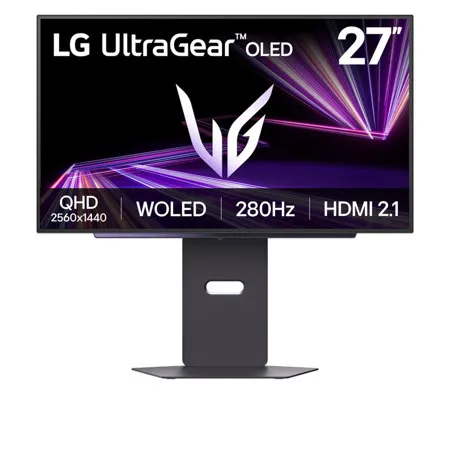
Introducing LG's first gaming monitor powered by 4th Gen OLED with revolutionary Primary RGB Tandem technology-reaching up to 1500 nits of peak brightness for visibly clearer gameplay. In fast-paced or sunlit in-game scenes, enhanced APL and reduced ABL help maintain consistent luminance without dimming critical visuals. UL Verified Perfect Black and VESA DisplayHDR True Black 500, this next-gen OLED delivers the contrast and clarity gamers need to react faster, see more, and stay immersed in every frame.
Note: Among all models using WOLED prior to 4th Gen. OLED, 27GX700A offers the highest brightness
Next-Gen OLED Brilliance
Powered by 4th Gen Primary RGB Tandem OLED, the 27GX700A delivers brighter visuals with less power than the previous 3rd Gen OLEDs-reaching up to 1500 nits of peak brightness. Its advanced 4-stack RGB structure produces deeper contrast, sharper detail, and stunning color precision. Experience clearer shadows, deep immersion, and visual consistency in every frame-built for serious gaming.
UL-verified Perfect visual experience, consistent in both low and bright light
Perfect black
Perfect Black is UL-verified and delivers true black levels to enhance perceived brightness and contrast, whether it's bright or dark around you.
Perfect color & 100% color fidelity
Perfect Color and 100% Color Fidelity deliver accurate color expression even under varying lighting conditions, from low light to bright ambient environments.
Perfect reproduction
UL-verified Perfect Reproduction delivers that actual game content is faithfully rendered on screen, maintaining intended color and detail in both dark and bright environments. Unlike static image-based metrics, this certification reflects real-world content reproduction accuracy.
Deeper Detail with VESA DisplayHDR True Black 500
Experience unparalleled depth and vibrant realism with VESA DisplayHDR true black 500, delivering detailed black expression even in the darkest scenes. With a 1.5M contrast ratio, DCI-P3 98.5% (typical) color gamut, and Delta E<=2 color accuracy, the monitor ensures that colors are displayed with realistic detail, as close to the original intent as possible.
Note: 1.5M:1 is the contrast ratio at 25% APL (Average Picture Level) value which is given as a percentage and refers to the value between the black level and the reference level for white
Advanced eye comfort technologies by five UL verifications
Featuring a matte anti-glare finish, LG WOLED's advanced eye comfort technologies minimize frustrating reflections and keep your eyes comfortable, delivering crystal-clear gaming performance with consistent clarity. With UL verifications in key areas-limiting harmful blue light exposure and preventing distractions from flickering lights-these technologies promote visual comfort and contribute to a smoother gaming experience, whether you're gaming in bright environments or LED-lit rooms.
Note:
LG WOLED have been verified as Flicker-Free, Discomfort Glare Free, and Low Blue Light by UL
Certificate Number: Flicker-Free Display (OLED) - A196009, Discomfort Glare Free - V563481 (conditions of UGR less than 22), Low Blue Light Hardware Solution Platinum - V745051, Eyesafe 3.0 CPF60 - V745354, Eyesafe 3.0 RPF40 - V275741
The above feature may vary depending on the user's computing environment or conditions
Protecting OLED via On-Screen Display
Through On-Screen Display, you can adjust OLED brightness and enable protection settings to prevent afterimages or burn-in, allowing you to enjoy superior OLED picture quality for longer. Plus, gamers can also easily customize their gaming setup for optimal performance.
How to use On-Screen Display
Enjoy seamless access to your favorite features as you dive into gaming or searching! Let's find the joystick located in the center of your monitor. Press the joystick button to bring up main menu of the gaming GUI.
Note: The display burn-in may occur in brighter mode
Speed
Lightning speed
Our UltraGear OLED monitor delivers unmatched power with a 280Hz refresh rate, offering ultra-smooth visuals and crisp, ghost-free gameplay that gives you a competitive edge.
Overwhelming speed, diving into gaming
The ultra-fast 0.03 response time (GtG), reducing reverse ghosting and providing fast response time, lets you to enjoy a whole new gaming performance
Note: Select 'Faster Mode' to perform '0.03ms Response Time'. (Game Adjust-Response Time-Faster Mode)
Technology
Certified with a widely adopted technology
Powered by AMD FreeSync Premium Pro, NVIDIA-validated G-SYNC compatibility, and VESA AdaptiveSync certification, this monitor provides tear-free, ultra-smooth visuals and low latency, delivering unmatched gaming precision and fluidity.
Note:
The performance of the feature is compared to the models not applying the sync technology
Errors or delays may occur depending on the network connection
4-pole headphone out: Plugin for immersive sound effect
Enjoy your games while having voice chat by connecting easily with 4-pole headphone out. Also, you can feel even more immersive with virtual 3D sound with DTS Headphone:X.
Note: Headsets sold separately
Smarter Control, Seamless Switching by LG Switch
With the LG Switch app, it's easy to optimize your monitor for both gaming and everyday use. Effortlessly manage your monitor settings-adjust image quality and brightness to your preference, then apply your settings instantly using a hotkey. The app also lets you split the screen into 11 layouts and launch your video call platform in a click-bringing even more convenience to your setup.
Compact and sleek
Experience our hexagon lighting and a virtually borderless 4-sided clean design featuring a fully adjustable base with swivel, tilt, height, and pivot. A clutter-free L stand and wide-range swivel adjustment are designed to minimize desk space usage and eliminate dead space efficiently.
+/-30 Degree Swivel
-5-15 Degree Tilt
110mm Height
Pivot Clockwise






