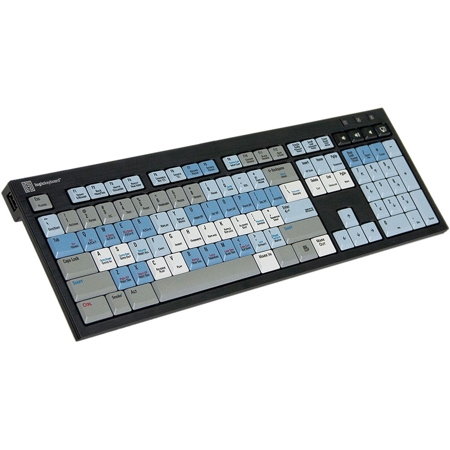
LogicKeyboard Autodesk SMOKE American English Linux/PC Nero Slim Line Keyboard

SKU: LGSMOKEPUUS

This item is no longer available.

Overview
Compare
Specs
Protection
Q&A

Questions & Answers

FAQ

What makes the Autodesk SMOKE American English Linux/PC Nero Slim Line Keyboard unique?

This keyboard is specifically designed for use with Autodesk SMOKE software. It features over 75 shortcut keys that are color-coded and logically grouped for easy learning and use. It also has a stylish design with high-quality graphical artwork.

Is the Autodesk SMOKE American English Linux/PC Nero Slim Line Keyboard compatible with both Linux and Windows?

Yes, this keyboard is compatible with both Linux and Windows operating systems, making it a versatile tool for users who work across different platforms.

Can the Autodesk SMOKE American English Linux/PC Nero Slim Line Keyboard be used for long hours?

Absolutely, the keyboard features an ergonomic design to ensure comfortable use, even during long hours of work.

Does the Autodesk SMOKE American English Linux/PC Nero Slim Line Keyboard help in learning the SMOKE software?

Yes, the keyboard serves as an effective learning aid for mastering the SMOKE shortcut key commands, thanks to its user-friendly, color-coded keys.

What is the quality of the Autodesk SMOKE American English Linux/PC Nero Slim Line Keyboard?

The keyboard is of professional-grade quality with a durable construction. It's designed to withstand the demands of creative professionals.

Reviews about this item

Review Summary

2020-12-24T07:06:00

Rated 5 out of 5

Logickeyboard is the perfect replacement for my Flame

I run Autodesk Flame on an HP computer. My home keyboard died and I decided to put the money into a replacement logic keyboard. This keyboard’s keys have a great feel. The click is firm. The included light works great for desktop paper work while not glaring on the screen. I use the lower brightness setting.

MARK S.

Select a plan in the Add Protection section above and purchase with this product by clicking “Add to Cart”.

image-protection

TRUSTED PROTECTION PLANS, EXCEPTIONAL SERVICE.

Invest In Your Gear and Peace Of Mind!

Accidents happen where life happens. Protect your favorite Adorama products and purchase a protection plan to stay covered from accidental damage, mechanical or electrical failure, and more.

Repair or Replacement

Repair or Replacement

If we can’t fix it, we’ll replace it at no additional cost.

Accidental Damage

Accidental Damage

Protect your product from drops, spills, and more.

Peace of Mind

Peace of Mind

Enjoy your gear without fear. We have you covered!

Malfunction Protection

Malfunction Protection

When regular use of your product over time results in mechanical or electrical failure.

Zero Deductible

Zero Deductible

We will never charge you a deductible after the purchase of a plan.

Customer-Focused Support

Customer-Focused Support

Our claims process is simple & easy and our customer service team is happy to help.

Adorama Protect powered by Extend is available for purchase to customers in the United States. Not available for purchase Internationally or in U.S. Territories.

LogicKeyboard Linux/PC Nero Keyboard Specifications

  • Supported Host Applications

    Windows 2000, XP, Vista, & 7

  • Host Interface

    USB 2.0

  • USB Ports

    2

  • Mechanism

    Scissor switch

  • Number of LEDs

    3 (Num Lock, Caps Lock, & Scroll Lock)

  • USB Cable

    59.0" / 149.86cm

  • Software Driver

    Plug & play

  • Certifications

    CE, FCC, TUV, CSA, UL, RoHS, & WEEE

  • Height

    In Use: 0.43" / 1.10cm front
    1.25" / 3.20cm back (with legs extended)

  • Dimensions

    18.3 x 5.6 x 0.9" / 46.48 x 14.22 x 2.29cm

  • Weight

    Including LED Lamp: 35.8oz / 1014.91g

  • UPC Code

    8451730025634

About LogicKeyboard Linux/PC Nero Keyboard

FEATURED REVIEWS

Logickeyboard is the perfect replacement for my Flame

By MARK S.

I run Autodesk Flame on an HP computer. My home keyboard died and I decided to put the money into a replacement logic keyboard. This keyboard’s keys have a great feel. The click is firm. The included light works great for desktop paper work while not glaring on the screen. I use the lower brightness setting.

The Autodesk SMOKE Linux shortcut NERO keyboard - give SMOKE creative users a proven tool at their fingertips to boost their artistic identity. With the Autodesk SMOKE software being the premier all-in-one solution for online editing and creative finishing, is the Autodesk SMOKE Linux keyboard also a superb way to learn the SMOKE shortcut key commands.

Typical of Logickeyboard designs, it boasts excellent graphical artwork and presents a functional and stylish appearance, featuring over 75 shortcut key commands under logical groupings and user-friendly coded keys.


LogicKeyboard Linux/PC Nero Keyboard Features

  • Easy to set up and use. No software required. Soft touch keystroke - Ideal for all day comfort
  • 2 USB Hubs: Built-in 2.0 Full Speed ports for additional desktop expansion
  • Enhanced Scissor-Key-Switches
  • Thin keycaps with sensitive and responsive touch
  • Platform: Linux

Key Features

  • Enhanced Scissor-Key-Switches

What's in the box:

  • LogicKeyboard Autodesk SMOKE American English Linux/PC Nero Slim Line Keyboard
  • LogicLight Keyboard Lamp
  • LogicKeyboard 1 Year Limited Warranty




