


Photography Softwares
Photography software has become an essential part of the modern photographer’s workflow, whether you’re capturing the vibrant colors of summer landscapes, the golden glow of autumn, or the dynamic energy of events and portraits throughout the year. The digital darkroom now offers a remarkable range of tools for organizing, developing, and perfecting images, catering to everyone from passionate hobbyists to seasoned professionals. At its core, photography software can be divided into several key categories: RAW processing and cataloging tools for managing and developing large photo libraries; layer-based editing applications for creative retouching, compositing, and graphic design; and innovative AI-powered solutions that streamline everything from sky replacements to noise reduction. As you explore the options, it’s helpful to consider your specific needs—such as whether you shoot in RAW, require advanced color grading, or simply want to enhance family memories with a few intuitive adjustments. Many photographers find themselves drawn to software that excels in batch processing and organization, especially after a busy day of shooting outdoor events or capturing seasonal changes in nature, while others prioritize detailed retouching capabilities for studio portraits or commercial assignments.
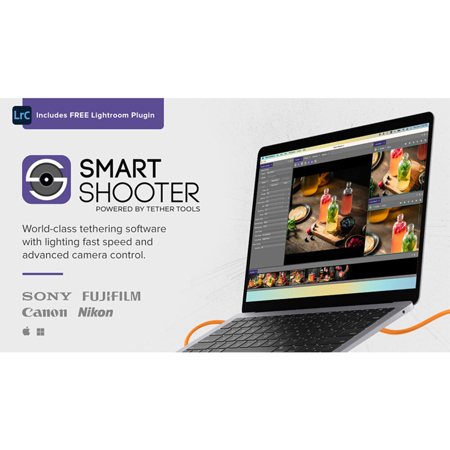
Selecting the right photography software often comes down to your workflow preferences, the types of projects you tackle, and your budget. For those managing extensive photo shoots—think weddings, sports, or school portraits—robust cataloging and tethering features can be invaluable. These tools help keep thousands of images organized, making it easy to locate favorites or sort by client, location, or shoot date. If your creative process involves heavy manipulation, such as removing distractions, blending exposures, or creating composite images, layer-based editors offer the flexibility and precision needed for complex edits. Meanwhile, the rise of AI-powered enhancements has opened new doors for photographers looking to save time without sacrificing quality. These intelligent tools can automatically detect subjects, correct lighting, or apply artistic effects with just a few clicks—perfect for those who want to quickly elevate their images before sharing them with friends, family, or clients. Photography software also makes a thoughtful gift for aspiring creatives, students, or anyone eager to preserve and enhance memories from summer vacations, autumn gatherings, or everyday adventures. Whether you’re gifting a subscription to a loved one who’s just picked up their first camera or upgrading your own toolkit for the busy season ahead, the right software can inspire creativity and streamline the editing process.
As you weigh your options, remember to look for features that align with your shooting style and post-processing goals. Consider compatibility with your camera’s RAW files, the learning curve of the interface, and whether you prefer a one-time purchase or a subscription model. For those building a comprehensive setup, integrating your editing software with specialized tools—like tethering utilities, batch renaming programs, or even studio management applications—can further enhance your efficiency. If your photography extends into professional studio work or you’re interested in exploring more advanced workflow solutions, take a look at our curated selection of Photography Studio Software for additional options tailored to demanding environments. Ultimately, the best photography software is the one that empowers you to bring your creative vision to life, whether you’re archiving sunlit landscapes, retouching autumn portraits, or preparing images for print and online sharing as the seasons shift.
Selecting the right photography software often comes down to your workflow preferences, the types of projects you tackle, and your budget. For those managing extensive photo shoots—think weddings, sports, or school portraits—robust cataloging and tethering features can be invaluable. These tools help keep thousands of images organized, making it easy to locate favorites or sort by client, location, or shoot date. If your creative process involves heavy manipulation, such as removing distractions, blending exposures, or creating composite images, layer-based editors offer the flexibility and precision needed for complex edits. Meanwhile, the rise of AI-powered enhancements has opened new doors for photographers looking to save time without sacrificing quality. These intelligent tools can automatically detect subjects, correct lighting, or apply artistic effects with just a few clicks—perfect for those who want to quickly elevate their images before sharing them with friends, family, or clients. Photography software also makes a thoughtful gift for aspiring creatives, students, or anyone eager to preserve and enhance memories from summer vacations, autumn gatherings, or everyday adventures. Whether you’re gifting a subscription to a loved one who’s just picked up their first camera or upgrading your own toolkit for the busy season ahead, the right software can inspire creativity and streamline the editing process.
As you weigh your options, remember to look for features that align with your shooting style and post-processing goals. Consider compatibility with your camera’s RAW files, the learning curve of the interface, and whether you prefer a one-time purchase or a subscription model. For those building a comprehensive setup, integrating your editing software with specialized tools—like tethering utilities, batch renaming programs, or even studio management applications—can further enhance your efficiency. If your photography extends into professional studio work or you’re interested in exploring more advanced workflow solutions, take a look at our curated selection of Photography Studio Software for additional options tailored to demanding environments. Ultimately, the best photography software is the one that empowers you to bring your creative vision to life, whether you’re archiving sunlit landscapes, retouching autumn portraits, or preparing images for print and online sharing as the seasons shift.