


+1
more
more

See Options
Need help? Ask our experts.
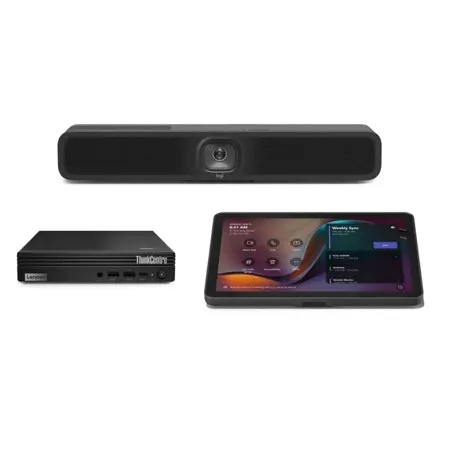
Entry-Level Small Room Solution for Microsoft Teams Rooms on Windows
Upgrade your small spaces with entry-level Microsoft Teams Rooms solutions with a Logitech Tap with USB Kit controller, Logitech MeetUp 2 and Lenovo ThinkSmart Tiny mini PC.
Upgrade Your Small Rooms
Transform your small rooms and BYOD spaces into certified Microsoft Teams Rooms with this preconfigured solution. Collaborate more effectively with richer audio and video in a Teams Rooms on Windows experience.
Richer Video And Audio with MeetUp 2
The solution includes MeetUp 2, an all-in-one USB conference camera designed for smaller spaces that's packed with next-gen video and audio and is simple to deploy and manage.
One-Touch To Join with Tap with USB Kit
Make video meetings simple to join with a touch controller. Tap with USB Kit has a responsive 10.1" screen, enables wireless or HDMI-based content-sharing, and has a motion sensor for always-on readiness, bringing ease and convenience to Teams Rooms on Windows.
Run Operations with Lenovo i3 Compute
Run Teams Rooms on Windows through the included and certified Lenovo ThinkSmart Tiny i3 mini PC. Power richer Microsoft Teams experiences for immersive collaboration.
Simple Cabling for Small Spaces
Connect the Tap with USB Kit controller up to 5 meters away from the mini PC with a single USB cable for both data and power.
Multiple Mounting Options
Easily place and secure devices to best suit your room environment. MeetUp 2 comes with a Multi Mount to easily attach the device to a display, table, or wall; add optional mounts to the Tap controller to secure to table grommets or to the wall; secure the mini PC with a Logitech Compute Mount for cable retention and secure placement.
Certified for Business
This preconfigured solution includes MeetUp 2 conference camera and Logitech Tap with USB Kit, which are certified for use in a bundle with Lenovo ThinkSmart Tiny as an entry-level Microsoft Teams Rooms on Windows solution..
- MeetUp 2 -
Upgrade your small meeting rooms with MeetUp 2, a USB conference camera for small spaces powered by AI features that simplify the meeting experience for both employees and IT.
Upgrade your small USB-based meeting rooms
Bring AI-based features into your small USB meeting rooms with Meetup 2. Compatible with popular video platforms such as Microsoft Teams, MeetUp 2 can function in USB mode with an in-room PC or when connected to a laptop in BYOD mode.
MeetUp 2 is easy to set up and easy to manage with Logitech Sync - monitor room status, deploy updates, and modify settings all from a single cloud-based app.
AI-driven experiences in small USB rooms
Simple to manage and deploy at scale
MeetUp 2 is easy to set up and manage in small spaces thanks to multiple mounting options, clean cabling, and remote management through Logitech Sync.
Single cable BYOD
Deliver elegant, single-cable BYOD connections with MeetUp 2 when it is paired with the optional Active USB Cable accessory.
Certified for Business
Leverage the video conferencing platforms and features you already use. MeetUp 2 works with leading video platforms like Microsoft Teams.
A Choice You'll Feel Good About
Logitech is committed to creating a more sustainable world and we are actively working to minimize our environmental footprint and accelerate the pace of social change.
Made with Recycled Plastic
The plastic parts in MeetUp 2 include up to 62% certified post-consumer recycled plastic. We're giving a second life to plastic from consumer electronics to reduce our carbon footprint.
Responsible Packaging
The paper packaging for MeetUp 2 comes from FSCM-certified forests and other controlled sources. By choosing this product, you are supporting responsible management of the world's forests.
- TAP Touch Meeting Room Controller -
Make video meetings simple to join with a USB-connected touch controller with an included USB Kit for flexible cabling.
Deploy Room Solutions with Ease
Transform your space into a Microsoft Teams Room with Logitech Tap. Deliver one-touch join, calendar integration, easy content-sharing, and a consistent experience across all rooms.
Clean and Convenient Setup
Just the Right Presence
With a spacious 10.1" display, low profile, and motion sensor for always-on readiness, Tap has a sleek and unobtrusive presence in the room.
Simple and Secure Cabling
Route cables out the back or through the bottom. Keep connections tight with built-in strain relief and retention mechanisms.
Multiple Mounting Options
Install Tap almost anywhere in the room with Table and Riser Mounts that fit standard grommets and rotate 180 Degree for visibility and convenience, or save table space in small rooms with the Wall Mount.
Clean Installation
Use the included or compatible category cabling to position the controller flexibly. This allows Tap to be conveniently placed near participants for easy operation, while installing the host computer in a cabinet, beneath a table, or behind a display.
Share Effortlessly
Bring instant content sharing via wireless or HDMI connections to video meetings rooms with Tap.
Simple To Manage
With Logitech Sync, you can monitor and manage Tap along with your other meeting room devices from one single platform.
Enhanced Performance with Logitech Services
Remove barriers to effective collaboration with global support, powerful software, and fast product replacements.
- Compute Mount -
A Clean and Secure Mounting Option
Securely mount your compute device out of sight and out of harm's way. Designed for discreet installation behind displays, inside cabinets, or on carts, Compute Mount is a great fit for any video conferencing space - and perfect for Logitech RoomMate, Google Meet compute system, Intel NUC, and other video conferencing compute devices.
Integrated Cable Retention
Cable retention clamp relieves cable strain and keeps connections tight and secure, including USB, HDMI, power, and network cables. The two-piece clamp is elevated for greater flexibility and less strain.
Hideaway Design
Compute Mount includes hardware to discreetly mount RoomMate or other compatible compute devices out of sight and out of harm's way.
https://www.logitech.com/en-us
510-795-8500







