2023-06-19T20:00:00
Rated 4 out of 5
Decent mouse which does what it says
Reason for purchase: 2 pc's connected to the same monitor that I need to switch between a couple of times a day. The bluetooth smart switch feature in this mouse allows me to seamlessly switch between the teo computers without having to move dongles around.
DISLIKE: The centre scrolling wheel can be customized through the logitech app in a million different ways, except for one. A traditional mouse wheel can be pushed in to hold the scroll function. I use softwares that require holding down the mouse wheel to rotate the objects. The mouse wheel on this does nothing when pushed in, and the logitech software does not allow this function to be added. As a workaround, any of the other buttons can be customized to do what pushing the mouse wheel does, but I just find that annoying.
LIKES: Other than the above, its a mouse that works...
kripat
Originally posted at

2022-12-27T19:00:00
Rated 4 out of 5
Very comfortable, lasts only 2-4 years
This model will, at some point, have button issues. It's a known issue of the hardware. Until that day, it's very comfortable, accurate and has great battery life. Still the only mouse I buy, even better than the newer bluetooth model.
ericinLA
Originally posted at
2021-03-22T20:00:00
Rated 4 out of 5
Use of graphite mouse
It is a very sensitive mouse that I just need to get use to using; will keep you posted
G S.
Originally posted at

2021-03-08T19:00:00
Rated 4 out of 5
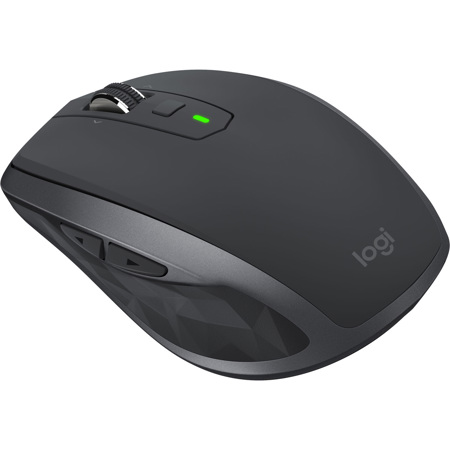
LOGITECH MX ANYSHWER 2S MOUSE
easy to setup and use, little bit small but easy to travel with
B O.
Originally posted at
2020-12-12T19:00:00
Rated 5 out of 5
Expensive
Works great but cheaper ones do the same
G G.
Originally posted at
2020-10-16T20:00:00
Great mouse and very easy to use
Na
Originally posted at
2020-10-03T20:00:00
I have been using Logitech mice for many years and the MX Anywhere is my all time favorite. I have two, love the multi device connection and anywhere use of them.
JR
Originally posted at
2020-09-30T20:00:00
Rated 5 out of 5
Logitech Mx Anywhere 2S
Great very versatile I do recommed this product
AR
Originally posted at
2020-08-25T20:00:00
Rated 4 out of 5
ergonomically friendly
Comfortable to use. Has a bit of lag when using bluetooth though. Not sure if that is the device or my service.
Rebecca
Originally posted at
2020-08-24T20:00:00
Rated 5 out of 5
Good mobile mouse
The prefect laptop mouse with Bluetooth. Long battery life and rechargeable. I like it so much I use one on my desktop also.
Frank V.
Originally posted at
2020-08-02T20:00:00
Rated 4 out of 5
Good choice for mouse.
Easy to use and very responsive. However may not be for everyone, especially if you have big hands.
Kyle
Originally posted at
2020-08-01T20:00:00
Rated 5 out of 5
Good product
Easy to use. Has a solid feel and comfortable. Works on all surfaces in my house
tnoldman
Originally posted at
2020-07-24T20:00:00
Rated 5 out of 5
Great, but would be better with USB-C
The mouse is great, but I wish the dongle was USB-C as I now need a special adapter to use it with my new Dell XPS.
Christine
Originally posted at
2020-05-28T20:00:00
Rated 4 out of 5
Would be 5-stars if it were USB-C
Works excellent. Only complaint is that it charges by micro USB, not USB-C. Not sure why and pictures didn't really highlight that or I might have waited for new.model of gotten something else because now I have to keep an old cable around. Again, works excellent and comfortable but took away a star because of cable required.
AJ
Originally posted at
2020-05-08T20:00:00
Rated 5 out of 5
The MX 2s Mouse
Feels great and works great! Logitech makes great products and stands behind them. Dell was quick to place the order and shipped it out to me asap. Thank you Dell!
MJ
Originally posted at
2020-03-23T20:00:00
Rated 2 out of 5
smaller than wanted
too small for hand - thought it was bigger - uncomfortable
jdhz
Originally posted at
2020-02-06T19:00:00
Rated 4 out of 5
How to change the battery
I’m loving this mouse but now it is no longer working and I can’t seem to see where to put in a new battery. Can someone help to let me know thanks
Mouse c.
Originally posted at
2020-01-30T19:00:00
Rated 5 out of 5
Mouse works but we'll see long term
I have not used the mouse very much and it will get extremely limited use but I can say it works.
Robert
Originally posted at
2020-01-26T19:00:00
Rated 5 out of 5
Everything you'd want & more
Connected instantly, works perfectly & very comfortable to use. I also love that I can use the same mouse for both my desktop & laptop at the same time. Great product.
RichGinNY
Originally posted at
2020-01-24T19:00:00
Rated 5 out of 5
Works Well For Mobile Use & Desktop Computer
I purchased this to try out on my iPad 2018 w/iOS 13. Though iPad use with a mouse is just a tad awkward it did introduce me to this very handy Logitech mouse. I'm also using it on my iMac. It is nice that the device allows up to three devices to be linked to it. If I had a laptop, I think this would be a perfect companion for mobile use.
Jazz1
Originally posted at
2020-01-07T19:00:00
Rated 5 out of 5
Nice product
Works really well, although I did have to purchase new dongles for it since my old ones were incompatible.
Vicky
Originally posted at
2019-11-28T19:00:00
Rated 4 out of 5
Great mouse
great mouse, only 1 negative, the scroll wheel is free spinning
Mark
Originally posted at
2019-11-27T19:00:00
Rated 4 out of 5
Very pleased. It works quite well for my daily use
I use it in conjunction with my Dell XPS 15, 7590.
Nice build quality. Solid, doesn't feel cheap.All buttons have a good feel and are responsive at all times. The scroll wheel works well, the minor complaint is I wish you can set the scroll speed at times.
Charges quickly and holds a charge very well.
I would recommend this mouse to anyone who needs this type for general use and basic graphic design and photo work. I can't comment on gaming use as that's not what I use it for.
Chip
Originally posted at
2019-11-21T19:00:00
Rated 5 out of 5
Best mouse ever. and YES it does have 7 buttons.
Best mouse ever. and YES it does have 7 buttons.
Thank you
Logitech l.
Originally posted at
2019-11-21T19:00:00
Love it!!! Can use it o. Any surface and pair it to three computers.
Let15
Originally posted at
2019-11-21T19:00:00
Rated 5 out of 5
Excellent Mouse at a Budget Price.
Great mouse for my large hands. Fast acting and sets up easy. Nice long battery life. Good price for a quality mouse. I am a power use that uses the mouse a lot, this works for me.
Sky P.
Originally posted at
2019-11-20T19:00:00
Rated 3 out of 5
Mouse wheel button
Mouse is nice but having the scroll wheel 3rd button be below the wheel is horrible for 3D modeling, would not buy again. Prefer the Marathon mouse set up for switching the scroll wheel.
3D M.
Originally posted at
2019-02-20T19:00:00
Rated 2 out of 5
All the great features I want BUT won't stay connected to my XPS15
The title says it all. When this mouse works I absolutely love it. Yet, I have to CONSTANTLY re-pair it with my brand new XPS15 laptop. I can't even tell you how much time it wastes. It has probably cost me 10x its price in wasted time. I will probably throw it away soon. SO disappointed because otherwise it is awesome.
cj12
Originally posted at
2019-01-15T19:00:00
Rated 5 out of 5
Great device
Easy installation, easy to use, nice design, very happy with purchase.
Ccf
Originally posted at
2018-12-25T19:00:00
Rated 2 out of 5
poor software
I purchased this mouse about a month ago, normally Logiteci i known for quality. the mouse worked great UNTIL the software said there was an update to be installed and before I could deny it it automatically updated. After the update I no longer was able to make any changes to the mouse settings. Logitech has been trying very hard to figure out the problem, but to this date it remains a mystery to them
allen6
Originally posted at