+8
more
more

This item is no longer available.
Review Summary
2023-07-04T20:00:00
This LG monitor is a game changer for people that spend all day inside spreadsheets. I love the fact you can use the LG OnScreenControl app to carve the monitor up into multiple boxes as well. USER FRIENDLY which is what a person wants. That combined with a 3 year warranty is AWESOME. Nice to see a company stand by their products!! This monitor is beyond amazing.
PKTECH1969

2023-01-26T19:00:00
I bought this monitor for my wife as an upgrade from her LG 27QN880-B, which she has been really happy with for the past 2-3 years. Her job requires a lot of documents and excel arks open at the same time, so it made perfect sense to upgrade into a 34', since she is working from home 4 days a week now. Sadly we discovered straight away that the ergo arm doesn't allow her to adjust the height of the monitor, because it just slides down because of the weight of the monitor .. On top of that, whenever she opens a excel in fullscreen, you can hear a high pitch sound (it's not the speakers). This only happens (so fare) when she uses excel in fullscreen. If she reduces the size a bit, the pitch sound is also reduced a bit .. It's super annoying to listen to and there is no way she can work an entire day in front of that. We are not sure what to do right now, since LG doesn't reply on Facebook (messenger) and the retailer has no clue what might be the problem here. It's connected to a laptop and running full resolution @ 60Hz, but when running with HDMI mode: ON, that just makes it even worse and it will onlu run in 50Hz. There are no dead pixels, bbl or anything like that, which rare to find these days. Therefore it's really disappointed that the armfunction doesn't work and we can't use the screen for what it was intended (office use). Maybe we have just been really unlucky with this one.
Iddqd84
2022-10-10T20:00:00
As a software developer I have multiple programs and windows open. Having the ultrawide is perfect for multitasking and splitting up the screen!
AJK0519
2022-10-05T20:00:00
Overall picture quality is amazing for such a wide screen. Setup was very easy. The mounting bracket provides A LOT of extra deck space. My only dislike I have regardining monitor is that you can not adjust volume through your computer or connect device.
JRemy
2022-04-03T20:00:00
I bought this on Feb. 23rd 2022 from Amazon. It arrived timely. The included power cable extension did not work. I worked with support to request a replacement. They indicated that it would take 7-10 days to receive. It is now April 3rd and I have not received the replaced. Additionally, the monitor will occasionally glitch out and fail only displaying static pixels, requiring a restart of the monitor. This solves the issue but is incredibly annoying, especially during conference calls.
EJM1
2022-03-02T19:00:00
I really wanted to love this monitor. The size was great and quality what you would expect from LG. Resolution wasn?t there for my needs (graphic design and photoshop) so I had to look into a 4k/5k resolution option. Great for general office use and the ergo arm is fantastic.
GMNEPats
2022-02-28T19:00:00
I had dual 27" monitors for years. I upgrade one to 4k -- and that was nice. But the reality was that the two monitors always had a gap between them and were at slightly different angles and I never really used them as a single sauce. Moving to the 34" single monitor had multiple beneficial effects. (1) The single larger continuous space is much more adaptable to my needs to have open multiple concurrent apps and files. It is all right in front of me in a single uninterrupted plane. (2) Unexpected benefit -- my entire desk setup feels more open, uncrowded, more comfortable. Definite win-win. Although the monitor isn't 4k I find the resolution to be completely clear and more than sufficient for my purposes which involve text far more than images. Definitely and whole-heartedly recommended.
Bob245
2021-11-18T19:00:00
I am a web developer and this is by far the best addition possible to my workstation. The stand is sturdy and can take many positions.
tinos
2021-09-28T20:00:00
I never knew a monitor could do so much. My first impression is it has a sleek design and a very ergonomic stand. The way the stand is mounted, it seems to have saved 50% of my workspace. I love how this monitor can be positioned and viewed at pretty much every angle thanked to the great engineering design of the stand. I use this monitor mostly with Microsoft software where white background is unavoidable. This is the reason why I really appreciate LG?s incorporation of Reader mode into this monitor. Basically, it dims the monitor and reduces blue light to lessen eye fatigue. In the past, I would have to manually turn down the brightness with my other monitor, but it could never produce the kind of color temperature optimal enough for reading environment like this monitor could. As a result, my eyes don?t get tired quick, I can work longer, and more importantly, I?m not prone to getting headache from prolonged staring at this monitor. The fact that it has multiple HDMI inputs allows me the convenience of connecting an Android TV box to watch TV shows and movies. Despite having the screen brightness of only 300 nits, it?s ample for my room?s ambience. In fact, I often need to change to Cinema mode when watching movies so it?s not too bright for my eyes. Even though it has a refresh rate of 75 Hz and response time of 5ms, which is considered mediocre for gaming purpose, I haven?t seen any ghosting. Moreover, as a very conscientious energy-saving person, one thing I wish this monitor has is a way to visually confirm whether it has turned off or still powered on. I find myself sometimes turning it on and off again just to make sure the monitor is completely off so that I don?t waste electricity unnecessarily. Overall, this is the best monitor I?ve ever owned, and I really like this monitor for its ergonomic design and versatility. Disclaimer: I received this product at a discounted rate in exchange for my honest opinion.
Informant
2021-09-05T20:00:00
I have been using this LG 34WN780-B UltraWide Ergo 34" monitor for a few weeks now and it is a fantastic upgrade over my old 27" monitor. The Ultrawide 34" monitor offers so much more work space over the old 27". The higher resolution and the wider format allows me to view several documents or emails at once. I can have several windows side by side so I can work/view multiple things without having to flip thru windows. It makes my work flow much faster. It's always better to work smarter, not harder. I use the monitor in a home office, so I appreciate the multiple inputs. There are two HDMI ports and a display port. I have my PC hooked up via display port and then a couple game consoles via the HDMI. I've done quite a bit of gaming and movie watching on this monitor now as well. The colors are fantastic as is the response time. Having HDR10 at the price point is also great. The HDR10 looked great in my movie playback. Setup was also very straight forward. The monitor was easy to mount. All my components also plugged right in and I had zero configuration problems setting my PC and equipment up. If you are looking for a wide screen monitor, I would definitely recommend this LG 34WN780-B UltraWide Ergo 34" monitor. It was easy to setup, looks fantastic, and displays everything I throw at it. I received this product at a discounted price for my fair and honest review.
teesee150
2021-08-15T20:00:00
I bought this monitor for my office. The setup was extremely easy, and the display is sharp! The adjustment was super easy. By the way, I used the DisplayPort for the best result.
roy_24601
2021-06-28T20:00:00
There is now a better than ever way to get rid of having the setup of multiple monitors. I have 3 monitors and never wanted to stray away from them but then came LG and the ultrawide monitor that said it can take on the tasks of 3 monitors into one monitor. I was very skeptical about this but gave it a try and let's just say I am staying with one monitor now as I am able to get so much more done because of the anti-glare and the huge 34 inch size of the monitor. I don't have an HDR10 television for my Xbox One Series X that I purchased so now this will work perfectly with my gaming laptop that I use for work. I can get multiple usages out of this one monitor. I like how it is very lightweight compared to carrying around 3 bulky monitors with all the cables. Highly recommend this. I received this product at a discounted price in exchange for my honest opinion.
speed45
2021-06-17T20:00:00
I recently purchased the LG 34WN780B-34" Ultra Wide Ergo QHD IPS HDR Monitor and could not be more happy with my choice. The screen is so clear and has so much space to view multiple programs/documents at the same time. The 3440x1440 resolution allows me to have 3 windows open side by side to see multiple documents or pages at the same time. I replaced 2 24 inch monitors with this 34 inch monitor and would not switch back. It is so much easier to see more content with the higher resolution monitor and the picture is so much more clear and crisp. The integrated monitor arm makes it easy to move the monitor around and position it in just the right spot. It is easy to move it up and down, side to side, and tilt back and forth. I also now have more open desk space available by not having 1 or 2 monitor stands taking up room on my desk. There are several configurations for mounting to a desk, so it should work for most situations. The on-screen menu options provide a lot of controls for configuring the monitor. You can customize the color levels, sounds options, energy settings, and picture settings, among many other things. I did not feel like the color levels needed any adjusting from the factory defaults for my usage. The picture quality is consistent from viewing straight on and from the side. The monitor feels very sturdy and solid and feels like it will last a long time. I would highly recommend this monitor to anyone who is looking for a new or bigger monitor. This can be used equally well for business, school work, entertainment, gaming, etc. You will not be disappointed. Disclaimer: I received this product at a discounted rate in exchange for my honest opinion
roberttheinsider
2021-06-17T20:00:00
I was able to get this monitor at a discount for my honest review. I have run dual screens for years, so I as very interested to see how an ultrawide compares. I run dual LG 27UD69P-W displays so there was no chance this would replace those. I set up this monitor with my Dell XPS laptop. I will be clear I rarely use the PC for gaming, so my use is for streaming from and creating YouTube videos, viewing pictures, and for business (QuickBooks, Excel, etc). The monitor is simplistic in design with the top and sides borderless edges. It's a 34" non curved, 21:9, 3440x1440, QHD, 1000:1, IPS monitor. The connectivity is 2xHDMI input, 1xDIsplayPort input, 2xUSB output, 1xUSB input, and 1x3.5mm output. It has 2x7W speakers. The Ergo stand is both solid yet a tad frustrating. There are two mounting options out of the box, and that's clamp to an edge or with plates through a hole in a desk. I used the monitor in it's native 3440x1440 native setting. The ultrawide provides plenty of viewable real estate. The LG software allows you to split the screen in multiple ways. I find it easier using it on this monitor as compared to the dual setup which already has a physical split. Unlike the 27" you really can't focus on the entire screen at once. You need to scan side to side. Viewing a panoramic picture is amazing on this monitor. I was surprised at how good it is to watch video. I thought by not filling out the entire screen that the black edges would be a distraction. That isn't the case as1080P video looked really good and fairly large. I was also pleased with how this single monitor handles multiple programs running. With dual monitors it isn't as fluid, but with this Ultrawide splitting the screen is much more fluid because you're working with one palette. I could "fling" windows around without worrying about passing it from one monitor to the next. Everything was clear to the eye (I need glasses), and I had no difficulty reading words and numbers. The least important feature for me is sound, and although it's adequate I use external speakers for better sound quality. One perceived weakness to me is this monitor is not curved. I've never had a curved monitor, but I think the edges coming one would provide a wider field of view. The mounting options can be a limitation depending on your setup. Overall I think at the price point you get a really nice monitor. I would recommend this monitor to anyone seeking a budget friendly ultrawide.
metalmancpa1
2021-06-09T20:00:00
Many of us had a change in the working environment over the past year. I had a 24-inch monitor when our company converted to work from home due to a pandemic. Then, I learned about the LG 34inch wide monitor and how it can improve work efficiency. I decided to invest in the monitor. LG was the brand I could trust because it was known for best monitor brand in the world. The reason I selected the wide monitor was I work with a lot of numbers and often need two screens at the same time to compare the data. 34 inches 21:9 ratio gives the exact two-screen view I need. On top of it, the wide monitor is good for editing the clips, which I do for the creative content. I do not have to scroll through the time strip as much as I did. The Ergo stands to give many ways to position the monitor which I needed. You can extend, retract, swivel, and adjust height and tilt. It also makes my desk clutter-free and gives enough space to put stuff on the desk. The OnScreen Control provided by LG is good software and I can manage how I want to divide wide monitor and position the screens. I definitely would recommend this monitor for anyone who is working from home or creative creators. This monitor comes from a trustworthy brand and they have know-how on how to design and control their monitor. Disclaimer! I received discount for giving honest opinion about the product
chkforu
2021-06-09T20:00:00
Hello everyone. I am the Truer Reviewer and I am here to introduce you to my brand new LG 34WN780B-34" Ultra Wide Ergo QHD IPS HDR Monitor with FreeSync. As far as gaming , working, creating and in between, my LG monitor provides a widescreen display, crystal clear picture and true color accuracy, all on A productivity powerhouse delivering a flexible workstation experience and easy setup. With the included ergo stand, you can: extend/retract/swivel/change height and tilt your new monitor, which has a 3-sided virtually borderless design. I use the monitor mostly for business purposes, music and videos and some gaming. The size of the monitor is great, as I can get at least 2 different programs up and running at the same time and both will be seen clearly. It is A Well designed, quality product and was easy to setup and get going. All in all, an excellent addition to any home home-office at a very competitive price. I received this product at a discounted price, in return for my honest opinion. Thanks for taking the time to read my review.
truerreviewer2020
2021-06-08T20:00:00
Before purchasing this monitor, I was considering a dual setup of two 24-inch monitors. I was glad to have scrap that idea after owning this monitor for just a few days. Aesthetically, this monitor looks minimalistic and yet modern in its design. I really like the Ergo stand because it frees up so much desk space I never thought possible. Moreover, it?s a heavy-duty stand with high quality build. It feels very smooth to rotate, extend, retract, and swivel. Coming from a fixed monitor stand, I can appreciate how versatile this stand is as it can swivel up to 280 degrees. Even when the monitor is swiveled to its furthest side, the stand is so strong that there?s no wobble at all. I highly recommend to download the driver from LG?s website so that the computer can properly recognize the monitor in its Device Management. Also, the OnScreen Control software makes it convenient to adjust various options, such as Screen-split and Picture modes, at the click of the mouse rather than a toggle button at the bottom center of the monitor. Of course, my favorite feature is the OnScreen split because I can connect up to four monitors and control/manage them independently. Moreover, what?s neat is that I can set application position within each monitor. This has made my workflow super convenient, and it?s one of the main reasons I chose this monitor. One of the first things I noticed after turning on this monitor was that the panel has no light bleed anywhere around the edge. It has an almost perfect black color that I see on some of LG?s high-end OLED panels. To test its color performance, I visited some of the 4K HDR channels on Youtube. I find the color production and accuracy of this monitor is just amazing. I literally sat and watched hours of HDR videos the moment I finished setting up the monitor. Despite its wide format, I don?t see any color difference or change when viewing at different angles. This is crucial for me because I do a lot of photo and video editing. In the past, I would have to sit right in the center of my monitor to perform this task so that my color production is not affected. This monitor has provided me this much needed flexibility. Overall, my experience with this monitor so far has me ponder why I waited so long to upgrade my old monitor. I highly recommend it! Disclaimer: I received this product at a discounted rate in exchange for my honest opinion.
In4once
2021-05-06T20:00:00
I had my eye on this monitor for months and I finally bought it. For my Audio and Video editing it is perfect!
mtmfx
2021-05-06T20:00:00
I had my eye on this monitor for months and I finally bought it. For my Audio and Video editing it is perfect!
Webweaverman
2021-03-19T20:00:00
This is my second lg34? monitor The first one had a burnt edge ( purchased from (Amazon), so I returned it. Purchased a replacement from LG directly, just unpacked it, but the hydraulics in the arm for the up down position doesn?t lock in any position and just bounces up. So frustrated, just expect so much more
Nik_3ps
2021-03-15T20:00:00
i felt like i could replace 2 27 inch HD screens with this monitor and save a lot of space and 90% of the time I think that goal was achieved. That's a win for me because 100% of the time i have a lot more space on my desk. The stand is BRILLENT and easily adjustable plus you gain space under the monitor which is right in front of you so its primo space
Kjnorman
2021-03-15T20:00:00
i felt like i could replace 2 27 inch HD screens with this monitor and save a lot of space and 90% of the time I think that goal was achieved. That's a win for me because 100% of the time i have a lot more space on my desk. The stand is BRILLENT and easily adjustable plus you gain space under the monitor which is right in front of you so its primo space
KenHead
2021-01-30T19:00:00
I was debating a dual monitor setup, and I came across this guy. Wonderful monitor. Could come with the display monitor cable, no just HDMI. Other than that, great!
Dev0
2021-01-22T19:00:00
It was so easy: Unpack Attach Plug In Controls underneath the monitor You are done!
Rosemari
2021-01-03T19:00:00
I got this monitor about a month ago and it was a great purchase, it has decent speakers and a good overall build quality the stand is amazing for my big desk so i could move it around and save's lots of workspace. the only thing is I wish It had a higher refresh rate for gaming
mathesitisimo27

Accidents happen where life happens. Protect your favorite Adorama products and purchase a protection plan to stay covered from accidental damage, mechanical or electrical failure, and more.

If we can’t fix it, we’ll replace it at no additional cost.

Protect your product from drops, spills, and more.

Enjoy your gear without fear. We have you covered!

When regular use of your product over time results in mechanical or electrical failure.

We will never charge you a deductible after the purchase of a plan.

Our claims process is simple & easy and our customer service team is happy to help.
Adorama Protect powered by Extend is available for purchase to customers in the United States. Not available for purchase Internationally or in U.S. Territories.
Browse our FAQ
34"
IPS
5ms (GTG)
75Hz
UW-QHD
sRGB 99% (CIE1931)
16.7M
0.2325 x 0.2325mm
21:9
3440 x 1440
300cd/sq. m
1000:1
178 Degree (R/L), 178 Degree (U/D)
Anti-Glare
Yes x2
Yes
Yes
Yes
Yes x2
Adapter
100 - 240Vac, 50/60Hz
Less than 0.5W
Less than 0.3W
45W
67W
Yes
Yes
AMD FreeSync
Yes
Yes
Yes
Yes
Yes
Yes
Yes
Yes
Yes (HDR10)
Yes
Yes
7W x2
Yes
Yes (Tilt/Height/Swivel/Extend/Retract)
100 x 100mm
Yes
DC Extension cable 3.9 ft Black with Holder
With Stand: 32.2 x 24.1 x 16.0" (817.8 x 612.14 x 406.4mm) (Up)
32.2 x 18.9 x 16.0"(817.8 x 480 x 406.4mm) (Down)
Without Stand: 32.2 x 14.4 x 1.8" (817.8 x 365.7 x 45.7mm)
With Stand: 23.8 lbs (10.7kg)
Without Stand: 15.2 lbs (6.9kg)
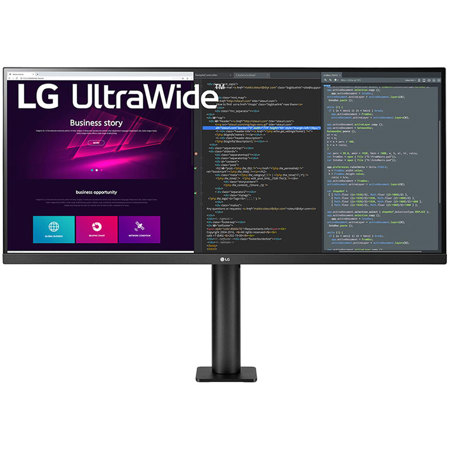
LG UltraWide Monitor Ergo
34" 21:9 UltraWide QHD
Wider View to Get More Done
See more, do more. The 34-inch UltraWide QHD (3440x1440) resolution allows you to edit clips of footage and simultaneously run different programs. You can edit, code and review, while enjoying the immersive and clear visual experience on a rich, vivid IPS screen that's accurate at wide angles.
HDR10
Enjoy the Latest HDR Videos and Games
HDR10 elevates picture quality for a more dynamic visual immersion experience and enhanced color of HDR content. HDR10 is the digital HDR standard based on the sRGB 99% color gamut. A true difference in color and brightness.
Full Movement of Display
Perfectly Follow Your Eye Level
Enhanced flexibility of the Ergo stand offers expanded ergonomic adjustment of extend, retract, swivel, height and tilt as well as providing perfect position of screen for more comfortable and sustainable user experience.
Clutter-Free Desk Setup
Fully Use Your Desk
The compact design takes up very little desk surface and also contributes to easier installation.
OnScreen Control
Control with a Few Clicks
You can customize the workspace by splitting the display or adjusting basic monitor options with just a few mouse clicks.
Reader Mode
Less Blue, Improved Visual Comfort
Reducing blue light to help lessen eye fatigue, Reader Mode creates a screen with a color temperature similar to paper and provides optimal condition for reading.
Flicker Safe
Care for Eyes
Flicker Safe reduces invisible flickering on the screen and provides a more comfortable working environment for your eyes.