
Orders placed during Passover Holiday (Wed 4/1 after 4PM ET – Thurs 4/9) will ship Fri 4/10. View our holiday shipping schedule.

Overview
Compare
Specs
Protection

Reviews about this item

Review Summary

Select a plan in the Add Protection section above and purchase with this product by clicking “Add to Cart”.

image-protection

TRUSTED PROTECTION PLANS, EXCEPTIONAL SERVICE.

Invest In Your Gear and Peace Of Mind!

Accidents happen where life happens. Protect your favorite Adorama products and purchase a protection plan to stay covered from accidental damage, mechanical or electrical failure, and more.

Repair or Replacement

Repair or Replacement

If we can’t fix it, we’ll replace it at no additional cost.

Accidental Damage

Accidental Damage

Protect your product from drops, spills, and more.

Peace of Mind

Peace of Mind

Enjoy your gear without fear. We have you covered!

Malfunction Protection

Malfunction Protection

When regular use of your product over time results in mechanical or electrical failure.

Zero Deductible

Zero Deductible

We will never charge you a deductible after the purchase of a plan.

Customer-Focused Support

Customer-Focused Support

Our claims process is simple & easy and our customer service team is happy to help.

Adorama Protect powered by Extend is available for purchase to customers in the United States. Not available for purchase Internationally or in U.S. Territories.

Magewell Pro Capture Specifications

  • Supported OS

    Windows 7/8/8.1/10/2008/2008 R2/2012 (x86 & x64)
    Linux (V4L2 kernel driver source code under NDA, supports x86, x64 & arm architecture)
    OS X 10.9-10.11
    macOS 10.12

  • Supported APIs

    Windows:
    DirectShow
    DirectKS
    Wave API/DirectSound/WASAPI

  • Supported Software

    VLC
    VirtualDub
    OBS
    xSplit
    vMix
    VidBlaster
    Wirecast
    Microsoft Media Encoder
    Adobe Flash Media Encoder
    Any other DirectShow/V4L2 encoding/streaming software

  • Input Interfaces

    HDMI
    DVI-D 1.0
    HDMI 2.0

  • Host Interfaces

    PCIe Gen2 x4

  • Loop-through Interface

    HDMI
    DVI-D 1.0
    HDMI 2.0

  • Input

    Support for input video resolutions up to 4096x2160 pixels

  • HDMI

    594MHz HDMI receiver
    Adaptive HDMI equalizer
    Support for customized EDID
    Support for extraction of AVI/Audio/SPD/MS/VS/ACP/ISRC1/ISRC2/Gamut InfoFrames
    Full colorimetry support
    Support for 8/10/12-bit color depths
    Support for RGB 4:4:4, YCbCr 4:4:4, YCbCr 4:2:2 color sampling
    Support for up to 8-channel IEC60958/IEC61937 audio streams

  • HDMI (Cont.)

    Support for extraction of audio formation information & channel status data
    Support for extraction of video timing information
    Support for extraction of 3D format information
    Support for extraction of Sony/Canon DSLR time code
    Support for Side-by-Side Half, Top-and-Bottom, Frame Packing 3D mode

  • Video Capture Formats

    Support for capture image resolutions up to 4096x2160 pixels
    Support for capture frame rates up to 144fps. (Actual capture frame rate can be limited by PCIe bandwidth & image resolution)
    Support for 4:2:0 8-bit capture formats: NV12, I420, YV12
    Support for 4:2:2 8-bit capture formats: YUY2, YUYV, UYVY

  • Video Capture Formats (Cont.)

    Support for 4:4:4 8-bit capture formats: V308, IYU2, V408, BGR24, BGR32
    Support for 4:4:4 10-bit capture formats: V410, Y410
    More capture formats are supported via Pro Capture SDK for DirectKS

  • Video Processing

    Two video processing pipelines with 180Mpixels/s processing bandwidth for each one
    Full 10-bit video processing
    Video cropping
    Video scaling
    Video de-interlacing
    Weave
    Blend top & bottom field
    Top field only
    Bottom field only
    Video aspect ratio conversion
    Auto or manual selection of input aspect ratio
    Auto or manual selection of capture aspect ratio
    Three aspect ratio conversion modes: Ignore (Anamorphic), Cropping or Padding (Letterbox or Pillarbox)

  • Video Processing (Cont.)

    Video color format conversion
    Auto or manual selection of input color format & quantization range
    Auto or manual selection of capture color format, quantization range & saturation range
    Support for RGB, YCbCr 601, YCbCr 709, YCbCr 2020 color formats

  • Video Processing (Cont..)

    Support for Limited or Full quantization range
    Support for Limited, Full & 'Extended gamut' saturation range
    Video frame rate conversion
    Video OSD composition
    Support for PNG OSD image (up to 4096x2160)
    Support for dynamic loading of RGBA OSD image via SDK

  • Multiple Cards per System

    Support for multiple cards plugged to one system
    On-board rotary switch to set card number, with 16 positions from 0 to F
    System hardware device tree will display "01: Pro Capture HDMI 4K+ LT" when rotary switch is set to 1, and so on
    The video and audio device names displayed in your software will include the card number (set by the rotary switch)

  • Multiple Capture Streams

    Unlimited capture streams for any one input channel
    Independent cropping, aspect ratio, color format, resolution, frame rate, de-interlacing and color adjustment settings for each individual stream

  • Ultra Low Latency Support

    Latency of 64 video lines
    Partial notification mode in SDK

  • Timestamp & A/V Synchronization

    Hardware based 100ns high resolution clock
    Audio frames (192 audio samples) & video frames are stamped with hardware clock
    Hardware clock can be synchronized across cards (via SDK)

  • Video Capture SG-DMA

    1600MB/s per channel DMA bandwidth in PCIe 2.x system
    800MB/s per channel DMA bandwidth in PCIe 1.x system
    Support for auto detection of Intel tiled GPU surface
    Support for DirectGMA for AMD video adapter chipsets
    Support for GPUDirect for NVIDIA video adapter chipsets

  • SDK

    Pro Capture SDK for DirectShow for easy integration (Windows)
    Pro Capture SDK for DirectKS for maximum flexibility & performance (Windows)

  • Windows Driver Tweaks

    All options can be controlled by three levels of registry key: global level, product level and device level
    Video, Audio, Crossbar filter names can be customized via registry keys

  • Firmware Upgrade

    Multiple cards in one system can be upgraded simultaneously
    Cards can be upgraded without a system power shutdown (In most cases, even a reboot is not needed)

  • LED Indicator

    Status LEDs indicate the working state of each channel: idle, input signal locked, memory failed or FPGA configuration failed

  • Form Factor

    Low profile PCIe x4 Add-on Card
    140mm x 68.88mm (without PCI bracket)

  • Power Consumption

    Max current at 12V: 0.48 A
    Max current at 3.3V: 0.82 A
    Max power consumption: 8.08 W

  • Operating temperature

    0 to 40 deg. C (32 to 104 deg. F)

  • Storage temperature

    -20 to 70 deg. C (-4 to 158 deg. F)

  • Relative Humidity

    5% to 90% non-condensing

  • UPC Code

    0814395021034

About Magewell Pro Capture

• Capture HDMI + embedded audio
• Loop-through HDMI + embedded audio
• PCIe 2.0
• Capture 4k x 2k
• Support HDMI2.0
• Compatible with Windows
• Compatible with Linux
• Compatible with Mac OS X
• Up/down Scaling
• Deinterlacing
• Multiple Streaming
• Automatically Detecting Input Signal
• High-fidelity Video Processing Pipeline
• Image Control
• Various Output Color Spaces
• SG-DMA Transmission Mode
• Multiple Devices on One Host
• Hardware Time Stamp
• Mounting Hole
• Rotary Switch
• High-speed Memory
• LED Indicator
• Firmware Upgrade
• Common Driver
• Continuously Work for 24h x7
• 1-year Warranty
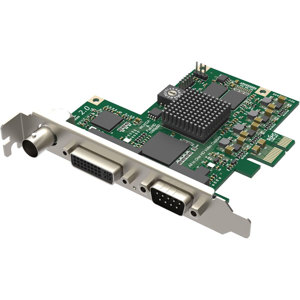
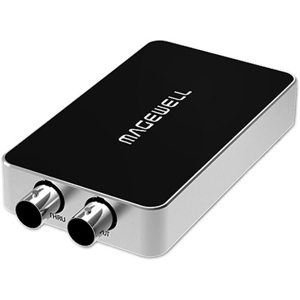
What's in the box:

  • Magewell Pro Capture HDMI 4K Plus LT Card
  • Magewell 1 Year Warranty