


This item is no longer available.
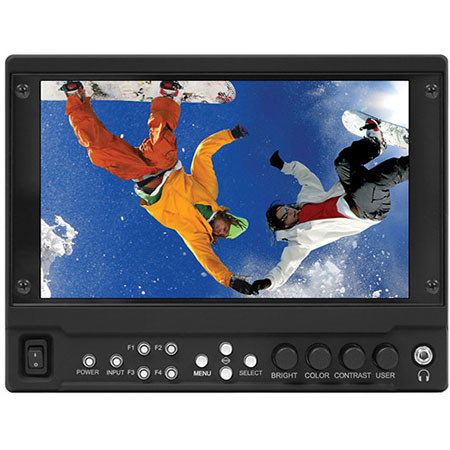
This Marshall Electronics 7" monitor offers a high brightness 700-nit, full resolution 1920 x 1080 LCD panel. Modules can be added at anytime in the field by you the user. Modular design allows you the user to determine what I/O combinations you want. The V-LCD71MD-3G includes the base unit with a preinstalled MD-3GE module providing an additional 3G/HD/SD-SDI input with loop-through. The V-LCD71MD-O version includes the base unit with a preinstalled MDO-3G module providing a 3G-SDI output converted from the HDMI input. Finally the V-LCD71MD base unit comes with no preinstalled module. Building on the features that made the MD series famous, these models add even more user friendly features.
Backlit panel and standard features including a wide variety of formats and markers, 4 user-config Icon driven Menu System, Waveform Display with dual Audio Bars, Front Panel Headphone output, Variable Pixel-to-Pixel function plus Marshall's industry leading PEAKING Filter now in four colors for easier focus assist make these monitors a must have appliance for serious photographers and videographers producers and directors alike. The monitor offers durable front panel function buttons, RGB Check Field / Field Detect, RGB gain and bias control, polycarbonate screen protection. New features include multiple DSLR presets, six User Presets, Adjustable IRE Clip Guide and Backlight control just to name a few. All of these new MD series monitors come equipped with an HDCP compliant HDMI input with pass-through, a selection of 10 available battery adapters and a choice of one Input or Output module.
DSLR Ratio Adjustment
Marshall's new DSLR Ratio Adjustment feature allows users to scale video that does not completely fill the monitor's screen when connected via HDMI in "Record" mode on certain Canon DSLRs. This new feature allows the user to scale their DSLR video output, fill the screen and eliminate black pillar bars with a variety of options to choose from. The user has the option of choosing between Normal, 3:2, 16:9 and full screen. The DSLR ratio adjustment feature can be programmed to one of the front panel's four-button presets for quick and easy access.
Waveform, Audio and Clip Guide Displays
The new V-LCD71MD incorporates both a Waveform display and Stereo Audio bars. These may be displayed separately or together in any one of the four corners of the monitor. The Stereo Audio is de-embedded from either the HDMI input (8 channels) or from the optional 3GSDI input (16 channels). Any pair of the available channels may be selected for both the display and the Headphone Output. The Zebra function (Clip Guide) is used to visually filter data on the screen that is under a Lower Threshold or over an Upper Threshold. Data on either side of the filters can be displayed with a custom color. The Zebra function can also be inverted to filter the area between the Upper and Lower Threshold. The color selected for the Lower Threshold acts as the color for all inverted Zebra data. In the image on the Left, the Lower Threshold is set to 20 IRE and the Upper Threshold is set to 90 IRE. The Zebra Invert will filter all data in between 20 IRE and 90 IRE and display it in red.
False Color Filter
The False Color filter is used to aid in the setting of camera exposure. As the camera Iris is adjusted, elements of the image will change color based on the luminance or brightness values. This enables proper exposure to be achieved without the use of costly, complicated external test equipment. To best utilize this feature, you must understand the color chart and have a basic understanding of camera exposure. Normally, when shooting subjects like people, it is common practice to set exposure of faces to the equivalent of approximately 56 IRE. The False Color filter will show this area as the color PINK on the monitor. Therefore, as you increase exposure (open the IRIS), your subject will change color as indicated on the chart: PINK, then Gray, then a few shades of Yellow. Overexposed subjects (above 101 IRE) on the monitor will be shown as RED. In addition, underexposed subjects will show as DEEP-BLUE to DARK-BLUE, with clipped-blacks indicated with a FUCHSIA-like color. Lastly, the color GREEN is used to indicate elements of the image that are approximately 45 IRE. This represents a "neutral" or "mid-level" exposure commonly used for objects (not people).
Peaking Filter
The Peaking Filter is used to aid the camera operator in obtaining the sharpest possible picture. When activated, the internal processor will display a colored highlight on the screen where sharp edges appear. When the camera operator adjusts (or "racks") the focus control (on the camera lens), different parts of the image will have these colored highlights. This indicates that this portion of the image is sharp or in focus. Final focus is achieved by racking the camera lens focus control back and forth until the desired portion of the image has the colored highlights. The original version of the peaking filter removed the color from the image leaving a black and white picture with Red highlights. This new version not only keeps the original color but adds a choice of four colors, Red, Green, Yellow and Pink to choose from for the highlights as well as adjustable sensitivity for even finer control of focus.
Quick Change Camera-Top Battery System
Easily change the battery plate on your camera-top monitor using Marshall's Quick Change Camera-Top Battery System. The system consists of a base plate that mounts onto the back of the monitor and accepts different types of battery plates. The base plate and battery plate disengage with the twist of a single screw. No tools are required. Simply turn the screw to remove one battery plate and replace it with another. This system is perfect for rental houses, schools and production studios where multiple cameras may be used with one monitor. When a user switches cameras, the battery plate on the monitor can be replaced in seconds. Marshall's Quick Change Battery System is designed save valuable time when switching easily between different pieces of equipment.
User-Definable Function Buttons
Four user-definable function buttons on the front-panel allow quick access to numerous settings and features including focus-assist, false color filter, aspect ratio, screen markers, monochrome mode, color temperature, delay mode and more.
Adjustable Screen Markers
A variety of screen markers in 4:3, 16:9 and full screen modes allow accurate monitoring of the different aspect ratios used in broadcast environments. User Markers allow for custom aspect ratio, cropping framing, now with a choice of four colors and variable width lines.
Stereo Headphone Output
8 channels of audio from the HDMI input or 16 channels of audio from the HDSDI input are available for monitoring. The headphones can monitor any pair from the available channels.
6 Custom Configuration Presets
Six User Setting Presets allow the user to save six system configuration files for later recall when needed. These configuration files will save 38 different parameters that can be adjusted by the user.