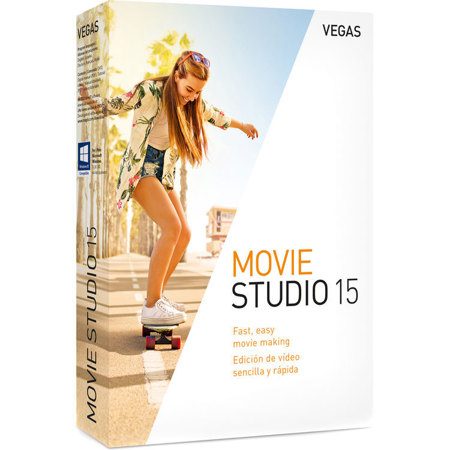
Magix VEGAS Movie Studio 15 Fast & Easy Movie Making Software, Electronic Download
SKU: MGXAN8170ESD
This item is no longer available.
Recommended Alternatives
Share:
Overview
Compare
Protection
Q&A
About Magix VEGAS Movie Studio 15
VEGAS Movie Studio
Turn memories into movies
Create lasting memories from your digital photos and video clips, and craft something special for your family and friends. VEGAS Movie Studio makes it easy to edit video and audio into something so special you can't wait to share it with the world.
Modern, Flexible Interface Makes Import-Edit-Deliver Workflow Easy
Import
Import video or digital photos from your smart phone, tablet, or AVCHD camera.
Edit
Click and drag your video clips and digital photos right onto the timeline for fast editing.
Enhance
Spice up your story with titles, video effects, music, scrolling credit rolls, and more.
From Popular Streaming Formats to Ultra High-Def 4K
Import, edit, and deliver in Standard Definition, High Definition, or beautiful Ultra High Definition. VEGAS Movie Studio enables you to edit the files natively. No re-rendering or re-wrapping. With support for 4K media, your video effects, composites, and text elements will shine with precision.
Easily Crop Out Unwanted Video
VEGAS Movie Studio makes it easy to frame-accurately select the portion of the video you want to keep and crop out the rest. Six different precision editing tools make it easy to get exactly what you want for your final video.
Get creative with special effects
Enhance, repair, or create something extraordinary with the built-in video effects and filters. Ready-made presets make for pure movie-making fun. All the effects are applied non-destructively so experiment to your heart's content; your original media stays intact.
Add professional-quality titles and text
Dozens of presets give a quick start to animating your titles with the Titles & Text media generator. Create eye-catching titles that flip, float, and bounce their way into your productions. The Titles & Text media generator is a fun way to add a professional touch to your movies.
Tiny Planet plug-in
The new Tiny Planet plug-in enables you to easily create your own Tiny Planet and Tiny Sky worlds in an instant! This is the hugely popular effect where an artificial globe is produced from a standard landscape scene. Tiny Planet works especially well with 360 Degree video footage and panoramic still images, but it will still create very interesting effects with standard footage and still images. You simply apply the filter and adjust a few controls to create your own tiny world.
Add a touch of Hollywood
With just a few clicks using the new AutoLooks OFX plug-in, you can bring Hollywood to your movies. It allows you to add the atmosphere, feel and look of famous films, movie genres, film stocks or particular movie-making eras to your video. You can therefore easily transform your viewers to another realm, with instant creative color treatments that help you establish a new - or old - cinematic atmosphere.
Enhance your audio and add music
Dozens of audio effects and filters enable you to repair and enhance dialog, camera audio, and sound effects to deliver a pristine audio experience.
Create the right mood and build the drama with your own original music which you compose with the included Music Maker software. Whether you're an experienced musician or just getting started, Music Maker makes it easy to create the perfect music track for your video.
Sharing Made Easy
Capture your media from a variety of devices. Generate the optimum quality format for your sharing destination. Upload directly to Vimeo, YouTube, and Facebook. Once you decide how you want to share your masterpiece, VEGAS Movie Studio automates the process.
Devices
Import from your phone, tablet, video camera, still camera, laptop, or desktop PC.
Standard or HD video
Wide format support including: AVC/AAC, AVI, MPEG-1, MPEG-2, MPEG-4, WMV, and more.
Online
Upload to Vimeo, YouTube, and Facebook directly from the timeline.
TV
View on your HD TV via USB drive, DVD, or Blu-ray disc.
Hardware Acceleration
Support for the latest generation of NVIDIA and AMD graphic cards and advanced Intel QSV (Quick Sync Video) technology boost real-time playback and drastically reduces render times for AVC files.
Show Me How
The built-in, interactive Show Me How tutorials teach you everything you need to know. Follow along, step by step, as the tutorials teach you how to add media to your project, edit and enhance your video, add titles and text, mix your audio, finalize, and deliver your movie. The Show-Me-How tutorials make learning the software easy.
The VEGAS Movie Studio Family of Products
Find the right video editing software for you. Easy click-and-drag workflow, dozens of audio and video effects, sophisticated titles and text, free Music Maker software, and more. Explore all three versions and find the perfect movie editor for your story telling.
For even more power, VEGAS Pro takes you to the next level
VEGAS Movie Studio uses the same core technology as the award-winning VEGAS Pro, so everything you learn to do in VEGAS Movie Studio works nearly identically in VEGAS Pro. When you're ready for more, you'll be able to jump right in and start editing with the pros - just learn all of the great new and expanded functionality that VEGAS Pro offers. Start with VEGAS Movie Studio, and easily upgrade at special prices to move on when you're ready.
VEGAS Movie Studio - Create. Simply.
VEGAS Movie Studio makes creating your masterpieces simple. Combine videos, still images, audio, graphics, and text. Add professional special effects and transitions to make it all look great. The modern interface makes creating easy. Jumpstart Templates give you a head start, and the Quick Start dashboard guides you along every step. Create picture-in-picture sequences, split-screen effects, and instant freeze frames. Use hardware acceleration to deliver MP4 files for YouTube and Facebook. Work with the most important formats, like the popular HEVC. With stunning video filters from Boris FX, and HitFilm, along with industry-standard noise reduction from iZotope, you can easily turn an ordinary project into something extra special.
Modern, flexible user interface
The new user interface presents all of the tools and the workflow in VEGAS Movie Studio 15 in a logical, easy-to-understand, modern fashion. You can easily reach all of the tools you need, and once you get to them, you can get right to work with their intuitive operation. The dark interface not only eases strain on the eyes after long editing sessions, it also helps you make better color evaluations and corrections. Timeline event headers make important information and powerful editing tools instantly available, and the modern icons make it easy to find and recognize your most important tools.
Get started quickly
The Quick Start window gets you up and running quickly with a launch dashboard that maps out your editing process in clear, concise order. Follow the logical workflow to import files into your project, then add titles and graphics, as well as video transitions, filters, and effects. Then, once you've edited your project and created exactly the movie that says what you want it to say, finish your job and make the movie files you need to post to YouTube, Facebook, Vimeo, and any other way you want to share your masterpiece. And any time you need help, access the Show Me How tutorials for step-by-step instructions.
Easily move your footage into your project
Find all of your options to add media to your project in one convenient location. Whether you use a tape- or file-based video camera, you can easily move the footage you've shot from the tape or card to your computer hard drive and into your project. It's all in one place, and you can set the default method to the one you use most often, yet still easily get to all of the other methods when you need them.
Event Healing: Keep your project timeline organized
When you're working fast, you can sometimes find that you've split a timeline clip event into two and then realize that you want those two merged back into one event after all. If you've done a lot of other editing in the meantime, you can't always use Undo to fixe the problem. Now, easily join two previously split timeline clip events back into one to clean up your project timeline and make timeline management easier.
Render your project at lightning speed
When you combine the MAGIX AVC/AAC MP4 codec (perfect for delivering your project to YouTube, FaceBook, and Vimeo!) with hardware acceleration from your NVidea or Intel QSV equiped computer, you can turn your project file into a file that your viewers can see with lightning speed.
Tiny Planet Plug in
Create your own Tiny Planet and Tiny Sky videos in an instant! The Tiny Planet plug-in enables you to easily create the hugely popular effect where an artificial globe is produced from a standard landscape scene. The plug-in works especially well with 360 Degree video footage and panoramic still images, but you can also use it to create interesting effects with any standard footage or still images. Just apply the filter, adjust a few simple controls, and your tiny planet is ready for your viewers to visit!