

This item is no longer available.
The All-In-One Tool for Professional Design
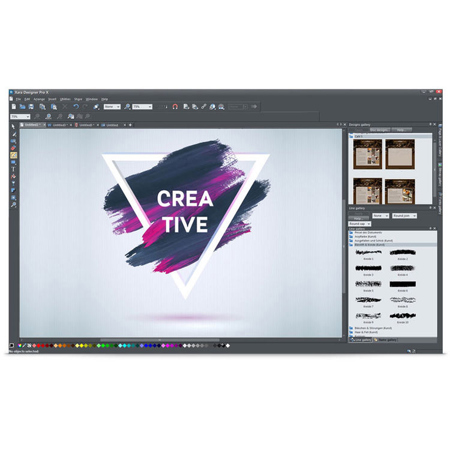
For when the whole is more than the sum of its parts: Xara Designer Pro X is the ideal design solution created specifically for the unique requirements of ambitious and professional users.
• Professional image editing and photo retouching
• Supports vector and pixel graphics
• Extensive color management
• Drag & drop to create websites and publish them online from within the program itself
• 2GB webspace & domain included
• High-quality layouts for all types of print material, such as business cards, flyers and brochures
• More than 3,000 design elements
• Presentations with interactive graphics elements and animations
Everything in One Program: Photos, Graphics, Web, DTP & Presentations
This multiple award-winning software seamlessly combines all of the high-performance features required for advanced design in one clearly laid-out program interface creating an optimum workflow for quick results.
For web, DTP & presentations
Get started with a template or an empty page and create high-quality designs for websites, flyers, brochures and presentations.
Pixel and vector drawings
Edit photos and pixel graphics or easily create vector drawings. There's no limit to the creative possibilities.
Tons of extras
With more than 3,000 graphic elements, over 200 design templates, 2 GB webspace and your own domain, Xara Designer Pro X has everything you need for your projects.
New photo filters
With 50 new photo filters, you have 50 times the possibilities to add a certain something to your images. Distort your photos, bring out contrasts or add depth and focus to your photos to create a certain atmosphere.
Free stock illustrations
The content catalog has been expanded. This means that in addition to free stock photos, you can download high resolution graphics and illustrations in the content catalog. The fully integrated library offers access to more than 780,000 free pictures, graphics and illustrations.
New smart shapes
The new arrow & chevron smart shapes let you visualize your ideas for effective communication. Show developments and processes or create a layout using arrows with fully customizable tips and ends.
New text handling features
Align text along a vertical axis as superscript or subscript, defining the desired position. In addition, you can add contours to the heading formats, delete existing format templates and add tables of contents.
Innovative list editing
Edit bullet points and numbers in your lists independently of text and individually assign color, size and font. Link two different lists without interrupting numbering and insert graphics or other elements.
Modern Web Design, For All Displays - No Programming Skill Required
Parallax scrolling
Parallax scrolling brings dynamics and depth to your website. Foreground and background optically separate from each other.
New sticky options and reveal effects
Thanks to the sticky objects function, you have even more options to freeze elements on your website. Sticky objects are unaffected by scrolling and remain visible at the same position. With the object reveal effects you can fade in elements as soon as the corresponding area in the browser becomes visible.
More than 200 website templates
Each one of the over 200 professional templates includes all the website elements you need - from navigation bars to graphics and images. And everything is 100% customizable.
New and improved smart shapes
The smart shapes have been completely redesigned and improved. The new smart shapes are perfectly suited for use in documents. For example, you can easily insert diagrams or arrows.
Online Designer
Customize websites and documents - anytime, from anywhere. Login to Online Designer through the browser on your computer, tablet or smartphone and continue working. Now improved and with lots of new features.
Image Editing and Graphic Design - Easy and Effective
New filters and effects Give your photos a unique look in a matter of clicks. Use breathtaking effects to present your memories in a totally new way.
Straighten horizons
If the camera was not held straight when the image was taken, the horizon may appear slanted. In Xara Designer Pro X, simply use the "Straighten horizon" slider to adjust the position of the photo.
New smart photo grids
Create amazing photo collages with the intelligent photo grid. Select the template you want and then drag and drop your pictures into position. The photo grids are fully customizable.
Magnetic lasso
Clip areas of your image quickly, cut figures out and add new backgrounds. Select an outline using the mouse and the intelligent selection tool will automatically create a path.
Blend modes for color dodge and color burn
Enhance individual color ranges in your images. With the tool for color dodge and color burn you can darken or lighten precise areas in any image.
More Great Editing Options
Improved Word and Photoshop file import
It's now even easier to import text from Word documents and layers from Photoshop files into your presentations and compositions and edit them further.
Link to license-free stock photo catalog
Need additional photos and images? Choose from a selection of over 780,000 free stock images and illustrations.
New symbol fonts
Choose from a wide range of new symbol fonts. You're certain to find just the symbol you're looking for. What's more, you can transform a symbol into a fully customizable vector graphic in seconds.
Reworked content catalog
Looking for additional content for your website, flyer or brochure? Download images, graphics, illustrations and videos for free. Now with a clearer structure and search feature.
Web Design
No programming
Create your own webpages without any previous experience. Customize easily using drag & drop. You always see the page as it will appear on the web.
Over 200 design templates
Choose from over 200 website templates. These are license-free and fully pre-made with images and graphics. Each of the templates are fully customizable.
Online Designer
Make changes to your website's text and images, even at the same time as others - on any device and from anywhere in the world.
Create mobile websites
Create websites that are optimized for various display sizes. Just make a standard design which can then be used to define other versions for smaller or larger displays. This way, you can make websites that perfectly fit smartphones, tables and extra-large desktop monitors. All contents are automatically synced. The positioning and design of individual objects can be separately defined for each type display. For displays with a higher pixel density, such as smartphones, high resolution versions of your images are automatically delivered.
Visitor counters
You can now add a visitor counter to your page with just a few clicks, to keep an eye on how many users have visited your site.
Full screen objects
Define your images as fullscreen to automatically expand to fill the visitor's browser.
Fixed elements
Easily prevent individual objects from moving when users scroll on your website. For example, you can fix the navigation bar so that it's always visible to visitors.
Media-X-change
MX stands for Media-X-change - the fast exchange of media with other MAGIX programs, online services and mobile devices.
Manage your photos in Photo Manager Deluxe
Set names for categories and keywords, carry out small-scale enhancements, rate your photos and save them with regular backups.
Create short films for your website with Movie Edit Pro
Use Movie Edit Pro to cut your travel clips, your own video podcast or image film and add it to your website.
Animation trigger
Micro animations bring your website to life. For instance, draw attention to individual elements by animating them when they come into view on the screen.
• Panorama websites
• Single-page websites
• Interactive photo gallery (Image Slider)
• Dynamic effects
• Screen-filling backgrounds
• Widgets
• Optimized for high-resolution displays
• Over 600 web safe fonts
• GIF and Flash animations
• HD Video Player
• Music player
• Web statistics
• Integrating online shops
• E-Commerce (widgets)
• Search Engine Optimization (SEO)
• Encrypted upload
• Password protection for websites
• Includes Website-M hosting package
Volume Licenses
The purchase of a volume license entitles you to use the products simultaneously on as many computers as you have purchased licenses for. Not with-standing this, you may install the products on an unlimited number of computers; simultaneous use, however, will be limited to the number of purchased licenses. If you install the products on more computers than you have purchased licenses for, you will have to purchase additional volume license codec packages for the number of computers that go beyond the number of purchased licenses.