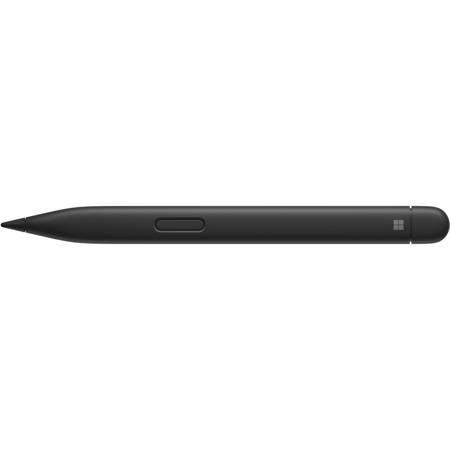
M C S Surface Slim Pen 2, Matte Black

SKU: MI8WV00001 MFR: 8WV-00001
$129.99
Earn VIP Reward Points

Key Features

  • Experience precise control with 4,096 pressure levels, perfect for detailed digital art.
  • Enjoy seamless writing and drawing on your Surface with exceptional palm rejection technology.
  • Stay productive longer with up to 15 hours of battery life, ideal for all-day use.
  • Boost your workflow with broad compatibility across Surface devices and MPP-enabled screens.
  • Feel the natural writing experience thanks to its ergonomic design and haptic feedback.
  • Achieve pixel-perfect accuracy for notes and sketches with zero force inking.
See More Product Details
Overview
Compare
Compatibility
Specs
Protection
Q&A

Questions & Answers

FAQ

What makes the Surface Slim Pen 2 different from other digital pens?

The Surface Slim Pen 2 features a sleek, modern design and a carpenter-inspired slim profile. It also has a haptic motor that provides a natural, pen-on-paper writing and drawing experience, along with precise shading capabilities and wireless charging when stored in compatible Surface keyboards or covers.

Can I use the Surface Slim Pen 2 with any device?

The Surface Slim Pen 2 is designed to work best with ink-enabled Surface devices, including the Surface Pro 8 and Surface Laptop Studio. It may not be fully compatible with non-Surface devices.

Does the Surface Slim Pen 2 come with a charger?

The Surface Slim Pen 2 does not come with a charger. However, it can be wirelessly charged when stored in the Surface Pro Signature Keyboard, Surface Laptop Studio, or other compatible Surface keyboards or covers.

Can I adjust the tactile signals on the Surface Slim Pen 2?

Yes, the strength of the tactile signals when using the Surface Slim Pen 2 can be easily adjusted or even turned off through your Windows settings.

Can the Surface Slim Pen 2 be used for professional design work?

Absolutely, the Surface Slim Pen 2 is designed for precision, allowing for professional-level design work in apps like Adobe Fresco and Photoshop. Its 77-degree tilt and 4,096 pressure sensitivity points also enable ultra-precise shading.

Shopper : Does it work on a Surface Studio?
Shopper : Why Did You Choose This?LAUREN M : I recently purchased the surface pro 8!JOSEPH N : To go with SurfaceMAX G : doens't come w surface pro and sold out everywhereSTUART W : My grand daughter wanted it for her college work with a computerNICHELLE H : Sold out every where else for ChristmasSTEVEN O : The microsoft store estimated 6 weeks for delivery...RYLAND B : It’s for my surface studioILYA S : Just gifts for my familyMatthew T : sold out everywhere else

Reviews about this item

Review Summary

Select a plan in the Add Protection section above and purchase with this product by clicking “Add to Cart”.

image-protection

TRUSTED PROTECTION PLANS, EXCEPTIONAL SERVICE.

Invest In Your Gear and Peace Of Mind!

Accidents happen where life happens. Protect your favorite Adorama products and purchase a protection plan to stay covered from accidental damage, mechanical or electrical failure, and more.

Repair or Replacement

Repair or Replacement

If we can’t fix it, we’ll replace it at no additional cost.

Accidental Damage

Accidental Damage

Protect your product from drops, spills, and more.

Peace of Mind

Peace of Mind

Enjoy your gear without fear. We have you covered!

Malfunction Protection

Malfunction Protection

When regular use of your product over time results in mechanical or electrical failure.

Zero Deductible

Zero Deductible

We will never charge you a deductible after the purchase of a plan.

Customer-Focused Support

Customer-Focused Support

Our claims process is simple & easy and our customer service team is happy to help.

Adorama Protect powered by Extend is available for purchase to customers in the United States. Not available for purchase Internationally or in U.S. Territories.

M C S Surface Slim Pen 2 Specifications

  • Color

    Matte Black

  • Material

    Plastic Enclosure

  • Compatibility

    Surface Laptop Studio
    Surface Pro 3 - Surface Pro 8
    Surface Pro X
    Surface Duo, Surface Duo 2
    Surface Go, Go 2, Surface Go 3
    Surface Hub 2S
    Surface Laptop 1 - 4
    Surface Studio 1, 2
    Surface Book 1 - 3
    Non-Surface devices that support Microsoft Pen Protocol (MPP)

  • Connection

    Bluetooth Wireless 5.0 Technology

  • Buttons

    Side button, Top Button with eraser functionality

  • Tactile signals

    Haptic feedback functionality compatible only with Surface Laptop Studio and Surface Pro 8 with Windows 11

  • Pressure and sensitivity

    4,096 pressure levels
    Zero force inking

  • Battery

    Rechargeable Lithium Ion
    Up to 15 hours of typical usage6

  • Battery capacities

    Battery Capacity Nominal (WH): 0.171
    Battery Capacity Min (WH): 0.164

  • Storage and charging

    Surface Slim Pen 2 storage and charging in Surface Pro Signature Keyboard , Surface Laptop Studio, and Surface Duo 2 Pen Cover
    Surface Slim Pen Charger
    Surface Slim Pen 1 USB-C Charging Base5

  • Battery Info

    Required, included

  • Battery Material

    lithium ion

  • Battery Type

    non-universal

  • Battery Quantity

    1

  • Dimensions

    5.38 x 0.44 x 0.25" (136.8 x 11.3 x 6.3mm)

  • Weight

    0.45 oz (13g)

  • UPC Code

    889842778717

Designed For Use With:

  • Microsoft Surface Pro

Need Help?

For any questions about compatibility with this product, call us at 800-223-2500 or you can email us any time.






