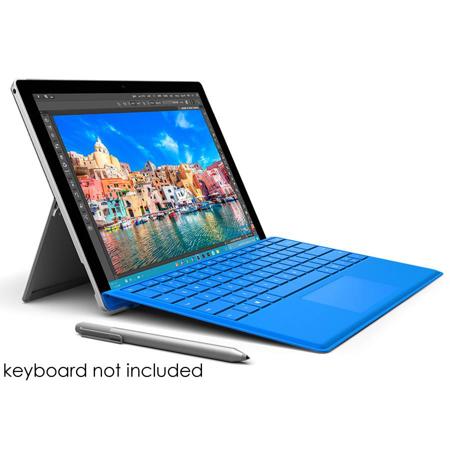

Microsoft Surface Pro 4 - 12.3", Intel Core i5, 4GB RAM, 128GB SSD, Windows 10 Pro, Silver

SKU: MISCR500001

This item is no longer available.

Overview
Compare
Specs
Protection

Reviews about this item

Review Summary

2017-06-07T21:17:44

Rated 4 out of 5

Compact and very usable

Good screen and enough power for most applications.

PAUL F.

2016-02-24T07:52:54

Rated 5 out of 5

I LOVE my Surface, prefer it to my LG tablet anyday!

I purchased this tablet/computer for $100 less, and with a bundle or a keyboard, mouse and software. While the software came in cd form, I was able to install it with an external cd. I LOVE my Surface, prefer it to my LG tablet anyday!

Judith Z.

2016-02-24T07:50:00

Rated 5 out of 5

Love it its a nice to would recommend it to a friend

Love it its a nice to would recommend it to a friend

RAY M.

2016-02-21T20:29:14

Rated 4 out of 5

Nice upgrade from pro3 no fan sound anymore

Nice upgrade from pro3 no fan sound anymore, and better keyboard totally worth it.

SRAVANTHI M.

2016-02-15T13:39:54

Rated 5 out of 5

made my wife happy

bought this as a birthday present for my wife. she thinks it's great.

chuck h.

2016-01-28T07:54:14

Rated 3 out of 5

Buggy and not friendly to Chrome users

I use Chrome a lot for my work, everything from Drive, Docs, to Sheets. Yes, Chrome takes up a lot of memory when running, but you'd think a Surface Pro 4 could handle at least 3 or 4 Chrome tabs open at the same time. Nope. This Surface cannot handle it at all. Even with all other programs off and minimal background processes going on, I've found the Surface 4 to crash, freeze, or run its fans at high speed whenever I use Chrome. Read the forums about this issue--other users have experienced the same thing. I experience glitches using Chrome almost every time on this device, and it's very frustrating. Surface was designed for people to use with Microsoft Edge browser. But in my opinion Edge is pretty terrible because it (still) doesn't offer extensions and a lot of the functionality of other browsers (like Firefox and Chrome). But you might like Edge, who knows. It's a matter of preference and what you use this Surface to do. Other than the Chrome issue, I've also experienced maddening episodes of bugginess from this device. The screen won't register my touches and I have to click several times on certain websites (like Hulu or Youtube) to select a keyboard field. At some point the device wouldn't show the on-screen keyboard at the sign-in screen so there was no way to type in my password to actually use the device. I had to restart several times and run some tests via Microsoft Customer Service (which, by the way, is terrible--I knew more about the device and how it worked than the agents they connected me with!). It got so bad that Microsoft had to replace my tablet entirely, but the replacement one still has some of these same issues (though not as often). I'm not ordering anymore replacements, though. I'm pretty sure this is bugginess is just the nature of this device. My recommendation is to try this device at a store using the apps that you think you will generally use BEFORE you buy this online or from wherever. Get a sense of how easy/hard it is for you to do things on this device using your fingers, the on-screen keyboard, keyboard attachment, and pen. PROS: Lightweight, beautiful screen, keyboard attachment and pen feel wonderful to use. Sound quality is awesome. CONS: Random glitches and bugs in the operating system hinder functionality. Cannot tolerate Chrome.

TK73099

2016-01-04T21:34:21

Rated 5 out of 5

Great laptop and tablet combined

I was looking for a laptop replacement for my 6 year old Lenovo Thinkpad. I also wanted to portability and form factor of a tablet, The Surface Pro 4 is a perfect solution. I highly recommend it. I use it mainly for office applications and corp email - it performs perfectly. I use a Logitech K810 bluetooth keyboard instead of the keyboard cover.

Lawrence S.

Microsoft Surface Pro 4 Tablet Specifications

About Microsoft Surface Pro 4 Tablet

Microsoft Surface Pro 4
Surface Pro 4 is the most productive way to get the versatility of a laptop and a tablet in one device. With exceptional performance that's engineered to run Windows and Office perfectly, Surface Pro 4 is the best way to experience advanced technology from Microsoft.

The versatility of a laptop and tablet in one
• Brilliant 12.3" high resolution, PixelSense display for crisp text and lifelike image with precise touch response.
• Run full Windows apps like Adobe Photoshop, Chrome and iTunes, along with touch apps like Kindle.
• Integrated multi-position Kickstand and improved click-in keyboard (sold separately) with a range of colors to choose from.
• Beautifully made and ultra-thin, and has the same proportions as a piece of paper.
• The ports you need: USB 3.0 for all your accessories, microSD for extra storage, and Mini DisplayPort

Exceptional performance
• Laptop-grade 6th Gen Intel Core i5 processor for a fast experience.
• Up to 9 hours of video playback.
• Dolby speakers for amazing, high-quality sound.
• Take fantastic photos and videos with the 5MP front-facing camera and 8MP autofocus rear-facing camera.

A great device for work
Surface Pro 4 is the best device for the professional on the go. It has all the power of your laptop, but is light like a tablet and has all day battery life. Designed for getting work done, Surface Pro 4 has a stunning display, meticulously crafted with a precision finish that will look great in any meeting.

Runs Windows & Office perfectly plus the apps you need
• Windows 10 is a familiar combination of all the best Windows features yet, so you'll feel like an expert from the get-go.
• Runs Office desktop programs like Word, Excel, and PowerPoint with an amazing touch-first experience for Office 365 customers.
• Use Windows 10 the way you want, optimized for touch, mouse, voice and pen.
• Get creative and run the full Adobe Creative Cloud with ease.
• Write directly on web pages and easily share in the all-new Microsoft Edge browser.

Advanced technology from Microsoft
• Surface Pen feels as natural as a real pen on paper with precision ink on one end and an eraser on the other.
• Even when Surface Pro 4 is asleep, click your Pen and you'll have easy access to a blank OneNote sheet. Click and hold the top of Surface Pen to activate Cortana, the personal digital assistant ready to help whenever you need.
• With Windows Hello, sign in easily by just looking at Surface Pro 4.

What's in the box:

  • Microsoft Surface Pro 4
  • Surface Pen
  • Power Supply
  • Quick Start Guide
  • (Type Cover Keyboard Sold Separately)
  • Microsoft 1 Year Limited Hardware Warranty