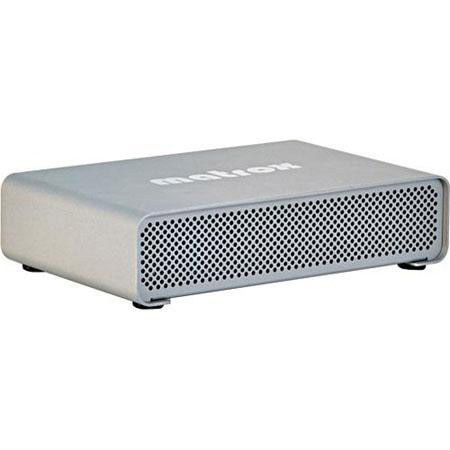

Matrox MXO2 Mini High Definition HDMI & Analog I/O Device with Max & PCIe Host ExpressCard/34 Adapter for Laptop, Win/Mac

SKU: MRMXO2MIML

This item is no longer available.

Recommended Alternatives

Overview
Compare
Specs
Protection

Reviews about this item

Review Summary

2013-11-11T19:00:00

Rated 4 out of 5

It does the job that needs done.

First of all, I'm happy this product exists. I bought an MX02 LE when I was using a PC laptop so I used the Expresscard on it. Then the laptop was stolen by some cowards who, I suppose, needed the laptop more than I (kinda like the guy from Bicycle Thief) and I picked up a new MacbookPro. I was delighted to learn that I just needed this box and didn't have to upgrade my whole dang MX02 LE (with MAX!). I've never had connection issues, and since I picked up the longer Thunderbolt cable, my field setup is much more flexible than the Expresscard and (short) Matrox cable. I haven't read the documentation enough to know the proper way to disconnect the thing so I've always powered down completely but I think there may be a safe way to disconnect it from the computer without powering down. Seems fairly well built and it's great it doesn't need external power. It's a simple box with 2 holes, just make sure you put the B side of the Matrox cable facing up.

AK

2013-01-21T19:00:00

Rated 4 out of 5

Works Well in my Workflow

Works well to feed the HDMI camera feed into the Mac/PC for broadcasting, if you choose drivers well. Contact Matrox support before installing the driver.

MM

2011-12-04T19:00:00

Rated 4 out of 5

Decent value - calibration not there yet

This is a good mid-price option to connect HDTVs and pro monitors to your editing setup. The use of an internal card makes it a desktop-only solution (you won't be taking this on set with your laptop). Unline using some sort of adapter from your video card, this sends an unadulterated signal for viewing. You can also use it to record video via HDMI or analog. The main feature that attracted me was the calibration utility -normally you would use hardware like this to drive a professional monitor, which you would calibrate using color bars. But large flatscreen pro monitors are frightfully expensive - the ability to calibrate a 30" HDTV and use it for editing sounds dynamite. But apparently, it only works properly with the (rather rare) 1:1 pixel TVs. I hooked it up to a large Samsung. The calibration utility "believed" the monitor was fine, but I compared it to my small Marshall (calibrated via color bars) and it was way off. So for now, I use an HDMI splitter to use the little marshall AND the big TV, and I use the TV controls to get the TV as close to the Marshall as possible. This gives me accurate color (via the small marshall) and a large screen that doesn't get all quicktimed-up (for a total of four screens at my workstation - hmm, chicks dig it!) Yep, the much cheaper blackmagic card would do the same thing, but hopefully firmware upgrades will come as the calibration utility evolves. Other issues you may have are that it can take a LOT of fooling with settings to make this work (After Effects is pretty seamless, FCP can be an oddball mess of FCP prefs and Matrox panels). Sometimes it just *stops* sending a signal, and you have to play with settings to wake it back up.

MICHAEL C.

2011-01-11T19:00:00

Rated 3 out of 5

Read instruction book before you buy

This is for the professional and requires a professional playback monitor. Some of the fps rates can play in RGB and some in HDMI. As of 1/2011 the driver does not work with After Effects. You get a pretty good range of options with Premier Pro CS5. Some of the playback options are in the pSF format, not likely that a consumer monitor will be compatible. For my purposes right now it is fine but may not be for everyone with this version of the Mac driver.

STEVE N.

2011-01-11T19:00:00

Rated 4 out of 5

Good...

Good... More...option software support ,example Show video output from Windows Mediaplayer .

Last

Matrox MXO2 Specifications

About Matrox MXO2

The Matrox MXO2 Mini is sleek little device for Mac and PC which gives you the added advantage of portability. You can take it with you wherever you go. Use it with a laptop and your favorite applications including Final Cut Pro, Adobe Premiere Pro and Photoshop and many more.

Capture and playback high definition video via HDMI and analog component; or NTSC and PAL via analog component, S-Video and composite. Convert your standard definition videos to high definition, or vice versa, while capturing or playing out, using Matrox MXO2 Mini's high-quality dedicated hardware.

Turn your HDMI screen into a professional-grade video monitor with Matrox's unique color calibration tool. Easily edit AVCHD footage by capturing into an edit-friendly compressed or uncompressed format.

Key Features

  • Works with Mac and PC desktops
  • High quality 10-bit hardware scaling
  • HD to SD downscaling
  • SD to HD upscaling
  • Cross conversion
  • Editing workflows for Mac

What's in the box:

  • Matrox MXO2 Mini Input/Output Device
  • Matrox MAX
  • Matrox MXO2 PCIe Cable (1 meter)
  • Matrox MXO2 Mini External Power Supply
  • Two S-Video Adapters
  • Matrox MXO2 PCIe Host ExpressCard/34 Adapter (for Use with MacBook Pro & PC Laptops)
  • Matrox 3 Year Hardware Warranty