


+3
more
more
This item is no longer available.
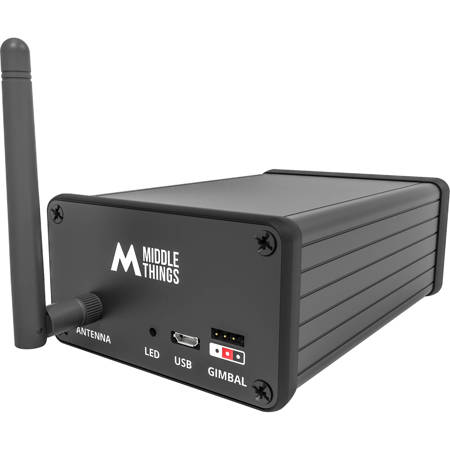
With the APC Pocket Controller (APC), you can use the APC Software Control or the APC Camera Control Panel to adjust your BMPCC settings remotely ! Which means minimal changes in your Live Production workflow. You can control the same settings as the URSA Mini Pro or URSA Broadcast, which includes Shutter / Iris / WB / Gain / some Primary color correction and Zoom
Since the BMPCC 4K / 6K doesn't have an SDI input connectors like the other Blackmagic studio cameras, the LPC converts the SDI program feed from the switcher into a Bluetooth signal that the BMPCC can read. The LPC only requires a 12V DC connection to operate. It also features and SDI loop out port if you want to daisy chain another Blackmagic Pocket Cinema Camera.
Note: That you still have to take the pocket HDMI signal and send it to the switcher.
Control your BMPCC 4K/6K camera over SDI with your APC switcher
Take full advantage of your BMPCC 4K / 6K for your live productions by remote control possibilities.
With the APC Pocket Controller (APC), you can use the Blackmagic APC Software Control or the APC Camera Control Panel to adjust your BMPCC 4K & 6K settings remotely! Which means minimal changes in your Live Production workflow. You can control the same settings as the URSA Mini Pro or URSA Broadcast, which includes Shutter / Iris / WB / Gain / Some Primary color correction, Focus and Zoom.
Since the BMPCC 4K / 6K doesn't have an SDI input connector like the other Blackmagic studio cameras, the APC converts the SDI program feed from the switcher into a Bluetooth signal that the BMPCC can read.
Long distance communication
So you might think: "Wait, what about that Bluetooth connection reliability in a very crowded venue ". Well the trick is to put the APC Pocket Controller as close as possible to the Pocket Cinema Camera so that the Bluetooth strength is at its maximum. Then, using a traditional long range wired SDI connection or Optical Fiber, you connect the Pocket Live Controller to the Program Output of your APC.
Easy pairing with the APC Pocket app
Pair your BMPCC and APC Pocket Controller with the APC Pocket iOS App. It also allows you to select which APC camera ID corresponds to your Pocket camera. You can configure up to 8 APC with a single app! Once the camera is paired to the APC and you have set the proper APC ID, there is of course no need to keep the app open!
Turn your Gimbal into a PTZ head
Another great feature of the APC is that you can operate your DJI Ronin-S/SC/RS2 or Ronin 2 directly from the Blackmagic 1 M/E Advanced Panel. The magic happens by wiring the S-BUS port of the DJI Focus Wheel to the corresponding data port on the APC. Check out the complete Gimbal Setup Guide for more info. If you wish to use the Ronin-S/SC/RS2/2 Gimbals as a PTZ Head, you need to purchase the APC with the Ronin-S 4pin to 3pin control cable. The standard length is 3m/9.8feet. Bear in mind that you need to use the small DJI R Focus Wheel.
Note: You need to buy the APC Gimbal Cable, which is not included by default.
Simple connectivity
The APC only requires a 12V DC connection to operate. It also features and SDI loop out port if you want to daisy chain another Blackmagic Pocket Cinema Camera. Please note that you still have to take the pocket HDMI signal and send it to the switcher.
Compatibility
Note: Compatibility can change over time as new products get released. Please visit middlethings.co/support for up-to-date compatibility information.
The APC can control the following cameras:
• Blackmagic Pocket Cinema Camera 4K
• Blackmagic Pocket Cinema Camera 6K
• Blackmagic Ursa Broadcast
• Blackmagic Ursa Mini Pro
• Blackmagic Ursa Mini Pro G2
The APC is compatible with the majority of Blackmagic Design APC Switchers. These are:
• APC Television Studio HD
• APC Television Studio Pro HD
• APC Television Studio Pro 4K
• APC Production Studio 4K
• APC 1M/E & 2M/E Production Studio 4K
• APC 4M/E Broadcast Studio 4K
• APC Constellation 8K






