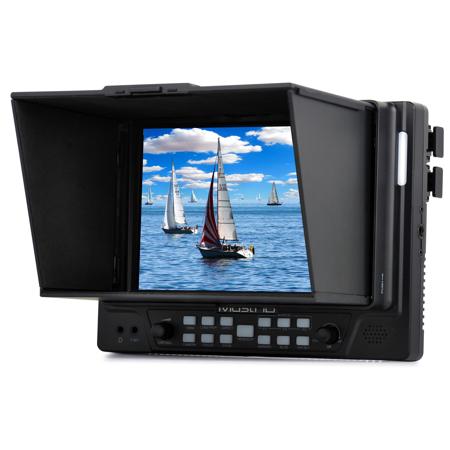
MustHD M702H 7" 1920x1200 Full HD HDMI Field Monitor for Professional Videographers
SKU: MUM702H
This item is no longer available.
Share:
Overview
Compare
Specs
Protection
About MustHD M702H
MustHD M702H is a professional grade field monitor with HDMI input and loop-through support. The 7" 1920 x 1200 pixel IPS screen combined with 450 cd/m2 (450 nits) brightness and a 1100:1 contrast ratio provide a crisp image clear image with accurate color. The 178deg. horizontal and 178deg. vertical viewing angles make it easy to see even at an angle helping to insure accurate video capture.
• 1920 x 1200 FullHD 7" IPS Panel
• HDMI Input/Loop-through, Composite input
• Luminance of 450cd/m2 (450 nits)
• Focus Assist / Peaking Color RGB
• False Color for Under/Over Luminance Warning
• Histogram and Zebra
• Pixel-to-Pixel
• Zoom (from 10-90%)
• R/G/B/Gray-only display
• H/V Mirror
• 3 Button Programmable Wired Remote
• Four 1/4"-20 Thread Mounting Holes
• Speaker & Headphone Output
• Tally
Multiple Input/Output Options
The HDMI input/loop-through support a camera signal of up to 1080p at 60fps for excellent capture flexibility.
Detachable Folding Sunhood
Its detachable folding sun-hood helps when shooting in bright locations and also protects the screen in transit.
Multiple Power Supply Options
The M702H can be powered on battery or DC 12V power adapter. It is compatible with Sony F970/Canon LP-E6/Panasonic D28S/V/A mount batteries via battery plates. The standard battery plate is Sony F970 battery plate. If you need others plates, please select them from the option list. It is light weight and the menu is easy to navigate. The advanced software features focus peaking, histogram, false color, zebra bars and audio level meters make it the perfect monitor for a professional videographer that does not require 3G-SDI.
Focus Assist (Peaking Red/Green/Blue)
Help shooters to easily find out the exact area in the picture with good focus by adding sharp red (green/blue) outline on the shape or boundaries of the object in the picture. The shooter adjusts the focus control until the red indicator outlines on the desired area are sharp, indicating optimal focus.
Histogram
The Histogram provides a graphic depiction of how many pixels in your image are at each level between black and white. This provides you exposure information so you can objectively judge how much of your image is clipping, falling into the shadows or being captured faithfully.
False Color
The false color filter is used to aid in the setting of camera exposure. As the camera Iris is adjusted, elements of the image will change color based on the luminance or brightness values. This enables proper exposure to be achieved without the use of costly, complicated external test equipment.
Marker
You can set the display marker mode, 16:10, 16:9, 15:9, 1.85:1 and 4:3 and also set the marker color, thickness and transparency. Image below shows the 2.35:1 marker.