


This item is no longer available.
Live video communication. Redefined.
Invigorate your meetings and presentations with visually appealing data and information. Create stunning graphics in minutes with Titler Live 5 Present.
Live graphics and data visualization for the boardroom, classroom, and more.
Titler Live 5 Present delivers affordable, broadcast-quality graphics and video overlays for businesses, classrooms, event production studios, religious gatherings, town halls, virtual meetings, and more.
Corporate communications.
Improve your communication and engage your audience with broadcast-quality graphics at a fraction of the cost. With Titler Live 5, you won't have to be a TV network to broadcast high-end, professional graphics to your employees, clients, or advisory board. Now anyone, in any organization, can create beautiful, compelling graphics with the Titler Live 5.
Education.
Capture your students' attention with Titler Live 5, the affordable live graphics solution for the classroom, on-campus studio, or athletic department. Whether you're teaching live graphics creation or producing an educational or athletic live stream for your school, Titler Live 5 meets all your graphics and titling needs.
Houses of worship.
Inspire and invigorate your congregation with polished video graphics. With Titler Live 5, you can easily produce and deliver lyrics, scriptures, announcements, videos, sermon notes, and animated graphics right on the screen. Titler Live 5 allows you to be creative and engaging without a steep learning curve-all at an affordable price.
Government.
Inspire and invigorate your congregation with polished video graphics. With Titler Live 5, you can easily produce and deliver lyrics, scripture, announcements, videos, and sermon notes as animated graphics right on the screen. Titler Live 5 allows you to be creative and engaging without a steep learning curve-all at an affordable price.
Live events.
Enthrall the crowd with a high-end network feel-without breaking the bank. With Titler Live 5, you'll elevate your production value with live graphics, dynamic data inputs, and social media integration. Whether your event is in-person or virtual, Titler Live 5 brings broadcast graphics to every live production suite.
Save time and look great doing it.
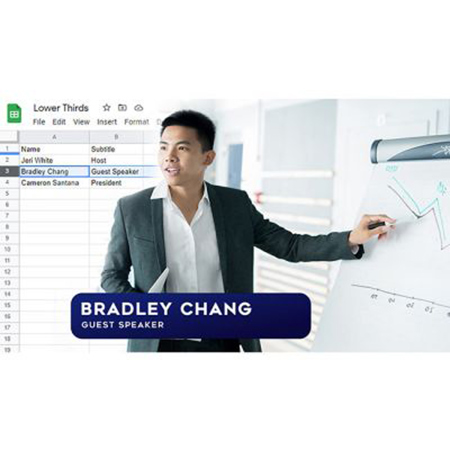
Cut production time and beat the learning curve with Titler Live 5 Present. Easily prepare and queue your lower thirds, crawls, and more by connecting to Excel spreadsheets, CSV files, RSS feeds, clocks, and more.
Deliver dynamic graphics.
Leverage 3D animated graphics for corporate events, presentations, lectures, house of worship services, or other live events using one channel of NDI or SDI key/fill.
Connect to your data.
Quickly connect your graphics to Google Sheets and Slides, Excel spreadsheets, CSV files, RSS feeds, clocks, and more to simplify your pre-show preparation and cut your production time.
Access ready-to-use designs.
Customize a full suite of lower thirds, crawls, main titles, motion bugs, and more. Even import your own graphics from Adobe Photoshop.
Integrate with leading solutions.
Easily work with leading streaming solutions including Wirecast, NewTek, Broadcast Pix, EVS, Lumantek, vMix, Blackmagic Design, Roland, Panasonic, and more.
Control with a Stream Deck.
Connects directly with the Elgato Stream Deck and displays your title graphics directly on the keys, for fast visual graphics control.
Streamline your workflows.
Titler Live 5 Present delivers new workflows and controls to help you get started quickly and easily make changes on the fly. Flexibly design, set up, and play out your graphics in one complete solution.
Design.
Drag and drop included design templates onto your playlist or import your own designs from Adobe Photoshop. Flexibly edit text, color and images right in the Edit/Preview window.
Connect.
Easily connect data to your graphics to streamline your set up. Drag and drop data inputs or variables onto any part of a design to repurpose it as you need. Even connect multiple inputs to a design.
Go live.
Quickly make animated updates to your graphics on the fly. Deliver one live graphic on a single channel.
Bring your data to life.
Titler Live 5 Present lets you easily connect to data to create dynamic visuals for any stream or broadcast.
Connect spreadsheets, RSS, and more.
• Connect to Google Slides and Sheets, Excel spreadsheets and tables, RSS feeds, clocks, and more.
• Leverage spreadsheet autoplay mode to run-through your lower thirds and crawls.
Integrate with social media.
• Engage your audience with comments, tweets, and Facebook comment and reaction polling.
• Combine your Facebook, Twitter, and YouTube feeds into one to easily manage your show.
• Quickly queue your most relevant comments and posts into a custom social playlist.
Control
• Real-time playout
• Live animated updates per layer
• Spreadsheet and crawl autoplay mode
• Hotkey functionality
Outputs
• 1 channel
• 15 total layers
• 3 simultaneous live layers
• NDI
• SDI key/fill (Blackmagic and AJA)
• HDMI
• OBS
Inputs
• Google Sheets and Slides NEW
• Excel spreadsheets
• CSV spreadsheets
• Text files
• RSS feeds
Design
• 3D animated graphics
• Animations, effects & transitions
• Adobe Photoshop import
• Title Designer interface
• Lower thirds
• Crawls
• Main titles
• Motion bugs