This item is no longer available.
Works great.
Works great. Used it to connect a legacy video mixing system and PTZ cameras to a Vmix broadcast computer.
NewTek NDI - Next Level Streaming
Works perfectly either wired or WiFi. Does everything it is supposed to do. Almost ZERO Latency to VMIX using NDI.
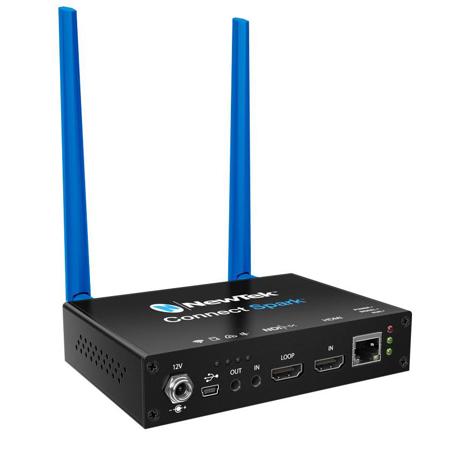
NewTek Spark, the fastest, easiest way to IP video.
All in the palm of your hands
With NDI, you've got options
Explore unprecedented possibilities for connectivity, creativity, and control of media productions with IP-all while using the network infrastructure you have in place today.
Add Spark to your gaming
Plug into the action and get video from games, cameras, and other devices distributed to viewers on-site at events, or watching from the other side of the world, putting them right at the center of the competition.
Add Spark to your company communications
Easily connect your camera, laptop or webcam to Spark and deliver live video to your meetings, training, conferences, and more through Google Hangouts, GoToMeeting, Skype, Skype for Business, WebEx, Zoom, and other communication platforms.
Add Spark everywhere: your venue, your classroom, your event & more
Whenever, wherever you need to get video signal from here to there, NewTek Spark is the fastest, easiest way to get it done. Just connect your device and like magic it appears on your network and is accessible to show and share.
Your workflow, your choice
NewTek Spark video converters are the fastest, easiest, and best way to video over IP. Ultra-portable enclosures with resolutions up to 4K UHD 60p, the groundbreaking benefits of NDI, and a host of tools and capabilities makes NewTek Spark video converters the right choice for all sorts of video applications.
Compatible With Any NDI Workflow
Share video over IP with any compatible system, device, or application that supports NDI, including NewTek solutions and products from third-party manufacturers and developers.
NDI Transfer Modes
Transmit video to your network using your choice of supported NDI transfer modes, to include unicast and multicast UDP with forward error correction (FEC), and unicast TCP.
NDI Output
Translate video from the connected camera or device to IP, delivering to the network as a NDI video source.
Connectivity
Send video to the network via Ethernet or WiFi, and make it available instantly as an NDI source for any compatible system, device, or application.
Audio
Present high-quality audio with support for analog and embedded digital sources. Present high-quality sound, with support for embedded audio and 1/4" analog audio.
Program and Preview Tally
Receive tally notification from compatible NDI devices via physical LEDs when video output from any NewTek Spark product is visible on Program and/or Preview.
NDI Virtual Input
Designate your video input source in popular desktop video applications like Google Hangouts, GoToMeeting, Skype, Skype for Business, WebEx, Zoom, and more using the free NDI Virtual Input tool.
NDI Virtual Input included with the free NewTek NDI Tools download.
Web-Based Interface
Monitor video, manage login credentials, access recording controls, and configure audio, video, and network settings from any supported Web browser on any compatible networked device.
Video Bandwidth
Select from High, Medium, and Low bandwidth output to accommodate your specific network configuration and traffic.
Multicast Mode
Permit multiple destinations as an option to receive your video source without individual point-to-point connections to conserve network bandwidth.
Network Identification
Easily identify devices on your network with the ability to apply custom device and channel names.
Network Visibility
Access devices connected to other networks via IP address and make them visible within your production environment using NDI Access Manager.
Free Firmware Updates
Download and install free firmware updates with the latest features, capabilities, and performance enhancements.