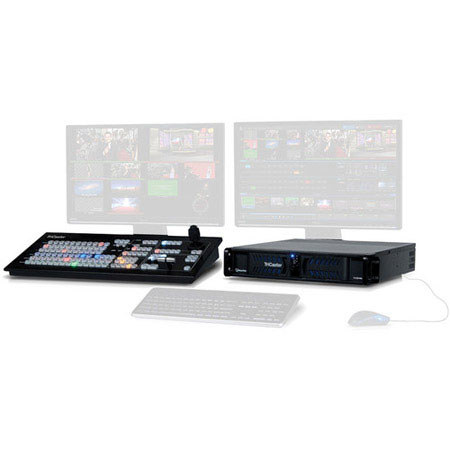
Turnkey Production: Based on the innovative concept of a single system to broadcast, project stream and record simultaneously, TriCaster 460's multiple turnkey functions do the work usually requiring racks of equipment, but integrated into a small, van-friendly footprint instead
Scaled for Mobility: The TriCaster is professional-grade gear in a compact size
Mix-and-Match I/O: TriCaster 460 provides connectivity to prepare for any location scenario. Connect multiple cameras with the capability to mix and match connection types, including SDI, component, composite and Y/C; and even camera types with varying SD and HD resolutions and formats
4-channel, Multi-Format ISO Source Recording: NewTek's seriously forward-thinking IsoCorder technology combines the capabilities of racks and racks of video capture equipment, providing multi-track, multi-format recording of up to four simultaneous channels
15-channel Multi-camera Production: Connectivity for 4 camera sources. Color correction, keying, cropping, scaling & frame sync on every input. Digital media from 2 built-in graphic & sound slots. 2 network sources for sharing computer displays, wireless iOS devices, or any over-the-network source
Expanded Media Sources: Buffers and Network Inputs: TriCaster 460 gives producers instant access to even more content in real time, without adding equipment or crew. 10 still buffers and 5 animation buffers provide 15 bonus "always on" sources
Audio Mixing: The TriCaster integrated multi-channel audio mixer is loaded with enhancements that raise the caliber of your shows' sound to the same professional, network quality as the visuals
Visual & Motion Effects: From full-color, animated transitions with alpha channel and embedded audio, to real-time cloth dynamics, 3D video warping and transformations with TransWarp effects and motion overlays
Automation: Automation functions in TriCaster 460 help you experiment with more complex sequences but leave nothing to chance during a live production
Virtual Sets: With TriCaster 460 system's virtual sets, you can elevate your look with realistic foregrounds and live moving backgrounds. Add real-time energy to any virtual set with two live sources-each with overlay, all with transitions, sounds, 3D DVEs and effects
Social Media Publishing: With a brief setup beforehand and the real-time grab of a shot, generate second-screen content for sites like YouTube, Facebook and Twitter during the live show and extend your brand to online and second-screen platforms-or share assets to common storage locations
Post-production: TriCaster 460 provides extensive workflow interoperation for postproduction: 4-channel ISO recording enables the capture of all the raw sources coming into the program, for later repurposing or re-use
External and Third-Party Applications: TriCaster 460 supports an extended set of products that work directly with the system to provide innovative solutions and workflows in several different areas of your live production, including streaming, graphics, content and controllers
Virtual Camera Moves: Bring your virtual environment to life with animated virtual camera moves. Adjust shot framing on the fly with manual pan, zoom and pedestal movements, or zip from one preset shot to another without touching the camera
2x LiveSet Shot Presets: Leagues further than just a start and finish zoom position, all professional TriCasters support full pan and scan configuration, with 8 custom preset positions for all sets-and with the new live Shot Editor, presets can be modified even while live
Live Virtual Sets: The next generation of live virtual sets included in TriCaster 460 takes total advantage of NewTek's full pan and scan capabilities and position presets and also included are updated, more life-like template sets
Holographic Live Virtual Sets: Create a customized virtual environment from any real-world location. Turn panoramic images taken with your smartphone, DSLR or even point-and-shoot camera into a photorealistic virtual set, using the companion TriCaster VSE 2.5 software (sold separately)
Playback from Cloud, IP and Stream: Access virtually limitless video sources and content applications as video sources, with the ability to connect to Cloud-based media, IP cameras and streaming servers through network inputs
Playlist Editing During Playback: Easily accommodate revisions to the show rundown or new content without missing a beat by making changes and updates to media player playlists during showtime
Macros: Make commonly used series of commands automatic, or just simplify complex ones. Record any sequence of operations as a macro event, then trigger with a mouse click, keystroke, control surface action or MIDI button, or gesture-based on-screen hotspots
Macro Editor: Save time reproducing your painstaking macros from scratch. Tweak to your exact specifications, editing the action, timing and order as needed to ensure that automated operations run smoothly and accurately
Snapshots: Configure your setup of a particular scene just the way you need it for any scenario then fire every macro action simultaneously to snap to it automatically, organizing and automating your show down to the fiGoogle Nest detail
Hotspots: Turn on-screen areas into interactive controls and let your talent trigger macros with live motion-even run your one-person show from in front of the camera. A wave of a hand or a walk to a mark and the next action sequence happens automatically
M/E Autoplay: Increase the efficiency and accuracy of your production with instant automatic playback. Clips and content play right on cue whenever you press the applicable switcher or M/E button, meaning zero delay when taking a video or image
Input Grouping: Use the UI to link switcher and M/E source rows together in color-coded groups to streamline your simultaneous actions on multiple sources and multiple outputs. Make instant, accurate adjustments and fewer mistakes