
See Options
Need help? Ask our experts.
Review Summary
Accidents happen where life happens. Protect your favorite Adorama products and purchase a protection plan to stay covered from accidental damage, mechanical or electrical failure, and more.
If we can’t fix it, we’ll replace it at no additional cost.
Protect your product from drops, spills, and more.
Enjoy your gear without fear. We have you covered!
When regular use of your product over time results in mechanical or electrical failure.
We will never charge you a deductible after the purchase of a plan.
Our claims process is simple & easy and our customer service team is happy to help.
Adorama Protect powered by Extend is available for purchase to customers in the United States. Not available for purchase Internationally or in U.S. Territories.
Browse our FAQ
Up to 65 ppm
Up to 30,000 pages
Up to 300,000 images/month
Quad Core
1.2 GHz
4GB standard
Optional: 500+GB HDD
Ethernet 10/100/1000 Base-T, High-speed USB 2.0 direct print, NFC (optional: Wi-Fi/Wi-Fi Direct with Xerox Dual Band Wi-Fi and Bluetooth Kit (Bluetooth for iBeacon))
Standard
Adaptive Learning, Configuration Cloning, Configuration Watchdog, Fleet Orchestrator, Remote Control Panel, Security Dashboard, Unified Address Book
600 x 600 dpi
As fast as 4.6 seconds
Annotation, Authentication for Services, Auto Paper Select, Auto Reduction & Enlargement, Auto Tray Switching, Automatic 2-sided/Duplex Booklet Creation, Bates Stamping, Collation, Covers, Dividers, Edge Erase, Features Help, ID Card Copy, Image Quality Adjustments, Image Shift, Invert Image, Large Job Interrupt, Multi-up, Sample Set, Save Job Settings, Touchless Workflow Accelerators
1200 x 1200 dpi
As fast as 4.4 seconds
Adobe Embedded Print Engine (AEPE), Adobe PDF, Adobe PostScript 3, PCL 5c/PCL 6
Application Defaults, Bi-directional Real-time Status, Booklet Layout, Earth Smart Driver Settings, Encrypted Secure Print, Hold All Jobs, Job Identification, Job Monitoring, Microsoft Universal Print Ready and available Xerox Print Support Application (PSA), Print Around
Print from Cloud Repositories (Dropbox, OneDrive, Google Drive), Print from USB, Print on Alternate Paper, Scaling, Store and Recall Driver Settings, Two-sided Printing (as default)
Apple AirPrint, Xerox Easy Assist, Mopria Print Service and Mopria Scan, PrintByXerox App, Universal Print, Xerox Print Service (Android)
Xerox Workplace Mobile App, AirPrint (iOS) including iBeacon (Bluetooth), Wi-Fi (802.11 b/g/n/ac), Wi-Fi Direct
Create scan files based on image count, Scan to Email, Scan to Home, Scan to Mailbox, Scan to Network (using Secure FTP/HTTP/HTTPS), Scan to Network Folder (using Secure FTP/HTTP/HTTPS), Scan to PC/Server Client (SMB or FTP), Scan to Print, Scan to USB
Mobile scanning: Xerox Workplace Mobile App (iOS/Android), Scan to Microsoft OneDrive, Google Drive and DropBox, Other solutions available through various Xerox Business Innovation Partners at xerox.com/Software-Solutions, Print from and Scan to Xerox DocuShare Go Content Management Platform, Scan to Cloud Repositories (Dropbox, OneDrive, and Google Drive), Xerox Scanning App for DocuShare
Fax Build Job, Network Server Fax Enablement
Direct Fax, Fax Forward to Email, or SMB Share, LAN Fax, Support for Fax over Voice over IP, Walk-up Fax one line, two-line available in select geographies
JBIG/SG3, MH/G3, MMR/SG3, MR/G3
Xerox CentreWare Web, Xerox Easy Assist, Xerox Embedded Web Server, Xerox Device Manager, Xerox Device Types for SAP
Other network accounting solutions available through various Xerox Business Innovation Partners, Xerox Virtual Print Management Service, Xerox Workplace Cloud/Suite
Android, Fedora Core, Mac OS 12.x, 13.x, 14.x, Ubuntu, Windows 10, Windows 11, Windows Server 2016, Windows Server 2019, Windows Server 2022, iOS
173
93
650 sheets
3,850 sheets
Single-Pass Duplex Automatic Document Feeder
Capacity: 200 sheets
Size: 4.1 x 5.8" to 8.5 x 14"
Tray (Bypass Tray): 100 sheets
Tray 1: 550 sheets
Tray 2 (optional): 550 sheets
Tray 3 (optional): 550 sheets
Tray 4 (optional): 550 sheets
Tray 5 (High-capacity feeder) (optional): 2,100 sheets
Bond, Card Stock, Custom, Envelopes, Glossy Card Stock, Hole Punched, Labels, Letterhead, Lightweight, Lightweight Card Stock, Lightweight Glossy Card Stock, Plain, Preprinted, Recycled
802.1x, AES 256-bit Encryption, Access Control, Audit Log, Automated threat response through Trellix DXL, Automatic Self-signed Certificate, Cisco Identity Services Engine (ISE) Integration, Common Criteria Certification under collaborative Protection Profile for Hardcopy Devices (HCD cPP v1.0E) pending, Configuration Watchdog
EU Radio Equipment Directive (RED) Articles 3 (3) (d) and (e) compliant, FIPS 140-3, Firmware Verification, HTTPS, Image Overwrite for optional hard disks, IPsec, Job Level Encryption via HTTPS and Drivers, Local Authentication (Internal Database), Microsoft Universal Print/IPP with Print Support Application (Secure Print and Secure Release)
NFC tap Authentication with Xerox Easy Assist App, Network Authentication, Port Disablement, Port/IP/Domain Filtering, SFTP and Encrypted Email, SHA-256 Hash Message Authentication, SIEM integration (including: Splunk, LogRhythm, Trellix ESM, Microsoft Sentinel), SNMPv3, Secure Print, Security Certificates utilizing ECDSA
Security Manager, Security Templates, Serverless Card Authentication, Signed Email, TLS1.1/1.2/1.3, Trellix Embedded Control Whitelisting, Trellix ePolicy Orchestrator, Trusted Boot, Trusted Platform Module (TPM 2.0), User Access, User Permissions
Hard Disk (AES 256-bit) with multi-pass Image Overwrite, Trellix Embedded Control, WPA2 and WPA3 with Xerox Dual Band Wi-Fi and Bluetooth Kit (Bluetooth for iBeacon), Xerox RFID Card Reader, Xerox Workplace Cloud/Suite Print Management and Content Security
Operating: 800W
Standby: 31W
Power save: as low as 0.2W
ENERGY STAR qualified
50 - 90 Degree F (10 - 32 Degree C)
8 - 80 % RH (noncondensing)
11 seconds
ENERGY STAR, EPEAT, Xerox Cartridge Collection Program
25.6 x 22.2 x 21.7" (65 x 56.4 x 55.1cm)
65.8 lbs (29.8kg)
095205040869
Right-sized Workplace Assistants that exceed demand and expectation
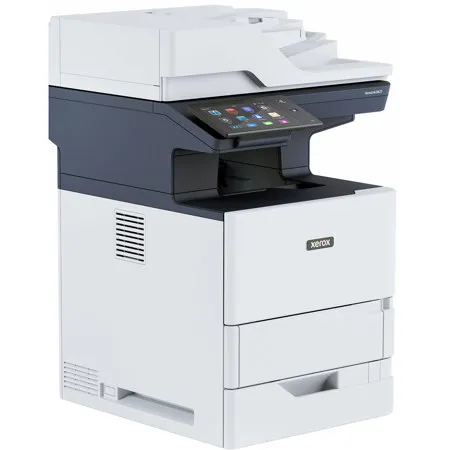
Meet the Xerox VersaLink B625 Multifunction Printer.
Is personalization, future readiness, and built-in security too much to ask for? Small enough to fit where you need them and fast enough to support high print volumes, these smart Workplace Assistants are made for high-performing work teams. The Xerox VersaLink B625 Multifunction Printer offers multifunction agility with print, copy, scan, and fax.
Compact Without Compromise
Make the most out of every square foot of your office space with the small footprint of the VersaLink B625 Multifunction Printer. Outrageously capable, these workhorses take up less space but get just as much work done. They're perfectly sized for scaled-back office spaces and hybrid work environments, where space is a premium and there's no room for disruption.
Disruption-ready technology
Your work is always evolving, so you need technology that's always a step ahead. The Xerox ConnectKey Technology-enabled VersaLink device adjusts quickly to the evolving needs of your organization.
Translator. Proofreader. Do-it-all digitizer. Now you can tackle whatever work throws at you. Stay ready with the Xerox App Gallery, an ever-growing portfolio of cloud-hosted apps and productivity tools.
and the VersaLink B625 allows access to the optional Xerox Workflow Central Platform, a cloud-based solution that takes the guesswork out of converting physical and digital files into usable formats right from the VersaLink user interface, even complicated work processes are simple. For example, summarize a lengthy report, translate it, and share it with your team in just a few quick steps.
Sustainable through and Through
Made up of more than 25% post-consumer recycled plastic, VersaLink printers give new meaning to being environmentally responsible. These devices meet the strictest, globally recognized standards for product environmental performance, including EPEAT, Blue Angel, and ENERGY STAR. The Xerox Supplies Recycling Program simplifies collection, reuse, and recycling of spent imaging supplies.
Automated productivity
Get up to speed in no time with a tablet-like touchscreen that balances simplicity and time-saving efficiency. Tap into AI-assisted algorithms that learn from you and prioritize your most commonly used tasks to create convenient shortcuts, so you can do more in fewer steps. and the ability to personalize the UI provides the freedom to work the way you want, allowing you to breeze through functions.
Mobility features, such as AirPrint, Mopria, and optional Wi-Fi Direct, take the hassle out of printing directly from your favorite mobile devices. With VersaLink printers, more capabilities means added convenience, not more complexity. Leading-edge scanning functionality and the automation of complex physical and digital workflows allow you to scan, digitize, and route information without missing a beat, reducing errors and saving time.
smarter, more sophisticated security
Comprehensive security features work hard to prevent, detect, and neutralize threats in addition to streamlining reporting and automatically remediating IT-required settings. Built-in, predefined security configurations simplify implementation. Just select one of three security templates and let VersaLink do the rest - no expert knowledge required.
Quality that's a cut above
Delivering a high-resolution output of 1200 x 1200 dpi, with crisp text and sharp lines to elevate your important documents.
Xerox Connectkey Technology
Intuitive User Experience
Enjoy a tablet-like experience with gesture-based touchscreen controls and easy personalization, plus AI-assisted workflow automation.
Mobile and Cloud-ready
Be more mobile with cloud-hosted services and instant connectivity to the cloud and mobile devices - right from the user interface.
Comprehensive Security
Prevent unauthorized access, detect threats, and protect data and documents with built-in proactive security features.
Enables Managed Print Services
Seamless integration with Xerox Managed Print Services delivers next-level workplace efficiency, employee productivity, and security, while helping you meet sustainability goals.
Gateway to New Possibilities
Transform the way you work with the apps in the Xerox App Gallery. Or choose the Xerox Workflow Central Platform to utilize apps from any device: laptop, desktop, or your Xerox ConnectKey Technology-enabled printer.
866-495-6286






