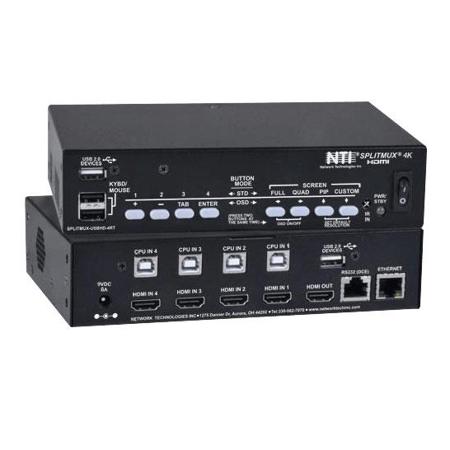
NTI 4K HDMI Quad Screen Multiviewer with Built-In KVM Switch, 1RU Dual Side-by-Side Rackmount
SKU: NTISPLUSBK2R
This item is no longer available.
Share:
Overview
Compare
Specs
Protection







About NTI SPLITMUX 4K HDMI
4K HDMI Quad Screen Splitter/Multiviewer with Built-In USB KVM Switch
Display video from four HDMI computers simultaneously on a single 4K x 2K monitor. Switch to and control any of the four computers while monitoring the other three connections in real time.
Also known as: 4K x 2K quad screen splitter, HDMI KVM multiviewer, four video sources displayed on one monitor, 4-port USB HDMI KVM switch built-in quad splitter, 4-channel video mixer.
The SPLITMUX 4K HDMI Quad Screen Multiviewer with Built-in USB KVM Switch allows video from four different computers to be simultaneously displayed on a single monitor. Additionally, it can switch one of the four attached computers to a shared keyboard and mouse for operation and to two additional USB devices. It is capable of displaying the video sources in quad, PiP, full, or custom mode. In custom display mode, each of the quadrants can be adjusted to any size and positioned to any location on the display.
• Quad, Picture in Picture, Full Screen, and Custom display modes
1. Custom Display Mode: the size, position and selection of any or all windows are customizable
- 2- and 3-source viewing is possible with this method
- Maintain input aspect ratio if desired - no stretching necessary
- Layer display windows and adjust transparency of each video source display
• Switch one of the four attached computers to a shared USB keyboard and mouse for operation
• Supported resolutions:
1. Inputs: 2K resolution 2048x1080, HDTV resolutions to 1080p and computer resolutions to 1920x1200
2. Output:
- Quad and Full mode: Ultra-HD 4K x 2K resolutions to 3840x2160 (60Hz) and 4096x2160 (60Hz), 2K resolution 2048x1080, HDTV resolutions to 1080p, and computer resolutions to 2560x1600
- PiP and Custom mode: 2K resolution 2048x1080, HDTV resolutions to 1080p and computer resolutions to 1920x1200
3. Independent video in to video out resolution
• HDMI features supported:
1. Inputs: 24-, 30-, and 36-bit xvYCC, sRGB, and YCbCr
2. Outputs: 24- and 30-bit sRGB
3. Four-channel mixing stereo with 16-, 20-, or 24-bit uncompressed PCM audio
4. Bandwidth up to 594 MHz
- Inputs: 2.25 Gbps
- Output: 5.94 Gbps
• HDCP compliant
• Fluid, real-time video performance with up to 60 frames per second (fps) in all four quadrants
• Zoom, pan, and crop the image from any source to focus on key areas
• Switch audio independently of video from connected HDMI sources
1. Multiple audio sources can be simultaneously active in any display mode or preset layout
2. Adjustable audio gain with VU level indicators for each input channel
• A customized text label can be added for each video window to provide easy input identification (UMD)
• Control the multiviewer through Ethernet, RS232 serial port, keyboard commands, on screen display (OSD), front panel buttons, or IR remote
• Built-in 2-port USB hub - switch devices between connected computers
1. In Full Screen mode, USB touch screen monitors can be used to control the connected active computer
• Compliant with USB 2.0 (high-speed and low/full speed) standards
• Cascade multiviewers to display video from any number of video sources on one screen
1. Each video source in the cascade can be controlled directly from the Web Server graphical user interface under Custom Mode Settings
• Backup and restore multiviewer configurations
• Supported output resolutions can be selected or set to auto detect optimal resolution from the monitor's EDID
• Available options: desktop unit, 1RU rackmount unit, dual side-by-side rackmount units in 1RU
1. Rackmount units can be mounted so that the front panel buttons are facing the front or back of the rack
2. Rackmount units include cable management shelf
Display Modes
• Quad Mode
1. In quad mode, the screen is split into four fields of equal size each displaying the entire contents of four different video sources
- Fluid, real-time video performance with up to 60 frames per second (fps) in all four quadrants
2. Borders can be set for each image input
3. Aspect ratio can be maintained for all outputs
3. Supported video output resolutions:
- Ultra-HD 4K x 2K resolutions (3840x2160 @ 60Hz, 4096x2160 @ 60Hz)
- 2K Cinema (2048x1080 @ 60Hz)
- HDTV resolutions to 1080p
- Computer resolutions to 2560x1600
• Full Screen Mode
1. In full screen mode, one of the four video sources is displayed in full screen size and maximum resolution.
2. Scan feature: cycle through four different sources at set intervals
3. USB touch screen monitors can be used to control the connected active computer
4. Supported video output resolutions:
- Ultra-HD 4Kx2K resolutions (3840x2160 @ 60Hz, 4096x2160 @ 60Hz)
- 2K Cinema (2048x1080 @ 60Hz)
- HDTV resolutions to 1080p
- Computer resolutions to 2560x1600
• Picture in Picture (PIP) Mode
1. In PIP mode, the full screen display of one of the four video sources is accompanied by one, two, or three small images (thumbnails) of the three other video sources on the right hand margin of the screen, allowing simultaneous monitoring
2. Size, position and selection of the thumbnails are customizable
3. Scan feature: cycle through two or four different sources at set intervals for the larger image
4. Borders can be set for each image input
5. Aspect ratio can be maintained for all outputs
6. Supported video output resolutions:
- 2K Cinema (2048x1080 @ 60Hz)
- HDTV resolutions to 1080p
- Computer resolutions to 1920x1200
• Custom Mode
1. In Custom mode, each video source is displayed in its own separate, detached window
2. Size, position and selection of the windows are customizable
3. Use web server graphical user interface to configure settings for each window
4. Zoom, pan, and crop the image from any source to focus on key areas
5. Presets of the window positioning can be saved
6. Borders can be set for each image input
7. Display optional Left/Right VU level indicators for each corresponding display window
8. Configure up to 10 preset layouts that can be switched live at any time
9. Supported video output resolutions:
- 2K Cinema (2048x1080 @ 60Hz)
- HDTV resolutions to 1080p
- Computer resolutions to 1920x1200
Control Methods
• Front Panel Interface
1. Use front panel buttons to locally change ports or to select a display mode
• Ethernet Control
1. Configuration can be done over the Internet/LAN via Web page or Telnet
2. Supports Internet Explorer 6.0 or higher, Firefox 2.0 or higher, Opera 9.0, Google Chrome, Safari 4.0 or higher for MAC and PC
3. Configure and control the settings for the system, network, input, output, and modes
4. Female RJ45 connector
5. 10/100 BaseT Ethernet interface
- Use NTI's Discovery Tool on a PC or MAC with Java Runtime Environment (version 6 or higher) installed to detect the IP address of a SPLITMUX unit
6. Web Server
A. Security is ensured by password and user configurable timeout
B. Up to 16 users can access the web page at one time
C. The user with administrative privileges can access the following pages:
- System page: allows configuration of unit, serial port, and OSD settings
- Network pages: configure IP and server settings
-Inputs page: allows configuration of the four video inputs
- Output page: configure the video and audio output parameters
- Modes page: allows selection and configuration of the output display mode
- User Config page: add, configure, and view all users
- Firmware page: update firmware for the SPLITMUX
7. Telnet
- Security is ensured by password
- Menu commands are similar to RS232 commands
- The telnet server listens on port 2000
- Port 2000 is for an operator telnet session
• On Screen Display (OSD)
1. Select display modes and computers with On Screen Display (OSD)
2. Use the front panel buttons or keyboard commands to operate the OSD
3. OSD controls for configuration and control of the system, network, input, output, and display modes
4. Access to OSD Mode can be limited by an administrator-assigned PIN number
• RS232
1. Configuration and control can be done through the serial port
- Female RJ45 connector
2. Control the multiviewer using the Text Menu via RS232
3. Selectable baud rate: 1200 to 115,200 bps
- Baud rate is set via the front panel interface, serial command, OSD, or web interface
• Infrared Remote Control
1. Routes video and audio signals together or independently
2. Transmitter can be up to 30 feet (9.1 meters) away
3. Power: two AAA batteries (included)
• Keyboard/Mouse
1. Use keyboard commands to select display mode and to select port
NTI SPLITMUX 4K HDMI Features
- Built-In USB KVM Switch and 2-port USB Hub
- Quad & full screen display modes with 4K, 2K, 1080p, & 2560x1600 output resolutions
- Picture-in-picture & custom display modes with 2K, 1080p, & 1920x1200 output resolutions
- The size, position & selection of any or all windows are customizable
- Zoom, Pan & Crop