
This item is no longer available.
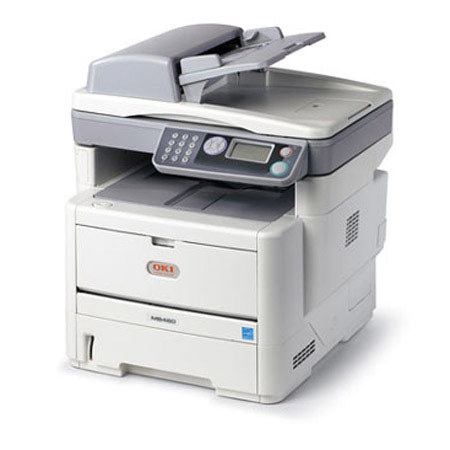
The OKI Data MB480 MFP 220V Multifunction Laser Printer from OKI Printing Solutions combines black & white printing and copying, color/mono scanning, analog faxing and scan-to capabilities. These affordable, compact, networked MFPs let you produce professional-looking documents with productivity-boosting speeds and budget-enhancing efficiency to distribute them with ease through simple, user-friendly steps.
MB480 model produce the first printed page in less than 6 seconds and deliver up to 30 clear, sharp prints per minute (ppm) and up to 22 copies per minute (cpm). To help you control costs, the MB480 multifunction laser printer comes with duplex (2-sided) printing standard, so you can save paper. For ongoing savings, their 2-piece consumables configuration lets you replace just a toner cartridge when you need to, instead of the toner cartridge and the image drum.
Sharing files and document is a snap
Place your document on the flatbed platen or in the 50-sheet automatic document feeder (ADF) and scan it in black & white or color. Save and send the electronic version to a folder on your PC, the network or FTP site, as an attachment to an e-mail address or as a fax. The MB480 model offers robust fax features including dual access (scan faxes into memory while sending or receiving), one-touch dialing, distinctive ring, broadcast faxing and LDAP support.
Multi-task to further enhance your productivity
With standard multi-tasking functionality, the MB480 multifunction printer lets you perform two tasks at the same time. For instance, you can receive or print a fax while it's copying, scan to e-mail while it's printing, print while it's scanning. For a fax, send or receive faxes while it's scanning and more.
Document management also made easy
Among the utilities that come standard with the MB480 MFP are PaperPort and OmniPage by Nuance. PaperPort is the industry-leading, award-winning software that will enable you to easily organize your scanned files, further enhancing your productivity. With its intuitive, thumbnail-based interface, PaperPort lets you save any scanned document in a PDF or JPEG format and quickly make it available for archiving or sharing.
The feature-rich OmniPage converts scanned documents and PDF files into editable file formats used by applications such as Microsoft Word, Excel, Adobe Acrobat or HTML files.
Control the way your MFP is used
The MB480 MFP model allows an administrator to grant or restrict access to individuals or groups of users. Simply assign individual PIN identification codes to your personnel, according to their privileges: print, copy, scan-to-email or network folders and with the MB480 fax transmission. These can unlock the restricted functions with your permission by entering their PIN codes into the machine's control panel.
Improve your bottom line
The MB480 MFP model delivers cost-effective operation as well as an exceptional return on your investment. Its outstanding reliability and long-lasting consumables help you control operating costs and improve productivity on support one device rather than several, stock fewer replacement supplies and reduce user interventions.
In addition, this MFP is designed with 2-piece, cost-efficient consumables including a high-capacity 12,000-page toner cartridge. Your investment just keeps looking better and better.