2013-11-11T19:00:00
Rated 5 out of 5
Great Printer - Convoluted Documentation
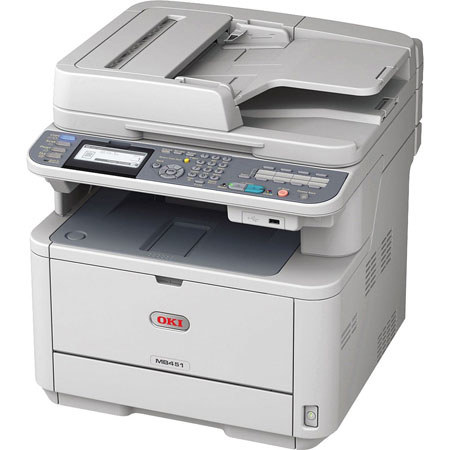
I needed a general purpose black & white printer/scanner/fax for my local network of 8 PCs and I didn't want to spend a fortune on features I'd never use and didn't want to use an Inkjet for the obvious reasons: ink costs and dry-up over time, so a non-inject was the goal. I also didn't expect fancy capabilities such as network printing/faxing/scanning that is possible with typical office machines. However, the OKI MB451w fulfills all these needs in an incredibly inexpensive machine. The pros: This printer is built like a battle-ship, solid and heavy. As an IT pro myself I had familiarity with hooking up this printer to a network: it comes with both a USB and Ethernet port. If you intend to use it on a single computer you can use the USB port to connect it. For network usage the Ethernet port is the one to use. In my case, I went with the Ethernet port. Mechanical setup of the printer (assembling, adding the toner cartridge, etc) is easy, though the instructions assume that you understand the illustrations - there's little if any actual text to guide you. Once the printer is assembled and connected you'll need to install the printers drivers but that depends on whether it's being used on a network, or as a stand-alone printer connected to a single PC. If it's a network setup, you'll need to install the FAX driver to allow faxing from your PC. The basic printer driver may or may not already be available on your operating system so before you install any additional drivers (other than the FAX driver) you should do a Printer Add from each (if using a network) PC and see if your operating system recognizes the printer and already has a driver it can install. If it does not, then you can add a number of drivers from the install disk that comes with the printer. Also on the CD disk are Omnipage and PaperPort - I did not test either of these applications with the printer so I cannot report on them here. Most of the settings on the unit are defaults and you will need to go through them using the display panel to ensure they meet your needs. In my case, after basic setup, I had issues faxing from a PC and later had to turn-off SGMODE on the Oki - once I did that faxing worked from any PC using the installed Oki FAX driver. Be aware that you have to install any required driver/s on each PC that you intend to use the Oki with on a network. This printer can also scan and copy/fax to a folder on a particular PC but I have not gotten into that. Another great thing is the printer can copy/scan/and fax in duplex mode (both sides of a page). In certain cases this requires using the ADF (Automatic Document Feeder) which I tested and worked quite well with absolutely no paper jambs. For security and tracking, the unit is capable of requiring a password before using its various function: this is controlled via software and I did not install or test this feature. However, if you need to track usage this unit can do that. The only downside I found was with the documentation of which there is little printed but mostly on the CD. There is both a "regular" and "advanced" set of docs depending on what you need to refer to. I found most of the docs complete, but there was not a "Quick Setup" for example, to setup and test the unit. If you have patience you will not find the docs an issue. Aside from that, for the price Adorama has on this unit if all you need is a solid and versatile printer/copier/faxer/scanner that can function in a networked setup this is a remarkably versatile and inexpensive machine. One last item: one reviewer gave this printer one or two stars because of issues obtaining toner cartridges: I had no problem finding replacement cartridges from at least three vendors and ordered two which I received - so obtaining toner replacements is not an issue as far as I could tell.
PETER S.
2013-08-02T21:00:00
Rated 1 out of 5
IMPOSSIBLE TO GET INK TONER!
WHO WANTS A MACHINE YOU CANT GET INK TONER?
YOU TRY ORDERING SOME RIGHT NOW AND SEE WHAT YOU GET. OWNED PRINTER SINCE FEB 2013 - NOT ABLE TO GET INK SINCE I BOUGHT IT!!
WARF
2013-06-04T21:00:00
Rated 4 out of 5
nice printer
Buy extra toner cartridges right away. The starter toner that comes with it doesn't last long.
JAMES M.
2013-05-20T21:00:00
Rated 5 out of 5
Great Printer
This MFP is really great, it has a great user interface, and it is intuitive, it is built like a tank, and is one of those products you can just feel will last a long time. The user interface is for more advanced users and IT pros that are used to the big leased copiers companies get with advanced scan to email functionality and scan to network folder, well worth the money !
UnitedForce