This item is no longer available.
Transform how you take product photos and videos. LiveStudio features product photography software that controls your camera, dimmable LED lights and the entire image capture workflow. From product placement to saving, each step is optimized and remembered for re-use. With all the flexibility and benefits of a traditional lighting system plus dimmable LED lights and control software, LiveStudio 's photo studio light kits makes photography faster, easier and better than ever before.
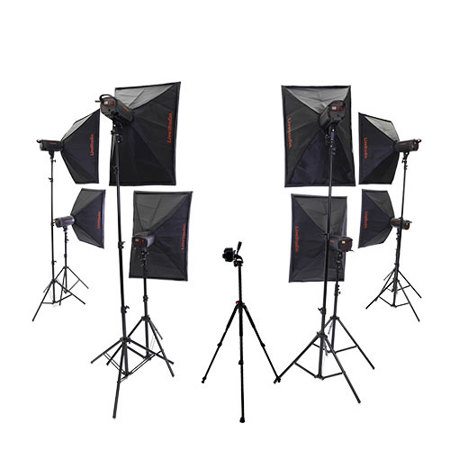
Lights, Softboxes and Light Stands
• 24" x 35" Collapsible Softbox
• Durable Framework
• Heavy-duty Reflective Silver Interior
• Removable Front Diffuser & Inner Baffle
• Softens and Diffuses Light
• Extremely Portable, Lightweight Design
• Adjustable Head, Rotatable with Tilt
• SpeedRing Allows 90-degree Portrait and Landscape Positioning
• Standard 5/8" Stand Mount
• Attaches Horizontally or Vertically
• Built-In Umbrella Mount
• S Type Bowens Mount for Accessories
• Carrying Bag Included
• Simple To Setup
• 8' Light Stand
• Standard 5/8" Stand Mount
• Air-Cushioned
• Heavy Duty
A Breakthrough in Product Photography
LiveStudio looks like all the other studio light kits but is remarkably different. LiveStudio offers an integrated photography solution.
Much More Than Just Lights and a Camera.
By integrating the individual components and steps required to create product shots and videos into one software controlled workflow, LiveStudio is able to:
• Simplify and Accelerate Product Photography and Video Creation
• Dim and Control Light and Camera Settings in Real-Time
• Control and Re-use the Best Camera, Light and Workflow Settings
• Maintain Flexibility While Offering a Way to Achieve Consistent Results
Patented Light Control
Advanced dimming with LiveLight feature. By simply moving the mouse, users can change the direction and intensity of light hitting the subject in real time. Light control can be individual or with groups of lights. This level of lighting control is new and offers many advantages over existing strobe and softbox solutions.
One Solution, Many Uses.
LiveStudio works for all types of image capture and for all types of products - Video, Still, Portrait, Model, Jewelry, Furniture, 360, 3D and more. It's completely scalable and sold in kits containing 8 lights. Output formats include: JPG, RAW, PNG, TIFF, HTML5, GIF, MOV and MP4.
Great for Pros and Amateurs
Unparalleled Workflow, Lighting Flexibility and Control
• For the Amateur - Comes with suggested lighting diagrams to help users setup and take pictures under the right lighting.
• For the Professional - Setup and control the lights any way you want. The light heads have S Type Bowens mounts.
A Great Place to Start and Grow
LiveStudio is a new way to take photos and videos. It's also fully compatible with all Ortery 360 turntables and 3D photography products.
Computer Controlled
Benefit from our Hardware & Software Working Together Integrated hardware and software allow Ortery's computer controlled product photography solutions to offer superior product photography results and workflow efficiency. From image capture to publishing, the studio and the software work in unison. Every detail of the entire product photography process has been thought through to maximize image quality and productivity to accelerate image preparation for publication.
Real Time Preview
All Ortery studios and turntables provide a large Live Preview when used with a compatible camera. The real-time preview helps you position and compose objects for photography. While in Live Preview you can view crop markers, zooming and camera setting changes in real time.
Save and Re-Use the Best Settings
Camera and Light Setting Profiles Make Product Photography a Lot Easier. Shooting a batch of similar products? Create your lighting and camera settings once and then reuse them over and over. This ensures that your team gets consistent results over time. By creating several profiles, a standard operating procedure for shooting items of each color can be used to increase product photography speed and make things easy for new employees. With multiple team members, this computer controlled product photography solution can allow them all to be productive and consistent using the same optimized settings.
Computer Controlled Product Photography Benefits
Real Time Preview
Visual workflow allows you to see the result before you even take the picture
Automatic Download
Images are automatically transferred to computer for immediate viewing, processing and editing
Immediately Know the Result - (Never touch that product again)
Before removing the product from the photography studio you know whether you have a usable shot. No more taking several shots then sifting thru them to hope you got a good one.
Remember My Settings
Settings specific to getting the right shot or for creating consistent results can be remembered and re-used over time.
Batch Processes
Using a computer inside the product photography workflow makes it possible to minimize the steps involved between capture and publication by efficiently handing image processing using batch and other one-click protocols to get things done faster.
Take Consistent Photos
Take Consistent Product Shots and Look Professional
The AfterImage feature in the Ortery software makes it easy to increase product shot consistency. By loading a previously captured image and using it as a template in the live Preview, objects can be placed in exactly the same location even though they were shot at different times by different people.
AfterImage
Our Solutions Make Photo Consistency Easy!
Product shot consistency requires a bit of forethought and planning, however with a real time preview and tools like grids, crop, Ortery's Centering Laser, AfterImage, dimmable lighting, turntable movement and more, Ortery's product photography solutions make it easy to produce consistent product shots over time.
• Save and Use Multiple AfterImages
• Use AfterImage to Make a Perfect Product Flip
• Memorize Grids and Crop Settings
• Save Multiple Light and Camera Settings
• Install a Centering Laser (sold separate)
• Create a Custom Defined photography sequence and turntable movement to take pictures from the same angles over and over
Even place and use multiple cameras to capture your objects from fixed angles.
Batch Image Editing & Saving
Automate processes to streamline your photography workflow
Batch image management is included with every Ortery product. Manage your editing process for easy exports direct to web or print use. Batch Saving saves you precious time and can be set and reused time and time again. Eliminate those unnecessary steps.
Batch Image Editing
Ortery offers a complete set of image editing features (Levels, Curves, Auto White Balance, etc.) that can be run in a batch process to speed up image editing. Captured images can also be annotated with text and drawings then immediately sent via email to interested parties for enhanced business communication.
Batch Image Saving
Save time on basic imaging. File naming, editing, resizing, copying. Advanced batch saving feature. Saving parameters can be predefined and saved as a reusable profile. This saves you time. From thumbnail, to regular and large sized images in one click. Automate the tedious parts of the photography workflow!