Overview
Compare
Accessories
Specs
Protection
Q&A

Questions & Answers

FAQ

What is the advantage of the ultra-short throw lens in the Optoma W340UST Projector?

The ultra-short throw lens allows the projector to display a large 100" image from just inches away. This reduces shadows and is ideal for interactive applications or spaces where the projector needs to be close to the screen or wall.

Can I present directly from the Optoma W340UST Projector without using a laptop or PC?

Yes, the Optoma W340UST Projector features a native office viewer that allows you to present directly from the projector. You simply need to copy your files to a USB stick or SD card and you can display them on the big screen.

Can I control the Optoma W340UST Projector remotely?

Absolutely, the Optoma W340UST Projector offers a wide range of options for remote control and monitoring, including RS232 commands, AMX compatibility, Crestron RoomView, and Extron IPLink.

Does the Optoma W340UST Projector support wireless presentations?

Yes, you can connect and present wirelessly from your PC, Mac, or mobile device using the free EZCast Pro App and an optional wireless USB dongle.

How does the Optoma W340UST Projector save energy?

The Optoma W340UST Projector includes several energy-saving features like Eco+ technology and Eco AV mute, which reduce power consumption and prolong the life of your lamp.

Shopper : Why Did You Choose This?PEDRO O : i need rush Taylos S. help me Thanks

Reviews about this item

Review Summary

Select a plan in the Add Protection section above and purchase with this product by clicking “Add to Cart”.

image-protection

TRUSTED PROTECTION PLANS, EXCEPTIONAL SERVICE.

Invest In Your Gear and Peace Of Mind!

Accidents happen where life happens. Protect your favorite Adorama products and purchase a protection plan to stay covered from accidental damage, mechanical or electrical failure, and more.

Repair or Replacement

Repair or Replacement

If we can’t fix it, we’ll replace it at no additional cost.

Accidental Damage

Accidental Damage

Protect your product from drops, spills, and more.

Peace of Mind

Peace of Mind

Enjoy your gear without fear. We have you covered!

Malfunction Protection

Malfunction Protection

When regular use of your product over time results in mechanical or electrical failure.

Zero Deductible

Zero Deductible

We will never charge you a deductible after the purchase of a plan.

Customer-Focused Support

Customer-Focused Support

Our claims process is simple & easy and our customer service team is happy to help.

Adorama Protect powered by Extend is available for purchase to customers in the United States. Not available for purchase Internationally or in U.S. Territories.

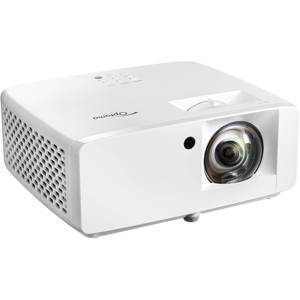
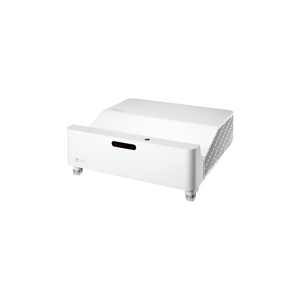
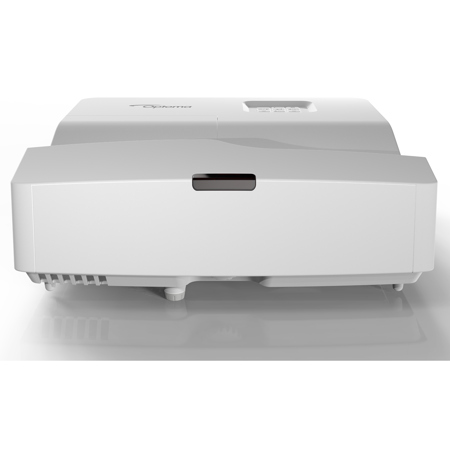
Optoma W340UST Specifications

Display/Image

Display/Image

Jump to...
  • Display technology

    DLP

  • Resolution

    WXGA (1280x800)

  • Brightness

    4,000 lumens

  • Contrast ratio

    22,000:1

  • Native aspect ratio

    16:10

  • Aspect ratio - compatible

    4:3,16:9

  • Keystone correction

    Horizontal: +/-4 Degree
    Vertical: +/-4 Degree

  • Scan rate

    Horizontal: 15.375 - 91.147Khz
    Vertical: 24 - 85(120 for 3D)Hz

  • Uniformity

    80%

  • Screen size

    85-115" (215.9-292.1cm) Diagonal

Lamp Info

Jump to...
  • Light source type

    Lamp

  • Lamp watts

    240

  • Lamp life hours (up to)

    4000 (Bright), 12000 (Dynamic), 10000 (Eco), 15000 (Eco+)

Optical

Jump to...
  • Throw ratio

    0.27:1

  • Projection distance

    19.29 - 25.98" (48.99 x 65.98cm)

  • Zoom type

    Fixed

  • Focal length

    0.146" (3.72mm)

  • Native offset

    118%

Connectivity

Jump to...
  • Connections

    Inputs: 1x HDMI 1.4a 3D support + MHL, 1x HDMI 1.4a 3D support, 1x VGA (YPbPr/RGB), 1x Composite video, 1x Audio 3.5mm, 2x USB-A reader/wireless
    Outputs: 1x VGA, 1x Audio 3.5mm
    Control: 1x RS232, 1 x RJ45

General

Jump to...
  • Noise level (typical)

    26dB

  • Noise level (max)

    28dB

  • PC compatibility

    FHD, UXGA, SXGA, WXGA, HD, XGA, SVGA, VGA, Mac

  • 2D compatibility

    NTSC M/J, 3.58MHz, 4.43MHz PAL B/D/G/H/I/M/N, 4,43MHz SECAM B/D/G/K/K1/L, 4.25/4.4MHz 480i/p, 576i/p, 720p(50/60Hz), 1080i(50/60Hz), 1080p(50/60Hz)

  • 3D compatibility

    Side-by-Side:1080i50 / 60, 720p50 / 60 Frame-pack: 1080p24, 720p50 / 60 Over-Under: 1080p24, 720p50 / 60

  • 3D

    Full 3D

  • Security

    Security bar, Kensington Lock, Password protected interface

  • OSD / display languages

    25 languages: Arabic, Czech, Danish, Dutch, English, Farsi, Finnish, French, German, Greek, Hungarian, Indonesian, Italian, Japanese, Norwegian, Polish, Portuguese, Romanian, Russian, Chinese (simplified), Spanish, Swedish, Chinese (traditional), Turkish, Vietnamese

  • Operating conditions

    41 Degree F-104 Degree F (5 Degree C-40 Degree C), max altitude 3000M/9843ft, max humidity 85%

  • Remote control

    Data remote with laser and mouse function

  • Speaker count

    1

  • Watts per speaker

    16W

  • Operating system compatibility

    Windows 7 / 8 / 8.1 / 10, MacOSX 10.9 +, Android 4.0+, iOS 8+

  • Optional wireless models

    HDCast Pro, QuickCast Bundle, QuickCast starter kit, WHD200, WUSB

Networking

Jump to...
  • LAN - control

    Yes

  • LAN - display

    Yes

  • LAN - wireless networking

    Yes - optional

  • Power supply

    100 - 240V, 50 - 60Hz

  • Power consumption

    Standby: 0.5W
    Min: 200W
    Max: 275W

Physical

Jump to...
  • Dimensions (W x D x H)

    13.5 x 15.08 x 4.41" (34.29 x 38.30 x 11.20cm)

  • Weight

    10.74 lbs (4.87kg)

1 Accessories for Optoma W340UST WXGA Ultra-Short Throw DLP Projector

  • All Accessories (1)
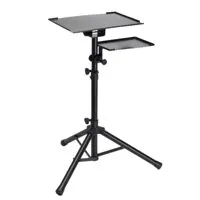
  • Laptop Stand (1)

About Optoma W340UST

Ultra short throw projector
Beam bright, eye catching content with the W340UST projector. Perfect for meeting rooms and classrooms, this projector is designed to be used at any time of day.

Incorporating an ultra short throw lens means it can project a 100" image from inches away. And having the projector installed so close to the wall avoids any shadows being cast across the screen from the presenter(s).

Installation and setup are simple with four corner adjustment.

Additionally, it provides a complete package for engaging learning with many new features, including two HDMI inputs, powered USB port, native office viewer and a powerful 16W built-in speaker.

Ultra Short Throw
With an ultra-short throw lens, you can project an impressive image greater than 100" from only inches away. This allows you to place the projector closer to the wall, reducing shadows so you can present with ease; perfect for interactive applications.

Amazing colors
Give powerful presentations and educational lessons with stunning colors. Optoma projectors provide reliable color performance suitable for any content and environment. From accurate sRGB colors for lifelike images to vibrant punchy presentations. We have a display mode to meet your needs. Perfect for a wide range of graphic and video presentations.

Superior contrast
Add more depth to your image with a high contrast projector. Compared to competing technology, Optoma DLP projectors provide you with brighter whites and ultra-rich blacks, images come alive and text appears crisp and clear - ideal for business and education applications.

Native office viewer
Give presentations directly from your projector without the need of a laptop or PC using the built-in office viewer. Simply copy your Word, Excel, PowerPoint, PDF or JPEG files to a USB stick, SD card or microSD (depending on the projector input) and display them on the big screen.

USB display
Connect your projector directly to a laptop and display the desktop using a USB cable. No need for a bulky VGA lead.

Control
Featuring a wide range of options you can control and monitor the projector remotely.

• RS232 Optoma projector's come with an extensive set of RS232 commands making it simple and easy to manage using any control system.
• AMX compatible Dynamic discovery protocol is incorporated into the projector allowing for easy installation with AMX control systems.
• Crestron RoomView Using the compatible RoomView software you can power on/off, monitor, manage and control up to 250 projectors at the same time from any computer
• Extron IPLink compatible Allows for easy installation with Extron control systems

LAN display
Display your PC or laptop screen on the projector via the network connection.

Wireless presentations
Instantly connect and present wirelessly from your PC, Mac or mobile device using the free EZCast Pro App and optional wireless USB dongle. The app gives you the freedom to wirelessly share and present documents, photos and your devices camera turning it into a document camera. Creating a more connected and collaborative experience for everyone.

Four corner correction
Adjust the keystone in both the vertical and horizontal plane. You can individually warp each corner of the image to create a perfectly square image. Ideal for uneven walls or where projector placement is awkward and needs to be installed at an angle.

Integrated speaker
A powerful built-in speaker provides exceptional sound quality and an easy setup without the need for costly external speakers.

Full 3D
Optoma projectors can display true 3D content from almost any 3D source, including 3D Blu-ray players, 3D broadcasting and the latest generation games consoles.

USB-Power
Use the USB-A port to power an HDMI dongle, such as Google Chromecast.

Remote mouse with built-in laser pointer
Keep your audience's attention focused on the right things using the simple, yet powerful remote with mouse control and built-in laser pointer.

Eco+
Eco+ technology brings together high contrast, improved lamp life and energy saving features that are easy to use while reducing power consumption.

Energy saving
Using the specially designed lamp modes, you can reduce the power consumption by up to 70%. Each mode also has a positive effect on the lamp life, while lowering the total cost of ownership and reducing maintenance.

Eco AV mute
Stay in control of your presentation with Eco AV mute. Direct your audience's attention away from the screen by blanking the image when no longer needed. This also reduces the power consumption by up to 70%, further prolonging the life of your lamp.

Quick resume
This feature allows the projector to be instantly powered on again, if it is accidentally switched off.

Auto power off
There may be instances when the projector is left running when not in use. To help save energy, the "auto power off" feature automatically turns off the projector after a set period of time if it is not being used

Direct power on
The projector will start up instantly when power is supplied to the unit. This eliminates the need to manually turn on the projector via the remote control or the keypad, ideal for use in rooms with a "master" power switch.

Direct power off
Power off your projector immediately or directly at the mains. This means you don't have to wait for the projector to cool down before turning it off.

24/7 operation
Optoma projectors have been designed to operate 24 hours a day in standard orientation. Perfect for applications where prolonged periods of use is required. Subject to 24 hour terms and conditions.

24/7 Operation - For optimum performance Optoma recommends that your projector is turned off or placed in standby mode for 30 minutes every 24 hours to prolonging the life of your lamp.

EPSON replacement adapter
Update your EPSON ultra short throw projector with an Optoma UST projector without changing your existing mount or white board.
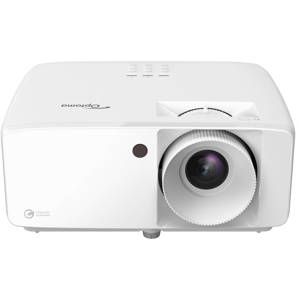
Optoma W340UST Features

  • Ultra-short throw lens that allows projection of an image over 100 inches from only a few inches away, reducing shadows and providing a clear display
  • Reliable color performance suitable for any content and environment with accurate sRGB colors for lifelike images and vibrant punchy presentations
  • High contrast projector that adds more depth to the image with brighter whites and ultra-rich blacks, providing crisp and clear text for business and education applications
  • Built-in office viewer that allows presentations directly from the projector without the need for a laptop or PC, using a USB stick, SD card, or microSD
  • USB display that connects the projector directly to a laptop and displays the desktop using a USB cable, eliminating the need for a bulky VGA lead
  • Remote control with various options to control and monitor the projector remotely, including RS232 commands, AMX compatibility, Crestron RoomView, and Extron IPLink compatibility
  • LAN display that displays the PC or laptop screen on the projector via the network connection
  • Wireless presentations that allow instant connection and wireless presentation of documents, photos, and devices camera via the free EZCast Pro App and optional wireless USB dongle
  • Eco+ technology that brings together high contrast, improved lamp life, and energy-saving features that are easy to use, reducing power consumption and total cost of ownership
  • Auto power off that turns off the projector automatically after a set period of time if it is not being used, to help save energy and prolong the life of the lamp

Key Features

  • Bright WXGA projector 4000 ANSI lumens
  • Ultra short throw lens 100" image from inches away
  • Ultimate control Crestron, Extron, AMX, PJ-Link and Telnet LAN commands
  • Feature packed Four corner adjustment, Office viewer, optional wireless presentations

What's in the box:

  • Optoma W340UST WXGA Ultra-Short Throw DLP Projector
  • AC Power Cord
  • Remote Control
  • 2x AAA Batteries
  • User Manual
  • Optoma 3 Year Limited Warranty on Projector (1 Year or 1000 Hour on Light Source Whichever Comes Fir