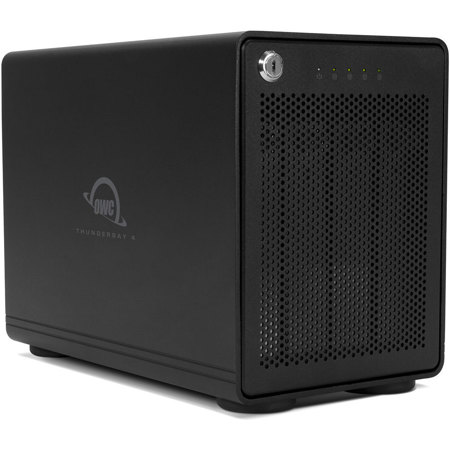
OWC / Other World Computing ThunderBay 4 RAID Ready 8TB (4x 2TB) 4-Drive SSD Storage Solution with Dual Thunderbolt 3 Ports
SKU: OWCB3IVS080S
This item is no longer available.
Recommended Alternatives



Share:
Overview
Compare
Specs
Protection
Q&A
About OWC / Other World Computing ThunderBay 4
FEATURED REVIEWS
Best video editing drive
This is really the best option for those editing on a Mac. No only do you get speeds that are slightly faster than the average SSD, you also get MUCH more storage capacity AND data protection. In my tests with the 20TB version I get about 505MB/s write and 580MB/s read. It's setup from the factory in Raid5 so you don't have to initialize the drives which saves time. In Raid 5 mode (best mode) you get 15TB of usable space as 5TB is setup for data protection. If one of the drives ever dies you ...
View full Review
OWC ThunderBay 4-Bay Thunderbolt 3 Enclosure
I was replacing an old Mac Pro tower with a new computer that is all display, but no room for storage. I had 4 hard drives inside the old tower, so I put them all into the new OWC enclosure. The build of the enclosure is excellent. Very solid with lots of vibration dampening. I migrated my old data from my old bootable hard disk to the new SSD via the Thunderbolt 3 connection. It took about 5 hrs. to transfer 1 TB of data. The Thunderbolt 3 is rated at 40Gb/s. The migration assistant displa...
View full Review
Be empowered with the ThunderBay 4 RAID Ready 8TB (4x 2TB) 4-Drive SSD Storage Solution with Dual Thunderbolt 3 Ports, a high-performance external storage powerhouse from OWC. This redesigned, state-of-the-art device offers an impressive sustained performance of up to 1527MB/s, thanks to the incredible speed of Thunderbolt 3 technology.
Designed to accommodate both 2.5" and 3.5" drives natively, this versatile storage solution is perfect for those seeking to add vast amounts of high-performance storage. The ThunderBay 4's four internal drives can be utilized independently or configured using your preferred software RAID for a multi-drive array, offering the perfect balance between high performance and data redundancy.
The ThunderBay 4's new design features a heat-dissipating aluminum chassis, ensuring it operates quietly and stays cool even under heavy use. The device is rigorously pre-tested with a multi-hour burn-in to guarantee optimal performance upon arrival, making it a reliable choice for demanding operations.
This storage solution is engineered to support multi-stream compressed 4K video and other bandwidth-intensive tasks, making it an ideal choice for professionals in the creative industry. With two Thunderbolt 3 ports and a dedicated DisplayPort 1.2 port, you can connect the display of your choice, including 4K displays, for an enhanced visual experience.
The ThunderBay 4 also features a time-tested cooling technology with an open "flow-thru" vented design and an oversized 92mm, low-turbulence, noise-quieting fan to keep the drives running cool and reliably. You can daisy-chain up to six ThunderBay 4s for massive storage capabilities and increased performance, or connect multiple ThunderBay 4s to multiple Thunderbolt 3 ports for exponential speed capabilities.
The device's drive isolating design reduces sonic resonance and is aided by oversized, rugged, vibration-absorbing, non-skid feet for stability. Each ThunderBay 4 comes with a 2.0-meter certified OWC Thunderbolt 3 cable, with other lengths available separately. Trust in OWC's award-winning U.S.-based support for the ThunderBay 4 solution, backed by an OWC Limited Warranty. Experience the power and performance of the ThunderBay 4 and take your workflow to the next level.
OWC / Other World Computing ThunderBay 4 Features
- High-performance ThunderBay 4 RAID Ready 8TB (4x 2TB) 4-Drive SSD Storage Solution with Dual Thunderbolt 3 Ports
- Offers impressive sustained performance of up to 1527MB/s, powered by Thunderbolt 3 technology
- Accommodates both 2.5" and 3.5" drives natively and supports multi-stream compressed 4K video
- Features heat-dissipating aluminum chassis for cool and quiet operation
- Provides multiple connection options with two Thunderbolt 3 ports and a dedicated DisplayPort 1.2 port
- Comes with a 2.0-meter certified OWC Thunderbolt 3 cable and backed by OWC's award-winning U.S.-based support