Overview
Compare
Specs
Protection
Q&A

Questions & Answers

FAQ

What is the data transfer speed of the ThunderBay 4 RAID 8TB (4x 2TB) 4-Drive SSD Storage Solution with Dual Thunderbolt 3 Ports?

The ThunderBay 4 RAID 8TB (4x 2TB) 4-Drive SSD Storage Solution with Dual Thunderbolt 3 Ports offers a sustained performance of up to 1527MB/s, making it ideal for high-speed data transfers.

What RAID configurations does the ThunderBay 4 RAID 8TB (4x 2TB) 4-Drive SSD Storage Solution with Dual Thunderbolt 3 Ports support?

The ThunderBay 4 RAID supports multiple RAID configurations including RAID 0, 1, 4, 5, and 1+0. This allows you to optimize your storage for performance and data redundancy based on your specific needs.

Can I link multiple ThunderBay 4 RAID 8TB (4x 2TB) 4-Drive SSD Storage Solution with Dual Thunderbolt 3 Ports together?

Yes, you can daisy-chain up to six ThunderBay 4 units together. This allows for massive storage capabilities and increased performance.

What type of drives is the ThunderBay 4 RAID 8TB (4x 2TB) 4-Drive SSD Storage Solution with Dual Thunderbolt 3 Ports compatible with?

The ThunderBay 4 RAID is natively compatible with both 2.5" and 3.5" drives, eliminating the need for adapters.

Does the ThunderBay 4 RAID 8TB (4x 2TB) 4-Drive SSD Storage Solution with Dual Thunderbolt 3 Ports offer any drive health monitoring features?

Yes, the ThunderBay 4 RAID comes with intelligent drive monitoring capabilities that provide desktop and email notifications about your system's performance and drive health. This helps maintain mission-critical workflows.

Reviews about this item

Review Summary

2019-09-10T10:12:37

Rated 5 out of 5

OWC ThunderBay 4-Bay Thunderbolt 3 Enclosure

I was replacing an old Mac Pro tower with a new computer that is all display, but no room for storage. I had 4 hard drives inside the old tower, so I put them all into the new OWC enclosure. The build of the enclosure is excellent. Very solid with lots of vibration dampening. I migrated my old data from my old bootable hard disk to the new SSD via the Thunderbolt 3 connection. It took about 5 hrs. to transfer 1 TB of data. The Thunderbolt 3 is rated at 40Gb/s. The migration assistant displayed the speed of flow which ran between 35 Gb and 59 Gb. It produced all it was advertised to do. Noise?. The fan does make some noise. It's not bad. The hard drives themselves make most of the noise as they read or write. The enclosure sits on a desk about two feet from either myself or the computer, so there is going to be some sound. I'm really happy with it and definitely say it's worth a look.

DON M.

2017-05-14T04:31:14

Rated 5 out of 5

PEACE OF MIND

After two data recoveries from my external hard drive for my pics nearly lost as a result of crashes/ accidental drops . I needed a better system. I was able to recover my images, but at a cost. I now have comfort and confidence my images will be safe. Though costly, but as I have said- it's cheaper than a data recovery ( I was lucky to get them back. ) I no longer worry about losing my pics. Peace of mind is priceless.

GARY M.

2016-10-24T08:43:35

Rated 5 out of 5

Super fast!

This thing is amazing! I mainly shoot photos but I'm moving into video and my single disk USB 3.0 external (Lacie porche 4tb) was not fast enough for my needs. I first tried out a Mediasonic proraid 4, loading it with four Toshiba 3tb 7200rpm drives in raid 5 and I just wasn't happy with the speeds I was getting in Black magic's speed test. I sent it back and bought this OWC Thunderbay. The Proraid 4 is fine for photos and backup but for speed, the Thunderbay is 2 or 3 times faster. Yes, this is way 2 or 3 times more expensive but you are paying for speed and getting a bonus in the quality of the product. The thunderbay is a very solid build. I raid 5 with the the same drives I got around 200mbps read and write in the Proraid4, in the OWC Thunderbay 4, I'm getting about 520-530mbps.The software was easy to use as well. Only took about 10mins to install the drives and set up the raid 5 once I figured out where the softraid app was. I definitely recommend this enclosure to anyone working with photos and video. Excellent storage solution.

CHRISTOPHER S.

2016-01-21T14:34:48

Rated 5 out of 5

Best video editing drive

This is really the best option for those editing on a Mac. No only do you get speeds that are slightly faster than the average SSD, you also get MUCH more storage capacity AND data protection. In my tests with the 20TB version I get about 505MB/s write and 580MB/s read. It's setup from the factory in Raid5 so you don't have to initialize the drives which saves time. In Raid 5 mode (best mode) you get 15TB of usable space as 5TB is setup for data protection. If one of the drives ever dies you slide it out and replace with a new one and you won't loose any data. I've been suggesting these to people for over a year now and I'm going to keep doing so. I have a video review of this drive on YouTube if you want to see it in action, speed tests, unboxing, and daisy chaining to a display just do a search for Max Yuryev Thunderbay and you'll find it. The 1.5 to 2.5 times as much. I would recommend it to anyone who needs a fast and reliable drive.

MAKSIM Y.

OWC ThunderBay 4 Specifications

  • Software Requirements

    macOS 10.12.2 or later
    Windows 10 or later

  • Hardware Requirements

    Mac or PC featuring Thunderbolt 3 interface
    Mac or PC featuring Thunderbolt or Thunderbolt 2 interface

  • Interface (Chipset)

    (2) Thunderbolt 3 (Intel DSL6540)
    (1) DisplayPort

  • Max Transfer Rate

    Thunderbolt 3: 40 Gb/s (5000 MB/s)

  • RAID Modes Supported

    Software
    RAID 0, 1, 4, 5, 10 and Independent drive mode

  • Initial Configuration

    RAID 4

  • Standard Mechanism

    4 x 2.0TB OWC Mercury Extreme Pro 6G SSD

  • Performance

    Read: Up to 1527MB/s

  • Kensington Lock Slot

    Yes

  • LED

    Yes (Power and disk activity)

  • Plug and Play

    Yes

  • Power Supply

    AC input: 100 - 230V

  • Operating Temperature

    10 to 35 deg. C (50 to 95 deg. F)

  • Non-Operating Temperature

    -40 to 65 deg. C (-40 to 149 deg. F)

  • Dimensions (HxWxL)

    7 x 5.3 x 9.6" (17.78 x 13.46 x 24.38cm)

  • Weight

    5.7kg (12.57 lbs)

About OWC ThunderBay 4

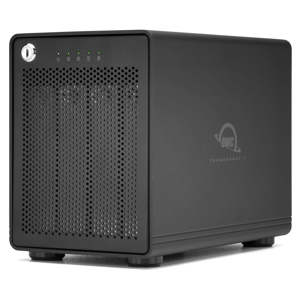
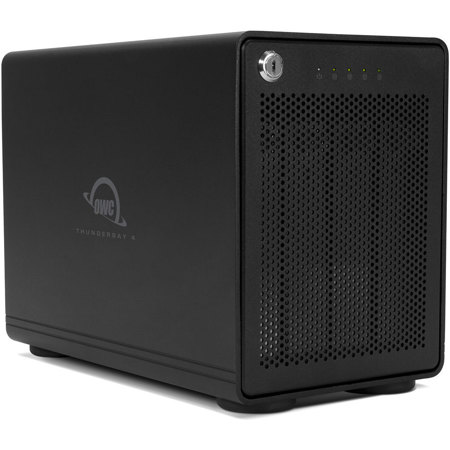
Just when you thought data storage couldn't get any better, the ThunderBay 4 RAID 8TB (4x 2TB) 4-Drive SSD Storage Solution with Dual Thunderbolt 3 Ports takes it to the next level. This high-performance powerhouse is designed to meet the demands of professionals who require reliable, fast, and capacious storage solutions.

Engineered to harness the power of Thunderbolt 3 technology, this storage solution delivers an astounding performance of up to 1527MB/s sustained speed, making it an ideal choice for multi-stream compressed 4K video editing, high-resolution photography, and other data-intensive operations.

The ThunderBay 4 RAID is natively compatible with both 2.5" and 3.5" drives, eliminating the need for adapters. It features a user-configurable RAID system, allowing you to choose from RAID 0, 1, 4, 5, and 1+0 configurations to perfectly balance your performance and data redundancy needs.

This storage solution is housed in an ultra-quiet, heat-dissipating aluminum chassis with a redesigned, cooler, and quieter structure. It also features a dedicated DisplayPort 1.2 port, allowing you to connect the display of your choice, including 4K displays.

The ThunderBay 4 RAID comes with intelligent drive monitoring capabilities, providing desktop and email notifications to keep you informed about your system's performance and drive health. This feature helps maintain mission-critical workflows, ensuring your data is always safe and accessible.

With the ability to daisy-chain up to six ThunderBay 4 units, you can achieve massive storage capabilities and increased performance. The ThunderBay 4's drive isolating design reduces sonic resonance and is aided by oversized, rugged, vibration-absorbing, non-skid feet for added stability.

Each ThunderBay 4 unit undergoes a rigorous multi-hour "burn-in" performance certification procedure before shipping, ensuring that it arrives operating properly and ready for demanding use.

In summary, the ThunderBay 4 RAID 8TB (4x 2TB) 4-Drive SSD Storage Solution with Dual Thunderbolt 3 Ports is a robust and flexible external storage solution designed to empower your workflow and take your data storage capabilities to new heights.
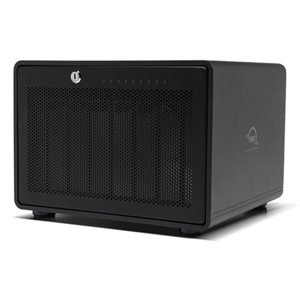
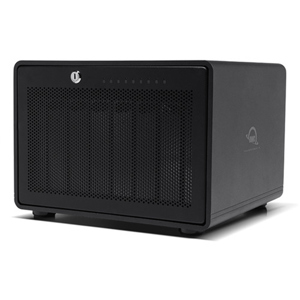
OWC ThunderBay 4 Features

  • High-capacity 8TB SSD storage with dual Thunderbolt 3 ports for blazing-fast data transfer
  • Configurable in RAID 0, 1, 4, 5 & 10 for optimal performance and data redundancy
  • Sustained performance up to 1527MB/s, ideal for 4K video editing and high-resolution imaging
  • Durable, ultra-quiet aluminum chassis with advanced cooling technology for reliable operation
  • Drive monitoring with real-time alerts and notifications to maintain critical workflows
  • Supports daisy-chaining up to six units for expansive storage expansion and speed enhancement

Key Features

  • High-capacity 8TB SSD storage with dual Thunderbolt 3 ports for blazing-fast data transfer
  • Configurable in RAID 0, 1, 4, 5 & 10 for optimal performance and data redundancy
  • Sustained performance up to 1527MB/s, ideal for 4K video editing and high-resolution imaging
  • Durable, ultra-quiet aluminum chassis with advanced cooling technology for reliable operation
  • Drive monitoring with real-time alerts and notifications to maintain critical workflows
  • Supports daisy-chaining up to six units for expansive storage expansion and speed enhancement

What's in the box:

  • OWC ThunderBay 4 RAID 4 8TB 4-Drive SSD Storage Solution
  • 2.0m Thunderbolt 3 Cable
  • External Power Cable
  • 2x Security Keys
  • ThunderBay 4 Quick Start Guide
  • SoftRAID Lite
  • SoftRAID Lite Quick Start Guide
  • Complimentary 1 Year Level 1 Data Recovery Service
  • OWC 3 Year Limited Warranty