Orders placed during Passover Holiday (Wed 4/1 after 4PM ET – Thurs 4/9) will ship Fri 4/10. View our holiday shipping schedule.
This item is no longer available.
Review Summary
2019-12-12T11:12:46
While the drive looks good and appears on the outside to be well constructed, there is virtually no support for the drives on the inside. Instead of some type of rail system, the drives are (essentially) supported by the mounting screws. Additionally, based on my experience with devices of this type, the drive connections inside are unusual. Even the cheapest devices like this typically have power/drive connectors that the drives 'slide into.' That also helps stability. This unit uses cheaper power and drive cable connectors making attaching the drives awkward. That may be acceptable for some people but, for an $ 84 device, it wasn't acceptable to me and I sent it back.
DAVID R.
2018-08-31T11:56:16
Very easy setup and use. It's very quiet and a small footprint. I haven't had to restore anything yet so I can't comment on that function.
John B.
2017-11-21T08:29:08
I had a friend recommended this to me and it works out perfectly for backing up all of my files.
Adrian B.
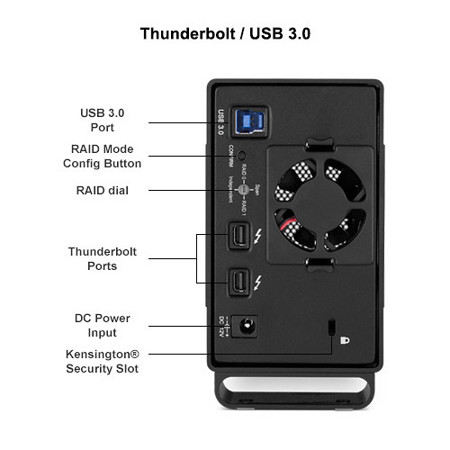
Thunderbolt
Thunderbolt
USB 3.0 (2.0 Backwards compatible)
RAID 0 - Performance Striping (default setting) for maximum performance(requires two identical hard drives).
RAID 1 - One drive mirrors the other for an instant backup(requires two identical hard drives).
Span - Combines both drives into a single, large volume.
Independent - Use both drives separately.
2x 5.0TB Toshiba MD04ACA500 Hard Disk Drives
7200 RPM
256 Megabyte (2 Drives with 128 Megabyte (131,072k) cache each)
Thunderbolt -2 ports
USB 3.0/2.0 -1 USB 3.0 Standard B port
Thunderbolt -Up to 10Gb/sec
USB 3.0 -Up to 500MB/sec
USB 2.0 -Up to 60MB/sec
USB 3.0: Supported on Macs and PC's meeting minimum requirements
USB 2.0: Supported on Macs and PC's meeting minimum requirements
Thunderbolt: It can be used as a Thunderbolt startup drive on Macs running Mac OS X.
Included Drive Guide Software will format drive for either OS X, or Windows Using the OWC Drive Guide
Macintosh:
USB 3.0: Macintosh with USB 3.0 interface, either built in or via USB 3.0 expander card and OS 10.6.8 or later.
USB 2.0: Macintosh with USB 2.0 interface, either built in or via USB 2.0 expander card and OS 10.2.8 or later.
Available Thunderbolt port and OS 10.6.8 or later.
Time Machine Compatible: Mac OS X 10.5 (version introduced) and later.
Linux:
Linux compatible via supported USB 3.0/USB 2.0 interfaces.
Windows:
Thunderbolt: Any PC running Windows 7 Service Pack 1 or later with a Thunderbolt port. Driver required for proper installation. (ZIP 3.3 MB)
USB 3.0: Windows XP and later with USB 3.0 interface, either built in or via USB 3.0 expander card.
USB 2.0: Windows 2000 and later with USB 2.0 interface, either built in or via USB 2.0 expander card.
Thunderbolt connectivity for OWC Mercury Elite Pro Dual is not supported in Boot Camp.
Intech Hard Disk SpeedTools Utilities OEM (For Mac OS 8.6 -X only)
ProSoft Engineering Data Backup for Mac OS X v10.2.8 or later
NovaStor NovaBACKUP for Windows 2000 or later
Over 1.5GB of Freeware/Shareware/Public domain software pre-installed
UL Listed U.S./International Auto Switching 100 - 240v, 50/60Hz input, 12 Volt 6 Amp output Power Supply (adapter plugs for International use sold separately). For replacement power supply, click here.
Operating: 5 to 42 deg. C (41 to 108 deg. F)
Non-operating: -40 to 65 deg. C (-40 to 149 deg. F)
Operating: 8% -90% RH (Non-condensing)
Non-operating: 5% -95% RH (Non-condensing)
65G 2mS; (non-operating) 175G 2mS
Operating: 1.0G (5 -300Hz)
Non-operating: 5.0G (5 -500Hz)
More than 300,000 power-on hours
5.3 x 2.8 x 9.0" (134.62 x 71.12 x 228.60mm)
2.5lbs (1.13kg) (without drives)
812437020618
Piece of mind and a great price and ease of use.
By John B.
Very easy setup and use. It's very quiet and a small footprint. I haven't had to restore anything yet so I can't comment on that function.
Awesome RAID system.
By Adrian B.
I had a friend recommended this to me and it works out perfectly for backing up all of my files.
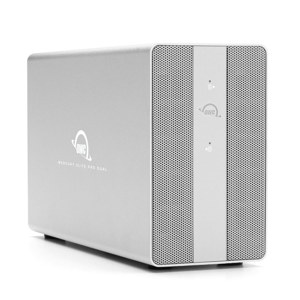
High-Performance, High-Reliability, Portability and Style are standard for the OWC Mercury Elite Pro Dual Series!
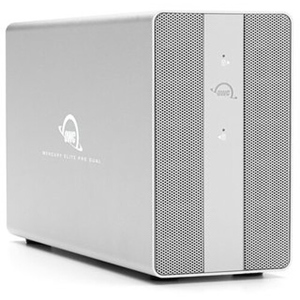
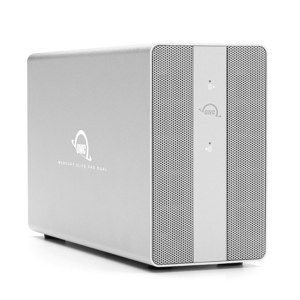
OWC external drives are built to last and have become the "go to" drives for professionals and enthusiasts alike. The OWC Mercury Elite Pro Dual houses two drives that can be easily configured in RAID 0, RAID 1, span or JBOD/independent modes via the easy-to-use RAID selector switch on the back, while USB 3.0 and Thunderbolt interfaces provide blazing fast access to your data. This feature-packed external drive comes in a durable, heat-dissipating, brushed-aluminum enclosure.
Outstanding Features
High-Performance + Flexible
A blazing fast Thunderbolt chipset unleashes the full potential of this rugged external drive's dual 3.5" hard drives with sustained data rates of nearly 400MB/s plus the flexibility of hardware RAID 0, 1 and non-RAID modes to best suit your demanding applications and workflow.
High-Reliability
The OWC Mercury Elite Pro Dual Series is Built to Last, with a quality design and the best components, backed up by a 3 Year OWC Solution Limited Warranty.
Portability
The Compact and Shock-Resistant Design has the Mercury Elite Series going places! In addition, the OWC Mercury Elite Pro Dual series offers two Thunderbolt ports and one USB 3.0 port for easy use with ANY system! The OWC Mercury Elite Pro Dual even includes all needed cables!
Smart Sense
Power Saving Connection Sensor. A built-in sensor detects when the data cable is disconnected from a Mac or PC's native Thunderbolt or USB interface and automatically spins down the drives to conserve energy during periods of inactivity. Ideal for notebook users who can go mobile without the need to turn it off or unplug the power cord.
Includes the Powerful SpeedTools Utility Suite for Mac
The comprehensive Mac utility used by professionals for accurate Mac diagnosis and maintenance.