


+1
more
more

See Options
Need help? Ask our experts.
Next-generation Remote Camera Controller Revolutionizes Operator Workflows
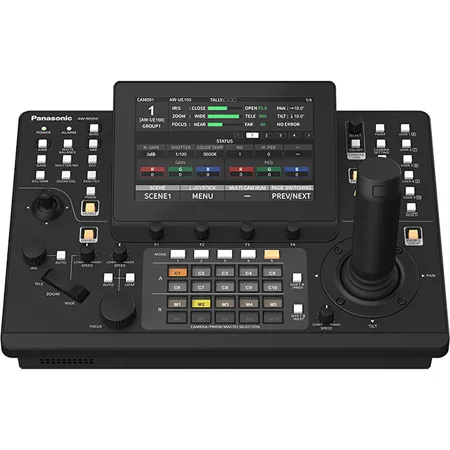
The AW-RP200GJ, building on its predecessor's (AW-RP150GJ) highly regarded operability, introduces powerful new features such as convenient macro functionality for executing complex camera operations with ease, and dual left and right joysticks for flexible control. Such innovations enhance the controller's performance for multi-camera productions, including in large-scale shooting environments, to elevate video content value.
20 Multi-select Switches: Precise, Efficient Control with Multi-select Switches
The AW-RP200GJ comes with 20 multi-select hardware switches that can be assigned to functions such as camera selection, preset control, macro control, and more. The switches are on the built-in LCD that displays the assigned mode, allowing the operator to execute tasks quickly and accurately.
Five selectable operation modes
• Mode 1: Camera selection (assign up to 20 cameras)
• Mode 2: Preset selection (assign up to 20 presets)
• Mode 3: Camera + preset selection (assign up to 10 cameras and 10 presets)
• Mode 4: Macro selection (assign up to 20 macros)
• Mode 5: Camera + macro selection (assign up to 10 cameras and 10 macros)
Panasonic's First Remote Camera Controller to Support Macro Functionality
One-touch Macros for Executing Complex Camera Operations
The AW-RP200GJ features convenient macro functionality-the first of its kind among Panasonic remote camera controllers. The user can easily register macros to handle complex sequences, such as the simultaneous control of multiple cameras or actions using presets.
Macros can be triggered with a single button, enabling the execution of complex multi-camera operations even in environments with limited staffing.
Handy Second Joystick on Left
Dual Joysticks for Enhanced Operability
In addition to the main joystick on the right for pan, tilt, and zoom or focus control, the controller features a handy second joystick on the left. By using each joystick simultaneously, operators can control multiple PTZ cameras at once. Furthermore, various functions can be assigned to the left joystick, enabling intuitive operation of menus or cropping features. The combination of the two joysticks allows for highly advanced and flexible control.
Advanced Functionality for Efficient Control Across Diverse Systems
Supports up to 200 PTZ Cameras
Thanks to IP connectivity, a single AW-RP200GJ controller can manage up to 200 PTZ cameras, making it ideal for complex, large-scale event productions. Twenty multi-select switches ensure smooth camera switching, even in high-density camera setups.
WFM and Vectorscope Display Support
The onboard 7-inch LCD monitor supports waveform-monitor (WFM) and vectorscope displays. Camera settings can be adjusted directly on the controller while referencing these displays, streamlining both setup and operation.
New LCD for Monitoring Camera Status and Settings
A newly developed 7-inch touchscreen LCD with excellent visibility and operability is built into the main unit. Operators can monitor connected camera status, manage camera presets and verify button assignments, all from the main unit.
Dedicated Web UI for Various Configurations
The web-based interface enables the centralized configuration of connected cameras, including the assignment of IP addresses in batches, helping to simplify the setup process for large-scale systems.
Shortcut Buttons for Quick Access to Frequently Used Features
Shortcut buttons provide immediate access to frequently used functions, enabling smooth, intuitive operation.
Functions for shortcut buttons
• WHITE BALANCE
• DTL/DNR
• GAIN
• ZOOM/OIS
• SHUTTER/ND
• PAN/TILT
• PED
• PMEM
Video Input via NDI and SRT (Full HD)
The controller's LAN terminal supports video input via NDI High Bandwidth and SRT for seamless integration into IP-based systems.
https://na.panasonic.com/us/standardwarranty
855-772-8324







