
This item is no longer available.
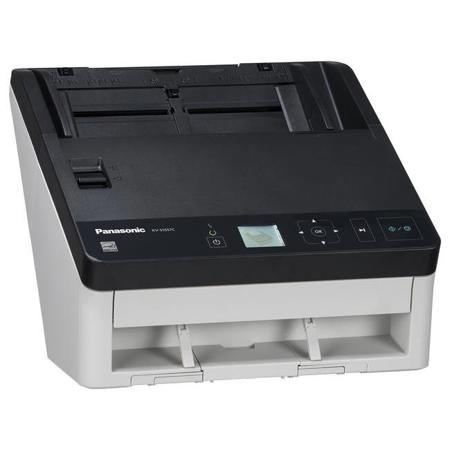
Work smarter and get more done with the new advanced, KV-S1057C workgroup color scanner. Engineered to enhance document imaging workflow and information management, the KV-S1057C features the fastest speeds in its product class. Scan all kinds of mixed documents - from extremely thin paper to passports and even heavy embossed ID cards - quickly and at the highest resolution. With a robust paper feed mechanism and advanced image quality functions, the KV-S1057C offers the performance and reliability that businesses count on from Panasonic.
•High-speed duplex scanning.
•Highly reliable 100-sheet ADF.
•Handles mixed documents easily.
•Intelligent Double-feed detection.
•100 programmable workflows.
High-Speed Full-Color Scanning
Excellent performance keeps office productivity high. This scanner can quickly convert a large number of documents into electronic data, so it provides smooth usage even in offices with many users. Scanning documents into data makes it possible to consolidate information, which improves work efficiency. And it lowers the cost of handling documents and reduces the space needed to store them.
Duplex Scanning
Prevents pages from being missed when scanning. Double-sided scanning of documents from business-card size all the way to A4 can be done with a single scan. Plus, double-sided scanning is done at the same speed as single-sided scanning. This eliminates the need to repeatedly turn the document over to the front and back to rescan and prevents pages from being missed when scanning.
Double-Feed Prevention Roller System
Prevents scanning mis-feeds. The active double-feed prevention roller reverses rotation the instant that the leading document leaves the paper feed section to prevent the double-feeding of documents that are stuck together.
Compound Paper Scanning
Compound paper such as carbonless copy paper can be fed. A double-feed prevention roller release mechanism is provided. By switching the DFP Roller lever, compound paper such as carbonless copy paper can also be fed.
Intelligent Double-Feed Detection
Memorizes the canceled double-feed detection as a scan setting. The positions and lengths of attached paper strips, such as labels, vouchers and photos, can be memorized to automatically disable Double-Feed Detection for documents with the same format.
Ultrasonic Double-Feed Detection
Prevent scanning errors. In addition to its double-feed prevention roller, the double-feed prevention system is enhanced by an ultrasonic sensor that detects the double feeding of originals during scanning. This innovative design prevents double feeding and has been proven effective even when the documents being scanned contain a mix of paper of different weights or thickness. Thanks to double-feed prevention, optimum reliability is assured even when scanning high volumes of documents.
Double-Feed Skip Function
Cancels double-feed errors to simplify rescanning. When scanning stops due to documents that include things like envelopes or that have sticky notes attached, simply press the Skip key to cancel the error and resume scanning.
Document Output Control
Prevents the output order from changing. The output speed is automatically lowered for documents that are 148 mm (5.82 inches) or shorter and the exit guides keep the document from slipping. This stops longer documents from sliding under shorter ones to prevent the output order from changing.
One-Touch Scanning
Easy scanning with a single press of the button. Settings can be made with a single press of the button while confirming the desired settings with the scanner's LCD and cursor buttons.
Booklet Scanning
Multi-page documents can be scanned with the ADF. By switching the DFP roller lever, multi-page documents, passports and bankbooks can be scanned.
Thin Paper Scanning
No more worries about scanning thin paper. Now you can continuously scan documents that are as thin as 0.04mm. That makes it easy to scan thin forms or vouchers. And it increases the number of situations where you can use scanning - without worrying about thin paper.
Embossed Card Scanning
Enables smooth embossed card scanning. This model can scan up to three embossed cards, such as driver's licenses, consecutively.
Mixed Paper and Hard Card Batch Scanning
Enables hard card scanning with paper documents in a single batch. This scanner was designed to be able to combine paper documents along with a hard ID card, such as a driver's license, in a single batch by using the mixed card batch guide.
Long Paper Mode
Even documents of unusually long sizes can be scanned. The highly reliable paper feed system lets you scan documents up to 5588mm (220") in length. This is ideal for scanning electrocardiograms (EKG) or other special documents. This single scanner handles a wide variety of applications.
Automatic Image Orientation
No more worries about the document's direction. Even when documents are set in different directions, this function detects the direction of the scanned text in documents and automatically rotates it into the correct direction. This boosts work efficiency by eliminating the need to change the direction of each page in advance when scanning large quantities of documents with various sizes and directions.
Advanced Image Processing
Makes complicated settings automatically to improve scanning quality. The Automatic Brightness Adjustment function automatically adjusts the brightness and contrast of scanned images, even on documents with varying paper colors and text hues, to produce scanned images with suitable brightness.
2-Page Seperation
Easily get the data you need from each page. This function automatically divides the single image into two single sheets. Dividing scanned documents saves time and trouble because it makes complex editing operations unnecessary.
Power Saving
Reduces power consumption.
•LED Lighting: The scanning section uses LEDs for its light source to lower power consumption while scanning.
•Sleep Mode: Power consumption is suppressed to 3 watt maximum during sleep mode to save energy while the scanner is not being used.
•Power Auto Off Function: The power automatically turns off at a preset time to cut down on wasted electricity.
Gate Mechanism
Reliable paper feed mechanism. 100 sheets can be easily placed on the ADF by using the gate mechanism. This avoids paper feed problems and skewing.
Easy Maintenance
Reduces maintenance costs and downtime. The clamshell design allows full, easy access to the entire paper path, so you can clear paper jams or clean the unit without calling a service center. The rollers last a long time and are easy to replace when worn, also improving the unit's cost-effectiveness.
Auto Erasure Security
A high degree of safety. Scanned data is automatically erased from the scanner memory as soon as scanning is completed. This basically eliminates the danger of information leaks and ensures the user of safe, secure scanning.
Space-Saving Installation
The scanner can be installed just about anywhere. Its small footprint allows it to conveniently fit into small spaces, such as reception counters or desk sides. For example, placing it at the reception area of a bank or hospital allows customer or patient ID cards, Passports and other documents to be quickly scanned. This enables real-time information sharing to help provide fast, accurate service. With no need for an AC adaptor, it takes up minimal space.






