
This item is no longer available.
Fast and accurate
I've only had this scanner for a few weeks, but it performs excellent. As a Financial Analyst, I needed the capability of scanning large reports (100-200 pgs) fast and accurately (not missing any pages) and this scanner delivered. It takes less than 2 minutes to scan 200 pgs., and the image (for my needs) is excellent. I've only been using it for a couple of weeks, so I can't attest to its long term performance, but so far I'm extremely happy with this purchase.
High-Speed Full-Color Scanning
Excellent performance keeps office productivity high. This scanner can quickly convert a large number of documents into electronic data, so it provides smooth usage even in offices with many users. Scanning documents into data makes it possible to consolidate information, which improves work efficiency. And it lowers the cost of handling documents and reduces the space needed to store them.
Large-capacity ADF
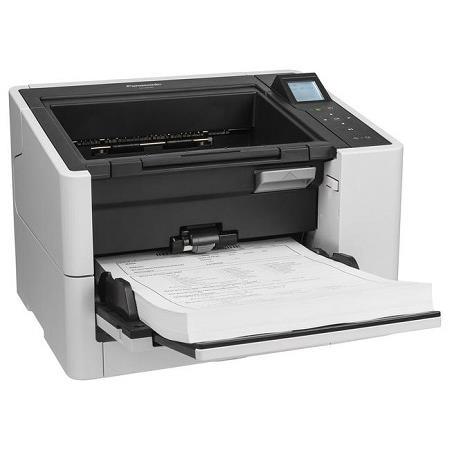
Handles large document runs. Up to 200 A4 pages can be set in a single run. This eliminates the need to set up scanning parameters time after time and brings greater efficiency to scanning jobs.
Duplex Scanning
Prevents pages from being missed when scanning. Double-sided scanning of documents from business-card size all the way to A4 can be done with a single scan. Plus, double-sided scanning is done at the same speed as single-sided scanning. This eliminates the need to repeatedly turn the document over to the front and back to rescan and prevents pages from being missed when scanning.
Double-Feed Prevention Roller System
Prevents scanning mis-feeds. The active double-feed prevention roller reverses rotation the instant that the leading document leaves the paper feed section to prevent the double-feeding of documents that are stuck together.
Intelligent Double-feed Detection
Memorizes the canceled double-feed detection as a scan setting. The positions and lengths of attached paper strips, such as labels, vouchers and photos, can be memorized to automatically disable Double-Feed Detection for documents with the same format.
Ultrasonic Double-Feed Detection
Prevent scanning errors. In addition to its double-feed prevention roller, the double-feed prevention system is enhanced by an ultrasonic sensor that detects the double feeding of originals during scanning. This innovative design prevents double feeding and has been proven effective even when the documents being scanned contain a mix of paper of different weights or thickness. Thanks to double-feed prevention, optimum reliability is assured even when scanning high volumes of documents.
Double-Feed Skip Function
Cancels double-feed errors to simplify rescanning. When scanning stops due to documents that include things like envelopes or that have sticky notes attached, simply press the Skip key to cancel the error and resume scanning.
One-touch Scanning
Easy Scanning with a single press of the button. Settings can be made with a single press of the button while confirming the desired settings with the scanner's LCD and cursor buttons.
2-Way Paper Transport System
Selectable U-turn/straight path transport for scanning of a wide variety of document types. By using two types of transport systems - U-turn and straight - the KV-S2087 is able to scan thin sheets, thick sheets, booklets, cards and other documents of varying sizes and thicknesses. The transport system can be switched by simply operating a lever on the side, for quick and easy scanning of a wide range of documents.
Booklet Scanning
Multi-page documents can be scanned with the ADF. By switching the manual feed selector, multi-page documents, passports and bankbooks can be scanned.
Thin Paper Scanning
No more worries about scanning thin paper. Now you can continuously scan documents that are as thin as 0.04mm. That makes it easy to scan thin forms or vouchers. And it increases the number of situations where you can use scanning - without worrying about thin paper.
Embossed Card Scanning
Enables smooth embossed card scanning. This model can scan up to one embossed cards, such as driver's licenses.
Mixed Document Feeding
Documents of different types can be scanned one after another. Documents from business-card size all the way to A4 with a variety of paper thicknesses can be fed at the same time - ideal for offices that handle a wide range of document types.
Long Paper Mode
Even documents of unusually long sizes can be scanned. The highly reliable paper feed system lets you scan documents up to 5588mm (220") in length. This is ideal for scanning electrocardiograms (EKG) or other special documents. This single scanner handles a wide variety of applications.
Automatic Image Orientation
No more worries about the document's direction. Even when documents are set in different directions, this function detects the direction of the scanned text in documents and automatically rotates it into the correct direction. This boosts work efficiency by eliminating the need to change the direction of each page in advance when scanning large quantities of documents with various sizes and directions.
Advanced Image Processing
Makes complicated settings automatically to improve scanning quality. The Automatic Brightness Adjustment function automatically adjusts the brightness and contrast of scanned images, even on documents with varying paper colors and text hues, to produce scanned images with suitable brightness.
2-Page Separation
Easily get the data you need from each page. This function automatically divides the single image into two single sheets. Dividing scanned documents saves time and trouble because it makes complex editing operations unnecessary.
Post-Imprinter / Digital Imprinter
Raises filing efficiency. The Digital Imprinter function adds text data to scanned images. By using the optional Post-Imprinter, text can be printed onto the rear side of the document after scanning. This makes it accurate and easy to compare scanned data and the original document.
Paper Feed Guide with Lock
Reliable paper feed mechanish. It prevents downward bending of the tray when scanning a large amount of documents.
Easy Maintenance
Easy cleaning from the front side. Paper jams inside the scanner can be easily removed by lifting the ADF section upward.
Auto Erasure Security
A high degree of safety. Scanned data is automatically erased from the scanner memory as soon as scanning is completed. This basically eliminates the danger of information leaks and ensures the user of safe, secure scanning.
Space-Saving Installation
"Open/Close Tray Feeding" for space-saving installation. The compact design lets you place the KV-S2087 right on your desk or on a nearby shelf. It's more compact when the paper feed tray is closed.