
This item is no longer available.
High-Speed Full-Color Scanning
Excellent Performance Keeps Office Productivity High. This speeds up the job of turning even large amounts of daily forms and mountains of documents into data. Clean, crisp, clear scanned data is also ideal for electronic file conversion and management.
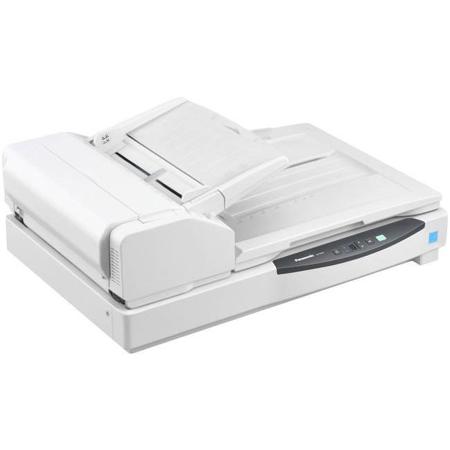
Flatbed Scanning
For Scanning Books, Drawings and Other Special Documents. Books, bound materials, large drawings and other documents that cannot be fed through the Auto Document Feeder (ADF) can be scanned with flatbed scanning. The scanner is also equipped with a Start button, so work efficiency can be increased by quickly scanning while turning the book's pages, with no PC operation necessary.
ADF/Flatbed Scanning
Hassle-free consecutive scanning. Now you can consecutively scan ADF and flatbed documents in one simple operation, greatly improving work efficiency.
Intelligent Double-Feed Detection
Memorizes the cancelled double-feed detection as a scan setting. The positions and lengths of attached paper strips, such as labels, vouchers and photos, can be memorized to automatically disable Double-Feed Detection for documents with the same format.
Double-Feed Skip Function
Cancels double-feed errors to Simplify rescanning. When scanning stops due to documents that include things like envelopes or that have sticky notes attached, simply press the Skip key to cancel the error and resume scanning.
Single Touch Scanning
Easy Scanning with a single Press of the Button. Settings can be made with a single press of the button while confirming the desired settings with the scanner's LCD and cursor buttons.
2-Page Separation
Easily get the data you need from each page. Use the flatbed to scan 2-page spreads from books, magazines, etc. and automatically divide the single image into two single sheets. Dividing scanned documents saves time and trouble because it makes complex editing operations unnecessary.
Multi-Crop
Save time by reducing the number of scans
Place various sized documents on the flatbed and scan them all at once, then crop whatever parts you need. This is convenient for scanning multiple business cards and thick documents.
Duplex Scanning
Prevents pages from being missed when scanning. Double-sided scanning of documents from business-card size all the way to A3 can be done with a single scan. Plus, double-sided scanning is done at the same speed as single-sided scanning. This eliminates the work of pre-sorting and prevents pages from being missed when scanning.
Mixed Document Feeding
Documents of different types can be scanned one after another. Documents with different sizes and thicknesses can be fed together. They can be center, right or left justified. By using left or right justification, there is no more need to spend time organizing documents according to their size, so scanning is fast and easy. This function greatly increases your productivity.
Single-Sided Document Alignment
Easy scanning of mixed size documents. You can enjoy smooth scanning by aligning either the right side, center or the left side of the documents. This lets you simultaneously set various sizes of documents for scanning.
Long Paper Mode
Even Documents of unusually long sizes can be scanned. The highly reliable paper feed system lets you scan long size documents. This is ideal for scanning electrocardiograms (EKG) or other special documents. This single scanner handles a wide variety of applications.
Easy Maintenance
Maintenance costs and downtime are reduced. The clamshell design allows full, easy access to the entire paper path, so you can clear paper jams or clean the unit without calling a service center. The rollers last a long time and are easy to replace when worn, also improving the unit's cost-effectiveness.
Double-Feed Prevention Roller System
Prevents Scanning mis-feeds. This double-feed prevention roller system is used to ensure reliable scanning of large amounts of documents. It reduces double-sheet feeding by separating the documents from the second sheet onward.
File Naming Function
Define the file Name Efficiently. Files can be named by a free combination of 20 items on the screen. This saves the trouble of typing complicated file names and also prevents file name mistakes.
High-Precision CIS
A CIS (Contact Image Sensor) equipped with a CCD is used for the high-luminous lamp and scanning element. This high-precision CIS enables higher-quality image scanning.
Pre-Imprinter / Digital Imprinter
Raises filing efficiency. The Digital Imprinter function adds text data to scanned images. By using the optional Pre-Imprinter, text can be printed onto the front side of the document after scanning. This makes it accurate and easy to compare scanned data.
Background Color Switching
Prevents Backside images from showing through. Background colors can be switched to black or white. Black allows the de-skewing function to correct skewed data and white prevents backside images from being visible when using thin paper, to ensure beautiful scanning quality.
Auto Erasure Security
A high degree of safety. Scanned data is automatically erased from the scanner memory as soon as scanning is completed. This basically eliminates the danger of information leaks and ensures the user of safe, secure scanning.