
This item is no longer available.
Well-Balanced Picture Quality
Refined optical engine balances brightness and color for vivid images without turning the lights off. Detail Clarity Processor 4, Dynamic Contrast, and Daylight View Basic optimize display to suit content and environment.
Flexible Design Fits Any Space
Unobtrusive cabinet, 26 dB operation, 4K-signal-ready DIGITAL LINK and CEC-compatible HDMI terminals (x3), Geo Pro, Edge-Blending, and support for optional
ET-ELU20 Ultra-Short-Throw Zoom Lens enable flexible projection.
Efficient Eco-Friendly Reliability
Energy consumption is reduced by about 20 % to meet your organization's CSR policy commitments. Multi-Laser Drive Engine and reusable Eco Filter extend maintenance to 20,000 hours with Early Warning software reducing labor and waste.
Tuned for Optimal Brightness and Color
Refined optical engine delivers an ideal balance of high brightness and vivid color for clear visibility in well-lit rooms. With a selection of display modes optimized to suit different kinds of content and screen surfaces, and dynamic optimization technologies that continuously adjust the image to suit environment and content, your audience will enjoy comfortably visible pictures without turning the room lights off.
Dynamic Contrast
To best suit the projected content or operating environment, Dynamic Contrast analyzes the input signal frame-by-frame and directly adjusts light-source output according to the contrast requirements of each scene. As well as increasing overall contrast precision, Dynamic Contrast more accurately reproduces scenes where light and dark images frequently interchange.
Daylight View Basic
Daylight View Basic helps deliver sharp, clear images by enhancing detail particularly in dark areas of the image that are otherwise difficult to see in brightly lit rooms. A built-in sensor measures ambient light while Daylight View Basic optimizes halftone color and adjusts brightness according to the surrounding level of illumination.
Detail Clarity Processor 4
Proprietary circuitry analyzes individual video frames to clarify areas of each image containing fine details. Algorithms extract data from four frequency bands of the signal, sharpening outlines, correcting contours, and reducing ringing noise for increased text definition and clearer detail resolution in video and graphics.
Unobtrusive Cabinet Blends into the Room
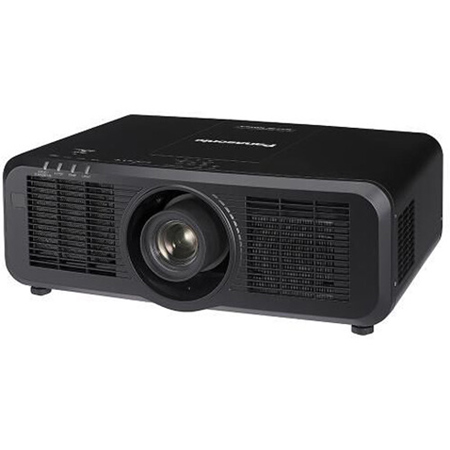
Elegant new cabinet styling helps these projectors blend into the room environment. Use of black for the recessed base makes the side and front panels appear slimmer. By combining unobtrusive styling with quiet operation and clear image visibility, the projection (not the projector) becomes the focus of attention. All-black versions are available for easy concealment in dark environments, such as museums.
Quiet Operation Increases Immersion
With lessons, meetings, conferences, and other events increasingly being held online, it's important that noise from the projector doesn't draw attention away from the presentation. Silent projection helps people focus, whether they're in the room or participating remotely. PT-MZ880 Series includes a Quiet Mode enabling almost inaudible 26 dB (PT-MZ780/MZ680) or 27 dB (PT-MZ880) operation, helping these projectors fit unobtrusively into the installation environment while keeping attention focused on the presentation.
Note: Operating noise is 32 dB in Normal Mode/Eco Mode (PT-MZ780/MZ680) and 34 dB in Normal Mode/Eco Mode (PT-MZ880).
Optional Powered Lenses Including New Ultra-Short-Throw Zoom Lens
PT-MZ880 Series ships with a 1.61-2.76:1 powered zoom lens and supports a selection of optional fixed and zoom lenses to suit your preferred projector location. These optional lenses include a new zero-offset ET-ELU20 Ultra-Short-Throw Zoom Lens, making this projector series not only a great fit for education and corporate use, but also for museum exhibition. When paired with a compatible powered lens, projectionists can perform zoom, focus, and V/H lens-shift adjustments using the projector remote control or Smart Projector Control app.
Multi-Screen Support System
Edge Blending
Edges of adjacent screens can be blended and their brightness controlled.
Color Matching
Corrects color reproduction variations of each projector via PC control software.
Digital Image Enlargement
Digital zoom up to 3x (H/V). Up to nine images (3 x 3) can be edge-blended to create large multi-screen images.
Contrast Sync and Shutter Sync
Contrast Sync synchronizes Dynamic Contrast value among multiple projectors connected via serial in/out terminals. This function increases the uniformity of individual images in a multi-screen system and reduces the visibility of overlapping areas of adjacent images for a seamless widescreen image. Shutter Sync, meanwhile, synchronizes shutter on/off timing for professional fade-in/fade-out effects.
Geometry Manager Pro Software (Geo Pro Software) with Free Grid
Geo Pro software makes edge-blending calibration and screen geometry adjustments via Windows PC easy. Overlay Free Grid on the projected image to reshape distorted areas by adjusting the position of node or V/H line control-points. Grids of between 2 x 2 and 11 x 11 lines are selectable, and work progress is saved automatically so you can move freely between grid resolutions. Grid and control-point colors are selectable to ensure clear visibility over the projected image.
Note: Some functions available in Geo Pro software are not supported by the PT-MZ880 Series. Download Geometry Manager Pro free from the PASS website.
Built-in Geometric Adjustment Functions
Geometric Adjustment is a suite of functions built into the projector operated via the projector remote control that allow installers to correct distortion when images are projected at an angle, onto curved screens, or over irregular screen surfaces. Correction extends to spherical, cylindrical, and other complex screen shapes without need of a connected PC. Maintain Aspect Ratio and independent Corner Adjustment simplify correction while the ability to save image-adjustment data is useful whenever correction settings needs to be disabled and reapplied, and for saving work progress as an adjustment profile is created.
Three HDMI Inputs Support CEC Commands
HDMI inputs are compatible with control signals sent via a CEC-command-compatible component, giving you limited control over the projector using the compatible source device's remote control. The projectors power up from Standby and commence playback automatically on command from a compatible player, such as optional Wireless Presentation System PressIT, when connected to the projector via HDMI.
Supports 4K Signal Input to Fit Your System Infrastructure
PT-MZ880 Series is compatible with 4K input signals, accepting 4K/60p video via HDMI inputs or DIGITAL LINK terminal. This capability is useful when integrating the projectors into existing 4K-ready system infrastructure or when it's necessary to distribute the same 4K signal to a network of endpoints with different display resolutions without having to use an external converter or to reencode the source.
USB-DC Output Supports Wireless Presentation System PressIT
The projectors include a 5 V/2 A USB-DC terminal to power optional Wireless Presentation PressIT or an HDMI network streaming device so that groups can easily share content to the big screen from their PCs or mobile devices. PressIT comprises a transmitter that works with Windows PC, Mac, and mobile devices, and a receiver that connects to your projector's HDMI port. The transmitter connects to receiver wirelessly with a single press and allows users to display their device-screen at full size. You can also connect a supported network media streaming device via HDMI and USB for a neat, self-contained installation.
Separate LAN and DIGITAL LINK Terminals
You can choose to control PT-MZ880 Series projectors via a dedicated LAN terminal or the HDBase-T-based DIGITAL LINK connection. Both support 100Base-TX- and 10BaseT-compatible control signals via Panasonic, Crestron Connected, AMX, and Extron applications. With control enabled via LAN, DIGITAL LINK is free to transmit video over long cable runs of up to 150 m (492 ft).
Works with Smart Projector Control App
Smart Projector Control is a remote-control app for iOS and Android devices that can be used to adjust, control, and monitor up to 64 projectors individually or simultaneously from anywhere within range of the wireless network. You can use the app to switch the unit on or off, select an input signal, and adjust the projector's OSD menu settings via your device's touchscreen while the projector is in standby or powered up with the shutter on. Projectionists can avoid delays by adjusting OSD settings via smartphone whenever OSD menu projection is inconvenient, such as immediately before a presentation starts. As well as enabling OSD menu operations, the app can be used to adjust lens settings, select test patterns, and focus the projection using your phone camera from distances of up to 30 m (98 ft) away.
Color Adjustment
Correct slight variations in the color reproduction range of individual units set up for multiple projection, particularly those in side-by-side configuration. Correction is performed on 3 or 7 colors.
Reduced Power Consumption
Power consumption is about 20 % less than previous models. These savings scale with every projector added to your fleet and make a significant contribution to your organization's efforts to reduce its carbon footprint.