This item is no longer available.
This option includes a full data display plus anciallary data packet inspection. It is provided as a software code and provides additional functionality to the chassis and to each separate analyzer instrument. If the 3G-SDI option is also purchased then the display will be upgraded to include 3G-SDI formats.
• SDI data view
• Ancillary data inspector
• Ancillary status
The SDI analysis option provides the engineer with a detailed view of the data words contained within the SDI stream. This allows the analysis of complex faults and is particularly useful when determining compatibility issues between equipment and when debugging new product developments within an R&D environment.
Detail within the active SDI stream can be viewed with continuous update. Analysis can be obtained from the generated or received SDI stream allowing quick comparison checks. A number of screen displays are provided for analysis.
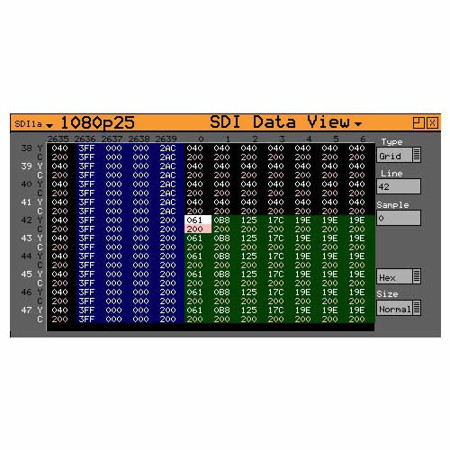
Grid
With reference to pixels at the top of the screen and lines along the left side of the screen, users can look within an x, y grid of pixel and ancillary data. Samples can be viewed as 8 or 10 bit, hex or decimal. Navigation is simple and fast using the thumb pad with the selected value highlighted in white. A separate entry box allows a specific line and sample to be selected.
Both the background and foreground text colors are coded for ease of identification. The background color at any time represents the FVH bits within the TRS words. In this way the operator can determine if a data element is active picture, vertical blanking, horizontal blanking, field 1, field 2 or TRS. The foreground color gives an indication of the type of pixel data being viewed - Y, Cb, Cr, R, G or B.
Stream
This allows the SDI continuous stream to be viewed. SD-SDI signals are represented by a 10 bit stream and HD/3G-SDI by a 20 bit stream. A further column provides information to aid the user in identifying data types.
Component
The component view splits the display into 3 columns displaying Y, Cb and Cr data as10/8 bit, hex or decimal. Split This mode splits the SDI stream further into the components 'Cb Y Cr Y' as 10/8 bit, binary, hex or decimal.
Ancillary Data
This separate window allows the user to capture whole Ancillary data packets identified by their data id (DID). Entering a known DID value or by selecting its descriptive text, the Ancillary packet will be continuously displayed if present within the SDI signal. Data values containing errors found will be displayed in red text. The data may be frozen on screen once captured. There is also a freeze on error check box.
Ancillary Status
The Ancillary Data Analyzer (ADA) option from PHABRIX provides broadcasters, studios, OB and broadcast manufacturers with a detailed analysis of the ancillary data present in a SDI signal. This option further allows additional 'user defined' selections with the appropriate DID or SDID code. Any ancillary packet code can be saved down for future recall.