PHABRIX Ancillary Data Analyzer Software Option for SxA, SxD and SxE Analyzer
SKU: PHSXOVNC
This item is no longer available.
Share:
Overview
Compare
Specs
Protection
Q&A







About PHABRIX Software Option
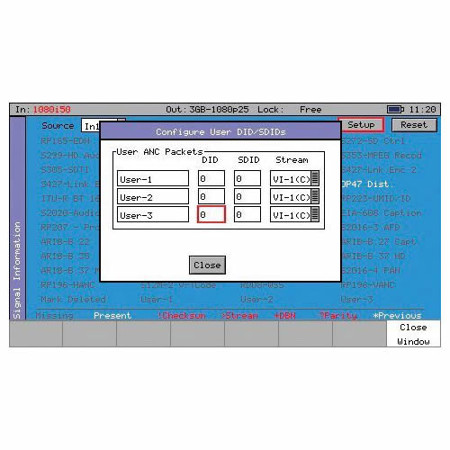
When it comes to comprehensive analysis of ancillary data within an SDI signal, the Ancillary Data Analyzer Software Option for SxA, SxD, and SxE Analyzer from PHABRIX is an indispensable tool for broadcasters, studios, OB, and broadcast manufacturers. This software option offers a meticulous examination of the ancillary data, providing a clear and concise overview through a user-friendly grid layout.
Engineers can swiftly identify the ancillary data present in the signal, with the packet type distinctly displayed as present, absent, or flagged in red if faulty. To simplify fault identification, intuitive icons are placed next to each packet, with a legend defining each icon conveniently located at the bottom of the viewing window.
The Ancillary Data Analyzer Software Option goes beyond just identifying the presence of packets. It also allows users to enable logging for each ancillary packet available from the grid view. This data can then be collated with other pertinent information in the events window of the main logging menu, providing a comprehensive overview of the signal's status.
Moreover, this software option offers customization by enabling users to define the required DID or SDID code. It also allows for the storage of any ancillary packet code, facilitating easy recall for future reference. It's important to note that while this software option is adept at identifying the presence of packets in the signal, it does not fully decode the ancillary data.
PHABRIX Software Option Features
- Simple grid view
- Present Absent Fault Alert Grid
- User defined identifier
- Custom save
- DID, SDID Filter
- Logging