
This item is no longer available.
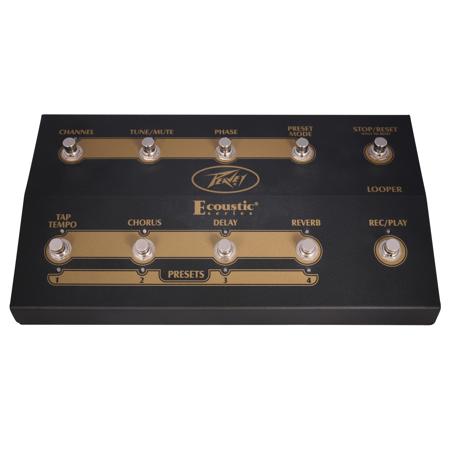
When in Channel Switch mode, this switch toggles between channels 1 and 2, including the effects section(s). In other modes, it changes which channel you are currently seeing/modifying with the foot switch or amplifier (red for Channel I and green for Channel II).
Tune/mute switch
This button mutes the power section of the amplifier, while keeping the tuner output active.
Phase switch
Changes the phase of the signal which can be very helpful in controlling feedback. Works with currently shown channel (red for Channel I and green for Channel II).
Preset mode switch
Toggles between Preset mode, wherein the Tap Tempo, Chorus, Delay and Reverb switches become presets 1-4 for each channel. In Normal operation mode, the preset buttons turn on and off the effects individually and allows access to the Tap Tempo function. In Preset mode, hold down one of the four preset buttons for two seconds to store a preset. Recalling an effect preset does not change/alter the other channel's recalled preset. There are four presets for channels I and II, for a total of eight effects presets!
Looper stop/reset switch
Stops the playback of the recorded loop in the Looper. Holding this button down for three seconds erases the recorded loop.
Tap tempo/preset 1 switch
Tapping this switch sets the delay time. In Preset mode, this switch becomes effects preset 1.
Chorus/preset 2 switch
Turns on/off the Chorus effect. In Preset mode, this switch becomes effects preset 2.
Delay/preset 3 switch
Turns on/off the Delay effect. In Preset mode, this switch becomes effects preset 3.
Reverb/preset 4 switch
Turns on/off the Reverb effect. In Preset mode, this switch becomes effects preset 4.
Looper rec/play switch
Starts the loop record function. This switch also starts the loop playback after the loop has been stopped by depressing the Looper Stop switch (5).