This item is no longer available.
TBS-453A 4-Bay M.2 SSD NASbook: A Compact yet Versatile Quad-core M.2 SSD NAS
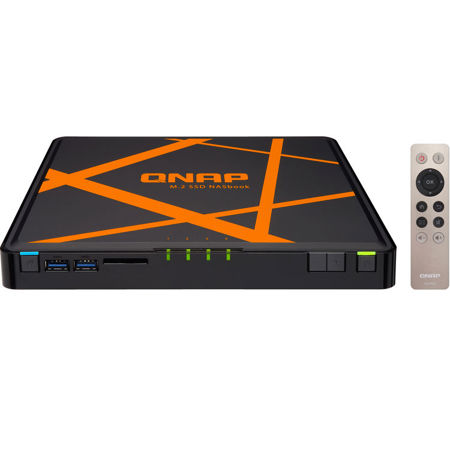
Compact, near-silent, and versatile, the 4-bay M.2 SSD NASbook TBS-453A is ideal for office meetings and multimedia applications. Featuring a quad-core Intel 1.6GHz processor, a built-in 4-port network switch, and using up to 4 M.2 SSDs for storage, the TBS-453A not only provides full-fledged NAS functions with RAID protection, but also can act as a switch and share network access with multiple users regardless of being powered on or off. Coupled with its dual HDMI output and 4K H.264 video display & transcoding abilities, the TBS-453A can easily be carried to meetings to present stored files and quality multimedia content. The TBS-453A also supports the open-source Linux platform that allows you to directly utilize feature-rich Linux apps, enjoying a private cloud combining storage and IoT applications.
Handy, quiet and compact with four M.2 SSDs
Designed with a "NASbook" concept, the TBS-453A uses a thin, B5-sized case to make it easy to setup anywhere in the office. Compared with a normal NAS, the TBS-453A's usage of M.2 SSDs (instead of conventional hard drives) allows it to be significantly smaller and quieter. The RAM and M.2 SSDs are also easily accessible for installation and upgrading by removing the rubber pads and thumb screws on the bottom of the TBS-453A.
Optimal performance with quad-core CPU, AES-NI hardware-accelerated encryption, and M.2 SSDs
The TBS-453A is powered by an advanced 14nm Intel Celeron N3150 quad-core 1.6GHz processor that can automatically burst up to 2.08GHz when performing CPU-intensive tasks. Coupled with dual-channel 4GB/8GB DDR3L-1600 RAM and four M.2 SSDs for storage, the TBS-453A has 2x Gigabit LAN ports and 3x Gigabit switch ports. The built-in 2 Gigabit LAN ports can deliver up to 112MB/s throughput independently for optimizing mission-critical tasks. The TBS-453A features Intel AES-NI hardware-accelerated encryption. With AES 256-bit encryption for full NAS volumes, the built-in 2 Gigabit LAN ports can deliver up to 109MB/s throughput independently.
Built-in four-port LAN switch for maximized network flexibility
The TBS-453A includes additional hardware-based LAN switch ports with network switch mode and private network mode settings, allowing you to easily build a flexible network environment. In the default switch mode, users can simply use the TBS-453A's network switch functionality to share the Internet and NAS resources at the same time. While in the private network configuration, users can create a closed network, allowing them to create secure environments for activities such as creating a secure surveillance recording with IP cameras.
The TBS-453A's network design greatly boosts collaboration and productivity at work as it ensures always-on Internet connectivity. Business meeting attendees, for example, could benefit from the network accessibility to access files stored on the TBS-453A or to search for information online during the meeting.
Dual HDMI output - switch between "duplicated" or "extended" desktop configurations
The TBS-453A supports QNAP's exclusive QvPC technology and comes with dual HDMI output, enabling you to use the NAS as a PC with a keyboard, mouse and HDMI monitors. You can configure the displayed content on the two monitors in either a "duplicated" or "extended" desktop configuration. Duplicating will display the same content on both displays, and extended allows users to display applications over two displays for improved multitasking convenience and productivity.
The TBS-453A can also be used as an amazing media player by using HD Station to enjoy rich apps including Plex Home Theater, Google Chrome, Mozilla Firefox, and more. Alternatively, you can directly use the TBS-453A as a PC by using Linux Station to enjoy the incredibly popular open source Linux operating system.
Wide range 10V - 20V DC input to meet various input voltage requirements
The TBS-453A is provided with a 65W 19V compact AC adapter and supports a DC power supply of 10-20V for maximum flexibility, making it suitable for industrial, factory and other environments that need a wide range of input voltages.
QTS-Linux dual systems for IoT applications
The TBS-453A features QTS-Linux dual systems which build on QNAP's advanced virtualization technologies. The revolutionary architecture of the TBS-453A enables users not only to enjoy the various advanced features introduced in QTS 4.2, download rich apps from QTS App Center but also to develop or utilize IoT packages for Linux and display them using HDMI output.
With the TBS-453A, you can develop and install various IoT packages on demand and centrally store the data on the TBS-453A, benefiting from a secure private storage and development solution. Simply plug in a keyboard, mouse and HDMI monitor to the TBS-453A, and use the Linux Station as if you were using a PC. You can also operate the Linux Station as a remote desktop via web browser for instant management.
Storage for hosting virtual machines and containerized applications
Virtualization Station allows you to host virtual machines (VM) on the TBS-453A and access them via a web browser or VNC. Virtualization Station supports multiple operating systems, fast VM creation, VM backup & restoration, VM import/export, snapshot, and Device Management for centrally managing VM. Virtualization Station allows the TBS-453A and VMs to share the same LAN port. No longer constrained by physical network performance, high-speed Virtual Switches greatly increases data transfer between VMs as well as between VMs and NAS through the internal interface. You can also download VMs on demand from online VM markets and import them to the TBS-453A without any complex procedures.
The TBS-453A also features the game-changing container technology for server virtualization with QNAP Container Station. It exclusively integrates LXC and Docker lightweight virtualization technologies, allowing you to operate multiple isolated Linux systems on the TBS-453A as well as download apps from the built-in Docker Hub Registry. Container Station also supports the Online Document app, which allows you to directly view, edit and store files of various types anytime on your NAS, including Office documents, images and text files.
Comprehensive data recovery with Snapshot, RTRR, and more
The TBS-453A offers various data recovery options. The web-based snapshot tool helps easily backup and restore data on the TBS-453A back to any point of time. You can take up to 1024 snapshots for both volumes and LUN, efficiently replicate volume/LUN snapshots via Snapshot Replica to remote servers by copying only the changes made, and quickly clone a volume /LUN snapshot as a local volume without interrupting the current system operation. Windows users can also directly restore files from snapshots with the Previous Versions feature, saving time and effort without requiring IT support.
RTRR (Real-Time Remote Replication) supports real-time or scheduled data backup to a remote QNAP NAS or FTP server and synchronizes files between remote and local folders. You can enjoy backup versioning to preserve a certain amount of versions, with options of simple versioning to schedule how many versions should be retained and for how long, or smart versioning with a rotation scheme that automatically replaces earlier backup versions. The TBS-453A also supports the rsync protocol to back up data to another remote server on a scheduled basis. Data can also be backed up to and restored from a range of cloud storage services, including Amazon S3, Amazon Glacier, Microsoft Azure, ElephantDrive, Dropbox, Google Drive, Google Cloud Storage, and more.
Cross-platform file sharing, centralized data storage
The TBS-453A supports SMB/CIFS, NFS, and AFP protocols for file sharing across Windows, Mac, Linux/UNIX networks. Data, logs and ISO images of CDs and DVDs can be centrally stored on the TBS-453A and protected by an integrated antivirus solution. The Windows AD and LDAP services enable system administrators to configure user permissions by using an existing Windows AD server, LDAP server or built-in LDAP service. The TBS-453A supports SAMBA v4 and can act as a Windows domain controller to manage privilege settings.
Well-rounded backup solutions to secure data
QNAP NetBak Replicator supports real-time and scheduled data backup on Windows including Outlook email archiving. Time Machine is also supported to provide Mac OS X users with a solution to effortlessly backup data to the TBS-453A. A wide range of third-party backup software such as Acronis True Image and Symantec Backup Exec are also supported.
Enhance productivity with multiple USB 3.0 ports
Direct-attached Storage (DAS) devices such as USB hard drives are incredibly convenient in portability, but they fall short in file sharing and functionality and can only be connected to one server or PC at one time. By connecting a DAS to the TBS-453A you can easily share its content with other users without having to unplug and move it around. The USB ports on the TBS-453A also support devices such as UPS and printers for greater all-round functionality.