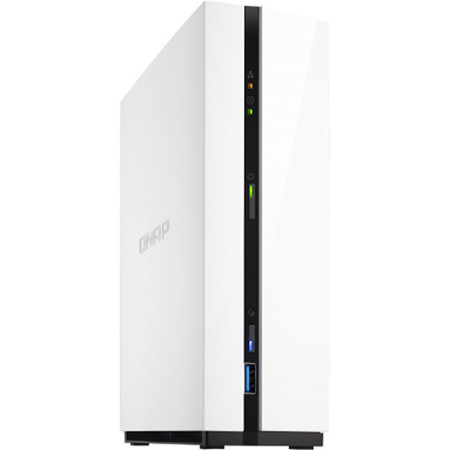
QNAP TS-128A 1-Bay NAS Enclosure, ARM RTD 1295 Quad-Core 1.4GHz, 1GB RAM
SKU: QNTS128AUS
This item is no longer available.
Recommended Alternatives
Share:
Overview
Compare
Accessories
Specs
Protection









About QNAP TS-128A
TS-128A - Lightweight and powerful entry-level NAS for private cloud and home entertainment
Equipped with a Realtek RTD1295 quad-core processor, the TS-128A provides home users with powerful features including snapshot-based backup, file synchronization, and private cloud services. The TS-128A is also a one-stop home entertainment portal for streaming photos, music, and videos to multiple devices throughout your home and beyond. With energy-saving and quiet operation, the TS-128A is especially suited for home users and provides easy-to-use and convenient functionality for file storage and multimedia needs.
Sleek and powerful
The TS-128A features a Realtek RTD1295 quad-core 1.4GHz processor, 1 GB RAM, and a 1GbE network port to provide performance of up to 112 MB/s. If you decide to encrypt your files with AES-256 encryption, the performance is still an impressive 112 MB/s - allowing you to ensure your privacy without sacrificing performance.
Lightweight and easy installation
The minimal and streamlined design of TS-128A makes it fit easily into your home. Featuring a unique, tool-less design, setting up the TS-128A is so easy that it doesn't even need a screwdriver!
A single NAS for cross-platform, multi-device file access and sharing
The TS-128A acts as a file exchange platform to simplify your file management across devices, and is compatible with a wide range of computers and devices (including Windows, macOS and more). For mobile devices, the Qsync suite can be installed for synchronizing and sharing files across PC, phones and tablets.
Backing up data is as easy as 1-2-3
By practicing safe computer habits and with the TS-128A handling your file backup tasks, you can rest easy knowing that your data is safe. QNAP's NetBak Replicator backup utility can assist in backing up/restoring files on a Windows PC while macOS users can set up Time Machine to save to the TS-128A.
High-end snapshot protection for files and data
QNAP has extended support for file snapshot protection to our entry-level NAS. Snapshots were originally only possible on high-end business systems, and they allow you to record the system state and data content at a single point of time. With snapshot protection, if you accidentally delete/modify files, or if any hard disks should fail or your network is infected with malware, you can quickly restore files to a previous point in time.
Back up your files with the versatile Hybrid Backup Sync
With the TS-128A, complicated backup settings are history. You can now use Hybrid Backup Sync as your single portal for backing up, restoring, and syncing files. Supporting local NAS, remote NAS and cloud storage as both origins and destinations, you can combine multiple backup tasks to provide optimal protection for your data. Other features include scheduling, versioning, data compression and multiple-layer encryption, so your files are kept safe and sound.
360-degree panorama photo/video
Good news for adventurers! QNAP NAS now supports the popular 360-degree panorama recording format! By clicking the 360-degree panorama display button, your photos and videos will be displayed as 360-degree panorama media files.
All your downloading needs covered
With the energy-efficient and quiet TS-128A, you no longer need to use different downloading utilities or to keep your computer running all the time. Use Download Station to search for downloads and to manage your download tasks.
Enjoy an amazing multimedia experience
The TS-128A transforms how to enjoy your photos, music and videos throughout your home and beyond. It's easy, convenient and fun!
Take photos anytime, anywhere and manage them with Photo Station. Organize photos by folders or albums, and view them in several modes.
With powerful smart playlists, comprehensive search functions and a user-friendly interface, Music Station is more than just music to your ears.
Video Station's smart collection, advanced search, and easy sharing functions makes it so easy for you to enjoy your videos. Spoiler alert: you can even import video information from multiple online databases!
Everything you need for the perfect multimedia experience
The all-new QVHelper can help you stream and decode multimedia files to media players on your computer and/or mobile devices. The Qfinder Pro utility can also save time and NAS system resources by transcoding media files locally on your PC before uploading them to the NAS. With the TS-128A your audiovisual experience is smoother and more convenient with useful apps and everything you need to enjoy great multimedia entertainment.
All these NAS functions on the go
The TS-128A has a multitude of companion mobile apps to extend its functionality to your smartphones and tablets. If you're on the go for business or pleasure, your files and data are only a few taps away.
Qfile lets you access the files saved on your TS-128A at anytime, from anywhere so you can ditch your thumb drives forever.
Qsync quickly and effortlessly syncs files across different platforms and multiple devices so you'll never miss any important information again.
Use Qget to remotely control your TS-128A to download files on the go. Files will be automatically downloaded to your TS-128A.
Use Qphoto to view and share photos stored on the TS-128A. You can also instantly upload photos/videos to the TS-128A as they're taken, so you don't have to worry about storage space issues or if your phone is lost.
Enjoy your music on the go with Qmusic! Search through your music and edit playlists before streaming or downloading from the TS-128A to your device.
Qvideo plays videos for you, and you can further share videos instantly and even stream them to Chromecast. Management features are also available on the go, such as categorizing, tagging and rating.
Serious security features
The TS-128A is loaded with comprehensive security features such as 2-step authentication, encrypted access, IP filtering/blocking and anti-virus. Also, you can use permissions for users and folders to block unwanted access from unauthorized users or apps.
Power efficient and quiet
The TS-128A requires only 7.06 W, providing powerful features without a high power bill. Other smart energy-saving modes help to minimize electricity usage, and with a quiet cooling fan both the noise and heat generated by the TS-128A is kept to a minimum.
QNAP TS-128A Features
- Qsync is an easy-to-use real-time file sync service for computers and mobile devices. With Qsync, your data can be shared across multiple locations, making file sharing even easier
- The TS-128A provides you with snapshot protection at an affordable price, allowing you to protect files and data from accidental deletion and malware attacks
- Hybrid Backup Sync gives you the freedom to set and combine multiple auto backup/sync functions to keep important data safe and to ensure peace of mind
- The three multimedia "stations" (Photo, Music, and Video) help you to effortlessly centralize, manage, organize, and browse your family's multimedia files
- Your multimedia collection can be streamed directly from the TS-128A to supported smart TVs, music players, and game consoles
- Download Station combines many popular downloading services and functions. With the power-efficient and quiet TS-128A, you can run downloading tasks for a long period of time without running up a large electricity bill