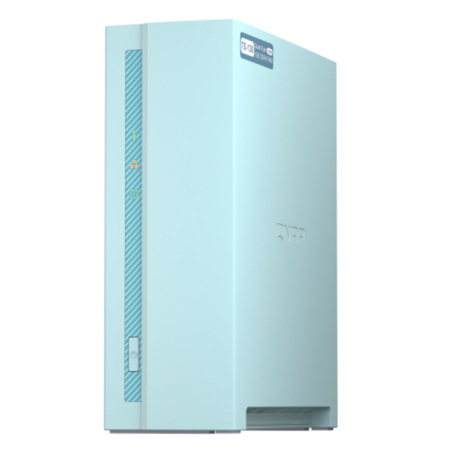
QNAP TS-130-US 1-Bay Tower Home NAS Enclosure, Realtek RTD1295 Quad-Core 1.4GHz Processor, 1GB RAM

SKU: QNTS130US

This item is no longer available.

Recommended Alternatives

Overview
Compare
Specs
Protection

Reviews about this item

Review Summary

Select a plan in the Add Protection section above and purchase with this product by clicking “Add to Cart”.

image-protection

TRUSTED PROTECTION PLANS, EXCEPTIONAL SERVICE.

Invest In Your Gear and Peace Of Mind!

Accidents happen where life happens. Protect your favorite Adorama products and purchase a protection plan to stay covered from accidental damage, mechanical or electrical failure, and more.

Repair or Replacement

Repair or Replacement

If we can’t fix it, we’ll replace it at no additional cost.

Accidental Damage

Accidental Damage

Protect your product from drops, spills, and more.

Peace of Mind

Peace of Mind

Enjoy your gear without fear. We have you covered!

Malfunction Protection

Malfunction Protection

When regular use of your product over time results in mechanical or electrical failure.

Zero Deductible

Zero Deductible

We will never charge you a deductible after the purchase of a plan.

Customer-Focused Support

Customer-Focused Support

Our claims process is simple & easy and our customer service team is happy to help.

Adorama Protect powered by Extend is available for purchase to customers in the United States. Not available for purchase Internationally or in U.S. Territories.

QNAP TS-130-US Specifications

Hardware

Hardware

Jump to...
  • CPU

    Realtek RTD1295 quad-core 1.4GHz processor

  • CPU Architecture

    64-bit ARM

  • Floating Point Unit

    Yes

  • Encryption Engine

    Yes

  • System Memory

    1 GB DDR4, not expandable

  • Maximum Memory

    1 GB DDR4, not expandable

  • Flash Memory

    4 GB (Dual boot OS protection)

  • Drive Bay

    1x 3.5" SATA 6Gb/s, 3Gb/s

  • Drive Compatibility

    3.5" SATA hard disk drives
    2.5" SATA hard disk drives
    2.5" SATA solid state drives

  • Gigabit Ethernet Port (RJ45)

    1

  • Wake on LAN (WOL)

    Yes

  • 5 Gigabit Ethernet Port

    Optional via the QNA-UC5G1T USB to 5GbE network adapter (5G/2.5G/1G/100M)

  • Jumbo Frame

    Yes

  • USB 2.0 port

    1

  • USB 3.2 Gen 1 port

    1

  • Form Factor

    Tower

  • LED Indicators

    System Status, LAN, HDD

  • Buttons

    Power, Reset

  • Operating temperature

    32 Degree F - 104 Degree F (0 - 40 Degree C)

  • Storage Temperature

    -4 Degree F - 158 Degree F (-20 - 70 Degree C)

  • Relative Humidity

    5-95% RH non-condensing, wet bulb: 27 Degree C (80.6 Degree F)

  • Power Supply Unit

    36W Adapter, 100-240V

  • Power Consumption (HDD Sleep Mode)

    3.45 W

  • Power Consumption

    Operating Mode, Typical 7.29 W

  • Fan

    1x 50mm, 12VDC

  • Sound Level

    15.2 db (A)

  • System Warning

    Buzzer

  • Dimensions (H x W x D)

    7.38 x 2.6 x 6.2" (18.8 x 6.6 x 15.7cm)

  • Weight

    1.34 lbs (0.61kg)

Software

Jump to...
  • Operating System

    QTS 4.4.1 (embedded Linux)

  • Supported Client Operating Systems

    Apple Mac OS 10.7 or later
    Linux and UNIX
    Microsoft Windows 7, 8, and 10
    Microsoft Windows Server 2003, 2008 R2, 2012, 2012 R2 and 2016

  • Supported Browsers

    Apple Safari 7 or later, Google Chrome, Microsoft Internet Explorer 10 or later, Mozilla Firefox

  • Supported Languages

    Chinese (traditional and simplified), Czech, Danish, Dutch, English, Finnish, French, German, Greek, Hungarian, Italian, Japanese, Korean, Norwegian, Polish, Portuguese (Brazil), Romanian, Russian, Spanish, Swedish, Thai, and Turkish

  • Supported File Systems

    Internal hard drive (EXT4)
    External hard drive (EXT3, EXT4, NTFS, FAT32, HFS+, and exFAT)

  • Network and Virtual Switch

    TCP/IP: Dual stack (IPv4 and IPv6)
    Jumbo frame
    DHCP server and client
    RADVD
    USB Wi-Fi adapter
    Static Route
    NCSI (Network Connectivity Status Indicator)
    DDNS settings (Customize & Multiple Service)

  • Web Server

    HTTP/HTTPS Connections (TLS 1.0/1.1/1.2)
    Supports WebDAV Connection
    Supports Virtual Host (Max: 32)
    Importable SSL Certificate

  • Security

    Network access protection w/auto-blocking (SSH, Telnet, HTTP(S), FTP, CIFS/SMB, & AFP)
    Host access control for shared folders (CIFS/SMB)
    AES 256-bit volume-based encryptions which are validated by FIPS 140-2 (Cryptographic Algorithm Validation Program)
    256-bit external drive encryption (AES)
    Importing of SSL certificates from Let's Encrypt
    Instant alerts through email, SMS, push service, audio, and LCD panel
    2-step verification

  • Storage Management

    Bitmap support
    Disk auto S.M.A.R.T. data migration
    Disk bad block scan and S.M.A.R.T test.
    Disk bad block recovery
    Disk secure data erase
    Ironwolf Health Management
    Storage pools
    Qtier Data Tiering Technology
    Automatic or scheduled data tiering
    IO-aware auto tiering
    Shared folder tiering on demand

  • Storage Management (Contd.)

    Flexible volumes and LUNs with thin provisioning and space reclaiming
    If the NAS has less than 4GB RAM, then the maximum volume capacity is 144TB.
    If the NAS has at least 4GB RAM, then the maximum volume capacity is 250TB.
    Online volume expansion
    Volume type conversion
    Volume shrink
    Storage space utilization
    Snapshots

  • Storage Management (Contd..)

    Volume and LUN snapshots
    Snapshot Dashboard
    Snapshot Manager
    Snapshot local restore and revert
    Snapshot Clone
    Snapshot Replica and Snapshot Vault
    Snapshot remote restore and revert
    Unified Snapshot Directory
    Support for Windows Previous Versions (CIFS/SMB)
    Snapshot Agent for Microsoft Windows and VMware vSphere
    Storage expansion using QNAP expansion units
    JBOD enclosure roaming

  • iSCSI (IP SAN)

    iSCSI targets with multiple LUNs per target
    LUN mapping (LUN can be moved between iSCSI and FC if supported)
    LUN masking
    Online LUN capacity expansion
    SPC-3 persistent reservation
    MPIO & MC/S
    iSCSI LUN backup, one-time snapshot, and restoration
    Virtual disks using iSCSI initiator
    Stack chaining master

  • VJBOD Cloud

    VJBOD Cloud now supports cloud Volume/LUNs.
    VJBOD Cloud now supports one-to-one pairing between cloud volumes/LUNs and local stored spaces.
    VJBOD Cloud now supports Amazon S3 Azure, BackBlaze, HuaWei Cloud, Alibaba Cloud, HKT, Google Cloud, OpenStack, RackSpace, Wasabi cloud, IBM cloud object storage service.

  • VJBOD Cloud (Contd.)

    VJBOD Cloud now supports local stored mode, which means that data can be stored on the NAS and the data can be backed up to the cloud.
    VJBOD Cloud now supports 20 recovery points for recovering volumes/LUNs.

  • Notification Center

    Added support for sending notifications via SMS center (SMSC) or providers, including Nexmo, Twilio, and Clickatell.
    Added Outlook as an SMTP service option.
    Added support for sending notifications via instant messaging applications, including Skype and Facebook Messenger.
    Added support for Overview and History in Notification Center.
    Added support for 23 languages for notification messages.

  • Notification Center (Contd.)

    Added support for creating custom notification rules to specify notification criteria, including application categories, severity levels, and keywords.
    Delivery method and message recipient settings are now more flexible.
    Added support for creating multiple notification rules at the same time.
    Added support for sending notifications for a single system event.

  • Power Management

    Wake-on-LAN (WoL)
    IPMI Management Module [x89]
    Standby mode for internal drives
    Scheduled power on and off
    Automatic power on after power recovery (x86)
    USB and network UPS support with SNMP management
    System sleep mode (S3)

  • Access Rights Management

    Multiple user creation
    User data importing and exporting
    User quota management
    Local user access control (AFP, CIFS/SMB, FTP, and WebDAV)
    Application access control (File Station, Music Station, Photo Station, and Video Station)
    Subfolder permissions (AFP, CIFS/SMB, FTP, and File Station)

  • Domain Authentication

    Microsoft Active Directory (AD) and domain controller support
    LDAP server and client
    Domain user login (AFP, CIFS/SMB, FTP, and File Station)

  • myQNAPcloud

    Free host name registration (DDNS), Optional myQNAPcloud SSL certificates (DDNS), Auto-router configuration using UPnP, Web-based file manager with HTTPS 2048-bit encryption, myQNAPcloud Link for remote access without complex router setup

  • Qsync

    File syncing across multiple devices with SSL secure connection
    Selective synchronization for specific folders or subfolders
    Team folders as file center for better collaboration
    File sharing using email links
    Policy settings for conflicting files and file type filter
    Version control for a maximum of 64 versions

  • Qsync (Contd.)

    Unified privilege and configuration management
    Central configuration mode
    Remote erase and restore
    Qsync client supported platforms: Windows, Mac, Ubuntu, Android and iOS

  • Resource Monitor

    Monitoring of NAS system resources such as CPU, memory and network
    Monitoring of NAS storage resources such as volumes and disk activity
    Monitoring of NAS application resource use
    Creation of extra swap space when SSDs are installed

  • Helpdesk

    Reporting of issues to the QNAP support team, with automatic collection of system information
    Remote connection between QNAP support engineers and NAS for issue resolution (with user permission)

  • Web Desktop Administration

    Multi-window, multitasking system management
    Smart toolbar and dashboard for system status display
    SNMP versions 2 and 3
    Resource monitor
    Network recycle bin
    Recover files deleted using AFP, CIFS/SMB, and File Station
    Automatic cleanup
    File type filter

  • Web Desktop Administration (Contd.)

    Comprehensive logs (events and connections)
    Syslog server and client
    Backup and restoration of system settings
    Qmanager: Mobile application for remote system monitoring and management
    Qboost

  • File Server

    File sharing across Windows, Mac, and Linux/UNIX
    Microsoft networking (CIFS/SMB)
    Apple networking (AFP)
    NFS version 3/4 services
    Windows ACL (CIFS/SMB)
    Advanced folder permissions (AFP, CIFS/SMB, and FTP)
    Shared folder aggregation (CIFS/SMB)

  • FTP Server

    FTP, SFTP and TFTP protocols, FTP over SSL/TLS (explicit FTPS), FXP support

  • File Station

    Integrate with HybridMount which supports File Cloud Gateway and File Station Mount mode. File Station Mount mode supports:
    Cloud drive mounting for Google Drive, Dropbox, Microsoft OneDrive, Microsoft OneDrive for Business, HiDrive, Amazon Cloud Drive, Yandex Disk and Box
    Remote shared folder mounting (CIFS/SMB, FTP, and WebDAV)
    Restore QDFF files and folders with HBS 3

  • File Station (Contd.)

    Document viewing using Office Online, Google Docs, and Chrome extension
    Microsoft Office file editing using Google Docs, Sheets, and Slides
    ISO file mounting (maximum: 256 ISO files)
    Mount smart phones as external storage
    Read access for compatible optical disc drives
    Read access for compatible smartphones (MTP)
    Download and upload link sharing
    File dragging and dropping (Chrome and Firefox)

  • File Station (Contd..)

    File compression (ZIP and 7z)
    Download link creation and sending for publicly shared files, with expiration date and password protection
    Subtitle display (SRT and UTF-8)
    Slideshow playback in media viewer
    Convert image files to pdf by "Image2PDF" integration
    Qfile: Mobile app for file browsing and management

  • Qfiling

    Auto filing
    Recipe function
    Archiving through iSCSI, USB, DVD and remote NAS
    Advanced settings
    Source File Filters
    File Editing
    File deletion
    Data integrity check
    File conflict policy

  • HBS

    (Hybrid Backup Sync) Cloud storage backup to Amazon Glacier, Amazon S3, Azure Storage, Google Cloud Storage, HKT Object Storage, OpenStack Swift, WebDAV
    Cloud storage syncing with Alibaba Cloud, Amazon Drive, Amazon S3, BackBlaze B2, Box, Dropbox, OneDrive, Google Drive, HiDrive, hubiC, OneDrive, OneDrive For Business, ShareFile, Yandex.Disk
    RTRR server & client with bandwidth control
    Rsync server with download bandwidth control

  • HBS (Contd.)

    Remote server syncing (CIFS/SMB, FTP, Rsync, and RTRR)
    Scheduled backup to local and remote storage spaces
    Backup versioning (RTRR)
    Encryption, compression, and file filters
    Centralized management for backup, restoration, and sync jobs
    Support for Apple Time Machine
    Data backup to multiple external storage devices

  • HBS (Contd..)

    Desktop backup with QNAP NetBak Replicator for Windows
    Support for the following third-party backup software: Veeam Backup & Replication, Acronis True Image, Arcserve Backup, Retrospect, Nakivo Backup & Replication, and Veritas Backup Exec

  • Multimedia Console

    Integrating indexing, thumbnail generation, and content management.
    New content management design, configuring content sources for QTS multimedia applications.
    View the status of multimedia apps and services all on the same screen.

  • QuMagie

    Browse photos in timeline view or folder view.
    Virtual albums and smart albums.

  • Photo Station

    Photo organization by thumbnail, list, timeline, or folder
    Virtual and smart albums
    Validity control for album sharing
    Photo tagging with text, colors, and ratings
    Slideshows with background music and transition effects
    Album configuration backup and restoration
    Advanced folder permissions
    Support for domain users
    Qphoto: Mobile application for online browsing and sharing

  • Music Station

    Music playing and sharing through web browsers
    Music streaming to multiple devices
    Changing of album covers through Google search or by uploading photos
    Internet radio (MP3)
    Eight music alarms
    Switching between spotlight mode and manage mode
    Advanced search
    Scrolling lyrics
    Qmusic: Mobile application for music streaming and management

  • Video Station

    Video organization by thumbnail, list, timeline, or folder
    Virtual and smart collections
    Video tagging with text, colors, and ratings
    Video link sharing through social media and email
    Movie information and poster display from Internet sources or user-uploaded files
    Subtitle display (SRT, ASS, SSA)
    Subtitle search and downloading

  • Video Station (Contd.)

    Subtitle file importing
    Subtitle display style adjustment
    Playback speed adjustment
    Direct video streaming for certain file formats
    Facebook login
    Advanced folder permissions
    Support for LDAP users
    Video uploading to YouTube and Youku
    Multi-zone video display
    Qvideo: Mobile application for online video browsing and management

  • Container Station

    Support for LXC & Docker
    Application downloading from built-in Docker Hub Registry
    One-click installation
    Container importing and exporting
    Console mode
    Three networking modes (Note: Docker containers support Bridge, NAT, Host mode. Linux containers (LXC) support only NAT.)
    Auto-start containers
    Docker certificate downloading
    Private registry addition
    Application repository for switching to any repository on GitHub.com

  • QUSBCam2

    Support for configuring USB webcams as ONVIF IP cameras (remotely manageable)
    Support for monitoring live views (no other apps required)
    Support for RTSP

  • QVPN Service

    VPN server
    Friendly graphical overview page.
    Secure remote access with PPTP, L2TP/IPSec, OpenVPN, QBelt(QNAP proprietary) protocol.
    Support for a maximum of 100 clients.
    Support public/ NAS default/ manually DNS server.
    Support manually assign/auto detect/none outgoing network interface.
    Support privilege settings for domain/Local users.

  • QVPN Service (Contd.)

    VPN client
    Support PPTP, L2TP/IPSec, OpenVPN, QBelt(QNAP proprietary) protocol.
    Support using VPN as a NAS default gateway.
    Support connection log check.
    Support utility and Mobile apps for Windows, Mac, iOS, Android.

  • DLNA Server

    Support for DLNA/UPnP TVs and players such as PlayStation 4 and Xbox One
    Support for CUE indexing file for APE and FLAC

  • Q'center (NAS CMS)

    Monitoring of multiple NAS devices
    Utilization history reports
    Unified configuration management
    Monitoring of NAS devices behind NAT routers with Connect to Q'center

  • Qfinder Pro

    QNAP NAS location on the same local network
    NAS shared folder mounting
    Basic setting configuration (firmware, SMTP server, and network settings)
    Direct connection with USB QuickAccess and Thunderbolt (specific models only)
    Storage Plug & Connect (Windows only)
    Creation and mapping of NAS shared folders
    Creation of and connection to iSCSI targets and LUNs
    Media upload (Windows only)
    Media file upload to the NAS

  • App Center

    Official and community software add-ons
    Automatic updates and notifications for new version
    Repository for imported third-party content
    User-specified volume for storing applications

  • AirPlay & Chromecast

    Video, photo and music streaming to Apple TV or Chromecast using the following:
    NAS applications: File Station, Music Station, Photo Station, and Video Station
    Mobile applications: Qfile, Qmusic, Qphoto, and Qvideo

  • Download Station

    PC-less downloads (BitTorrent, FlashGet, FTP/FTPS, HTTP/HTTPS, QQDL, and Thunder)
    BitTorrent: Support for search, magnet links, private trackers, and proxy
    Scheduled download and bandwidth control
    RSS subscription and download (broadcatching)
    Support for add-ons that extend download functionality
    Qget: Mobile application for download browsing and management

  • Notes Station 3

    Insert Evernote Notes in Notes Station 3
    Enable Embedding YouTube video into Notes
    Table creation using the insert table editor

  • Qcontactz

    One-way scheduled sync of contacts from multiple Google accounts
    Contact importing from CSV or vCard 3.0 files
    Contact exporting to CSV or vCard 3.0 files
    Duplicate contact searching and merging
    Contact management: Groups, favorites, lock, search, delete and restore
    Support for Android and iOS

  • IFTTT Agent

    Daily task automation
    Social media data archiving
    File synchronization between the NAS and various cloud services
    System event notifications on Line, Skype, Gmail, and mobile phones
    Music playback on Music Station using Amazon Echo voice commands
    Usage of motion detection sensors as trigger for camera recording on Surveillance Station

  • Qmiix Agent

    File synchronization between the NAS and various cloud services
    View miixes made using the Qmiix web portal that include triggers and actions involving QNAP apps.
    Create miixes for web-based and NAS-related apps.
    Create miixes on the Qmiix web portal that include File Station, a QNAP app
    System event notifications on Line, Skype, Gmail, and mobile phones

About QNAP TS-130-US

TS-130
Budget-friendly Home NAS for file storage and multimedia streaming with Snapshot protection.

Lightweight, quiet, and versatile, the TS-130 is the perfect entry-level Home NAS. Coated in a shade of elegant baby blue, the TS-130 comfortably fits into your living environment to create a smarter home for file storage and entertainment. By centrally storing and backing up files to the TS-130 you can easily access, sync, and share them with your devices and protect them from viruses and ransomware with Snapshots. A complete home entertainment portal also awaits, allowing you to stream and share photos, music, and videos with family and friends. Create a smart digital home now with the TS-130!

An entry-level Home NAS with snapshot protection, allowing you to protect files and data from accidental deletion and malware attacks.

Centrally store photos, music, and videos; easily browse, organize, and share multimedia files, and enjoy video streaming for greater entertainment.

Use HBS to back up or sync NAS files to remote or cloud storage space for reliable data backup and restoration.

Remotely access, manage, and share NAS files via the Internet using the myQNAPcloud service.

Serves as your secure private cloud and supports user account protection, IP blocking, 2-step verification, encryption access, and more.

Flexibly scale your total storage capacity by connecting USB expansion enclosures (TR-004 or TL-D800C).

Sleek and stylish design
Adorned with a refreshing baby blue color, the minimal and slim TS-130 fits anywhere in your home. Let the TS-130 help you create a smarter home for greater productivity and boundless entertainment.

Effective cooling fan for heat flow
The TS-130 is small in size (187.5mm high, 66.1mm wide, and 157.6mm in depth) and requires only 7.3W, providing powerful features without impacting your energy bill. The 5 cm cooling fan assists in maintaining high system performance with minimal disruptive sound.

Compact feature-rich NAS for home and everyday use
Powered by Realtek RTD1295 quad-core 1.4 GHz processor, built-in 1 GB DDR4 RAM, one Gigabit LAN port, and supports SATA 6Gb/s hard drives, the TS-130 provides dependable read/write performance for running various personal and home NAS applications. The TS-130 features AES-NI 256 hardware-accelerated encryption for both full NAS volumes and shared folders, boosting system performance while securing sensitive data stored in the TS-130.

Tips for a more productive work day
The TS-130 provides a smart NAS solution for professionally managing files by integrating rich apps for storing, synchronizing, searching, and archiving files. You can easily access files on various devices (including USB storage and mobile phones), instantly synchronize files with friends' or colleague's devices, quickly find specific files, and automatically organize your documents and media files. The TS-130 helps you save time while being more efficient and productive.

Always remember to back up your data
The TS-130 provides a flexible backup and disaster recovery solution, including snapshots that record the system status and data. You can easily restore data back to any point of time with snapshots or backup files whenever needed.

Windows and Mac backup
Backup/restore files from Windows computers with the license-free QNAP NetBak Replicator utility. Time Machine is fully supported for backing up Mac computers.

Uses HBS for cloud backup
HBS consolidates backup, restore, and synchronization for easily transferring data from the TS-130 to another QNAP NAS or cloud storage space for double protection.

Instant snapshots
Snapshots are essential for NAS data protection and restoration. The TS-130 supports up to 16 snapshots per volume/LUN, and up to 32 snapshots per NAS.

A snapshot a day keeps ransomware away
Snapshots provide a dependable method for protecting data in the face of growing ransomware threats. Use Snapshot Manager to manage storage spaces for snapshots, while also creating Snapshot Replica tasks to save snapshots to another NAS for double protection. If files become infected, you can easily restore them to an earlier state using a Snapshot.

Comprehensive home entertainment with flexible multimedia streaming
Make the TS-130 your home multimedia hub for streaming photos, music, and videos to all your devices!

Easy and fun photo management with QuMagie
QuMagie is a photo management application that allows you to easily manage and find photos using its built-in timeline scroll, customizable folder covers, iOS Live Photos display, and powerful search tool (such as using Tags). By using the QuMagie Mobile App and enabling the "Auto upload" function, your photos can be automatically uploaded to the TS-130 as soon as they are taken.

Easy and secure remote connection with myQNAPcloud
Wherever you are, myQNAPcloud allows you to be always connected to your TS-130 via the Internet by using a unique domain name. It is easy, secure, and convenient to access, manage, and share NAS data as you do not have to worry about complex routing settings. myQNAPcloud also strengthens keys on SSL Certificates to 2048-bits, ensuring the security of remote access.

Protect your data with higher security
The TS-130 is loaded with comprehensive security features to keep your data safe.

Security Counselor
A security portal for the TS-130 that scans for weaknesses and offers recommendations for enhancing NAS security. It also integrates anti-virus and anti-malware scanning software.

IP blocking
Operates policy-based automatic IP blocking of suspicious IP addresses. You can also block specific IP addresses to strengthen system security and reduce the risk of malicious attacks over the Internet.

2-step verification
When activated, anyone who logs in to the TS-130 must enter a one-time verification code after their username and password.

Notification Center
Consolidates system logs and notifications of all NAS apps, facilitating smooth and easy NAS management. You can receive notifications via emails, SMS, instant messages, and push notifications (through the Qmanager mobile app and web browsers).

All these NAS functions on the go
The TS-130 has a multitude of companion mobile apps to extend its functionality to your smartphones and tablets. Whether you're on the go for business trips or traveling, your files and data are only a few taps away.

Qfile allows you to remotely access NAS files, freeing you from having to carry important data on USB thumb drives. Files can also be downloaded to your mobile devices for offline reading.

Qmanager takes the hassle out of managing multiple NAS by allowing you to remotely monitor system status, shutdown/restart the NAS, and pause/run downloads and backup tasks.

With Qsync Pro, you can easily sync files between your NAS and devices. By enabling "Space-saving mode" on the NAS with Qsync, files from your NAS will not be transferred to your mobile device unless you try to open it, helping to save cellular data usage and device space.

Securely and easily connect to your TS-130 using a VPN from your mobile device with QBelt, PPTP, OpenVPN, L2TP protocols.

Expand your storage capacity with HybridMount
HybridMount allows you to flexibly expand your storage capacity by connecting to cloud storage. You can leverage QTS apps to manage and edit your cloud files or monitor multimedia files.
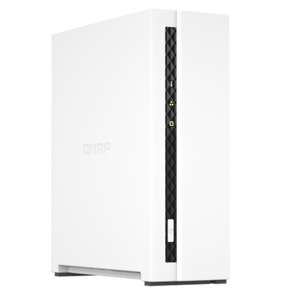

QNAP TS-130-US Features

  • Sleek and stylish design
  • Effective cooling fan for heat flow
  • Compact feature-rich NAS for home and everyday use
  • Tips for a more productive work day
  • Always remember to back up your data
  • Windows and Mac backup
  • Uses HBS for cloud backup
  • Instant snapshots
  • A snapshot a day keeps ransomware away
  • Comprehensive home entertainment with flexible multimedia streaming
  • Easy and fun photo management with QuMagie
  • Easy and secure remote connection with myQNAPcloud
  • Protect your data with higher security
  • Security Counselor
  • IP blocking
  • 2-step verification
  • Notification Center
  • All these NAS functions on the go

Key Features

  • Sleek and stylish design
  • Effective cooling fan for heat flow
  • Compact feature-rich NAS for home and everyday use
  • Tips for a more productive work day
  • Always remember to back up your data
  • Windows and Mac backup

What's in the box:

  • Qnap TS-130-US 1-Bay Tower Home NAS Enclosure
  • Ethernet Cable
  • AC Adapter
  • Power Cord
  • 12x Flat Head Screw for 2.5" HDD
  • 16x Flat Head Screw for 3.5" HDD
  • Quick Start Guide
  • Qnap 2 Year Limited Warranty





