

Orders placed during Passover Holiday (Wed 4/1 after 4PM ET – Thurs 4/9) will ship Fri 4/10. View our holiday shipping schedule.


This item is no longer available.
Review Summary
Accidents happen where life happens. Protect your favorite Adorama products and purchase a protection plan to stay covered from accidental damage, mechanical or electrical failure, and more.
If we can’t fix it, we’ll replace it at no additional cost.
Protect your product from drops, spills, and more.
Enjoy your gear without fear. We have you covered!
When regular use of your product over time results in mechanical or electrical failure.
We will never charge you a deductible after the purchase of a plan.
Our claims process is simple & easy and our customer service team is happy to help.
Adorama Protect powered by Extend is available for purchase to customers in the United States. Not available for purchase Internationally or in U.S. Territories.
Browse our FAQ
AMD Ryzen 3 1200 4-core/4-thread 3.1 GHz processor, Turbo Core 3.4 GHz
Architecture: 64-bit
Graphics: Optional (with PCIe expansion card)
Encryption Engine: AES-NI
4 GB DDR4 (1x 4GB)
64 GB (4x 16 GB)
4x Long-DIMM slots
(For dual- or quad-DIMM configurations, you must use a pair of identical DDR4 modules.)
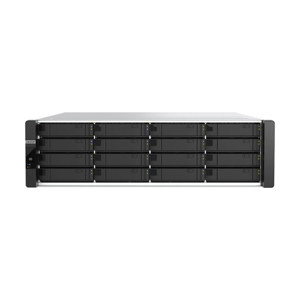
16x 3.5" SATA 6 Gbps bays
3.5" bays:
3.5" SATA hard disk drives
2.5" SATA hard disk drives
2.5" SATA solid state drives
2x 10GbE SFP+ ports
2x RJ45
2x USB 3.1 Gen 2 (10 Gbps)
1x USB 3.1 Gen 2 (10 Gbps) Type-C
1x 3.1 Gen 2 (10 Gbps) Type-A
4x USB 3.0 Type-A
Slot 1: Gen3 x8 (if Slot 2 is occupied, then the speed becomes Gen3 x4)
Slot 2: Gen3 x4
Slot 3: Gen3 x8 (if Slot 4 is occupied, then the speed becomes Gen3 x4)
Slot 4: Gen3 x4
Optional: With PCIe expansion card
3U Rackmount
500W (x2), 100-240V AC, 50/60Hz
In operation: 136.45 W
4x 9.2cm fan (12V DC)
46.6 dB(A)
32 - 104 Degree F (0 - 40 Degree C)
5-95% RH non-condensing
Wet bulb: 80.6 Degree F (27 Degree C)
5.11 x 18.93 x 22.57" (130 x 481 x 573.5mm)
37.83 lb (17.16kg)
QTS 4.3.4 (embedded Linux)
Apple Mac OS 10.7 or later
Linux and UNIX
Microsoft Windows 7, 8, and 10
Microsoft Windows Server 2003, 2008 R2, 2012, 2012 R2 and 2016
Apple Safari 7 or later
Google Chrome
Microsoft Internet Explorer 10 or later
Mozilla Firefox
Chinese (traditional and simplified), Czech, Danish, Dutch, English, Finnish, French, German, Greek, Hungarian, Italian, Japanese, Korean, Norwegian, Polish, Portuguese (Brazil), Romanian, Russian, Spanish, Swedish, Thai, and Turkish
Internal hard drive (EXT4)
External hard drive (EXT3, EXT4, NTFS, FAT32, HFS+, and exFAT)
TCP/IP: Dual stack (IPv4 and IPv6)
Jumbo frame (failover, multi-IP settings, port trunking/NIC teaming)
DHCP server and client
USB Wi-Fi adapter
Virtual switch
Virtual switch editing in Virtualization Station
Combining virtual machines and containers in the same virtual switch
Network Address Translation (NAT)
Spanning Tree Protocol (STP)
WirelessAP Station
Network access protection with auto-blocking (SSH, Telnet, HTTP(S), FTP, CIFS/SMB, and AFP)
Host access control for shared folders (CIFS/SMB)
AES 256-bit folder-based and volume-based encryptions which are validated by FIPS 140-2 CAVP (Cryptographic Algorithm Validation Program)
256-bit external drive encryption (AES)
Importing of SSL certificates from Let's Encrypt
Instant alerts through email, SMS, push service, audio, and LCD panel
2-step verification
Storage space utilization monitoring
Flexible volumes and LUNs with thin provisioning and space reclaiming
Supported RAID types: RAID 0, 1, 5, 6, 10, 50, JBOD, Single
RAID hot spare and global hot spare
RAID rebuild speed customization
Advanced secure data erase
Storage pools
Qtier Technology (automated storage tiering)
Automatic or scheduled data tiering
IO-aware auto tiering
Shared folder tiering on demand
Snapshots
Volume and LUN snapshots
Snapshot Dashboard
Snapshot Manager
Snapshot cloning
Snapshot Vault
Snapshot Replica
Unified Snapshot Directory
Support for Windows Previous Versions (CIFS/SMB)
Snapshot Agent for Microsoft Windows and VMware vSphere
Online volume expansion
Online storage pool expansion
Online RAID capacity expansion
Online RAID level migration
SMART data migration
Storage expansion using QNAP expansion units
JBOD enclosure roaming
SSD read-only or read-write cache
Bad block scan and hard drive S.M.A.R.T test.
Bad block recovery and RAID recovery
Bitmap support
iSCSI targets with multiple LUNs per target
LUN mapping and masking
Online LUN capacity expansion
SPC-3 persistent reservation
MPIO & MC/S
iSCSI Extensions for RDMA (iSER) with VMware ESXi
iSCSI LUN backup, one-time snapshot, and restoration
Virtual disks using iSCSI initiator
Stack chaining master
Wake-on-LAN (WoL)
Standby mode for internal drives
Scheduled power on and off
Automatic power on after power recovery
USB and network UPS support with SNMP management
Multiple user creation
User data importing and exporting
User quota management
Local user access control (AFP, CIFS/SMB, FTP, and WebDAV)
Application access control (File Station, Music Station, Photo Station, and Video Station)
Subfolder permissions (AFP, CIFS/SMB, FTP, and File Station)
Microsoft Active Directory (AD) and domain controller support
LDAP server and client
Domain user login (AFP, CIFS/SMB, FTP, and File Station)
Free host name registration (DDNS)
Optional myQNAPcloud SSL certificates (DDNS)
Auto router configuration using UPnP
Web-based file manager with HTTPS 2048-bit encryption
CloudLink for remote access without complex router setup
File syncing across multiple devices with SSL secure connection
Selective synchronization for specific folders or subfolders
Team folders as file center for better collaboration
File sharing using email links
Policy settings for conflicting files and file type filter
Version control for a maximum of 64 versions
Unified privilege and configuration management
Central configuration mode
Remote erase and restore
Windows and Mac OS support
Monitoring of NAS system resources such as CPU, memory and network
Monitoring of NAS storage resources such as volumes, RAID, and disk activity
Monitoring of NAS application resource use
Creation of extra swap space when SSDs are installed
Reporting of issues to the QNAP support team, with automatic collection of system information
Remote connection between QNAP support engineers and NAS for issue resolution (with user permission)
Multi-window, multitasking system management
Smart toolbar and dashboard for system status display
Dynamic DNS (DDNS)
SNMP versions 2 and 3
Resource monitor
Network recycle bin
Recover files deleted using AFP, CIFS/SMB, and File Station
Automatic cleanup
File type filter
Comprehensive logs (events and connections)
Syslog server and client
Backup and restoration of system settings
Qmanager: Mobile application for remote system monitoring and management
Qboost
File sharing across Windows, Mac, and Linux/UNIX
Microsoft networking
Windows ACL
Advanced folder permissions (AFP, CIFS/SMB, and FTP)
Shared folder aggregation (CIFS/SMB)
FTP over SSL/TLS (explicit)
FXP support
Cloud drive mounting for Google Drive, Dropbox, Microsoft OneDrive, Microsoft OneDrive for Business, HiDrive, Amazon Cloud Drive, Yandex Disk and Box
Remote shared folder mounting (CIFS/SMB, FTP, and WebDAV)
Document viewing using Office Online, Google Docs, and Chrome extension
Microsoft Office file editing using Google Docs, Sheets, and Slides
ISO file mounting (maximum: 256 ISO files)
Mount smart phones as external storage
Read access for compatible optical disc drives
Read access for compatible smartphones (MTP)
Download and upload link sharing
File dragging and dropping (Chrome and Firefox)
Photos, video, and music preview and playback
File compression (ZIP and 7z)
Download link creation and sending for publicly shared files, with expiration date and password protection
Subtitle display (SRT and UTF-8)
Slideshow playback in media viewer
Qfile: Mobile app for file browsing and management
Auto filing
Recipe function
Archiving through iSCSI, USB, DVD and remote NAS
Advanced settings
File deletion
Intelligent subtitle filing for videos
Data integrity check
File conflict policy
Video transcoding (240p, 360p, 480p, 720p and 1080p resolution)
Automatic video transcoding for watched folders
Hardware-accelerated transcoding
Embed subtitles into videos for background transcoding
Cloud storage backup to Amazon S3, Amazon Glacier, Microsoft Azure, Google Cloud Storage, Openstack Swift, WebDAV, and HKBN
Cloud storage syncing with Microsoft OneDrive, Google Drive, Dropbox, Amazon Drive, Yandex Disk, Box, hubiC, BackBlaze B2, Amazon S3, and HiDrive
RTRR server & client with bandwidth control
Rsync server with download bandwidth control
Remote server syncing (CIFS/SMB, FTP, Rsync, and RTRR)
Scheduled backup to local and remote storage spaces
Backup versioning (RTRR)
Encryption, compression, and file filters
Centralized management for backup, restoration, and sync jobs
Support for Apple Time Machine
Data backup to multiple external storage devices
Desktop backup with QNAP NetBak Replicator for Windows
Support for the following third-party backup software: Veeam Backup & Replication, Acronis True Image, Arcserve Backup, Retrospect, Nakivo Backup & Replication, and Veritas Backup Exec
Photo organization by thumbnail, list, timeline, or folder
Virtual and smart albums
Validity control for album sharing
Photo tagging with text, colors, and ratings
Slideshows with background music and transition effects
Photo geotagging and display on Google Maps
Photo and video uploading to Picasa, Flickr, and Weibo
Album configuration backup and restoration
Advanced folder permissions
Support for domain users
Photo Station Extension: Supports face detection and PDF to image
Qphoto: Mobile application for online browsing and sharing
Music playing and sharing through web browsers
Music streaming to multiple devices
Changing of album covers through Google search or by uploading photos
Internet radio (MP3)
Eight music alarms
Switching between spotlight mode and manage mode
Advanced search
Scrolling lyrics
Qmusic: Mobile application for music streaming and management
Audio and video sharing for Windows & Mac iTunes
Video organization by thumbnail, list, timeline, or folder
Virtual and smart collections
Video tagging with text, colors, and ratings
Video link sharing through social media and email
Movie information and poster display from Internet sources or user-uploaded files
Subtitle display (SRT, ASS, SSA)
Subtitle search and downloading
Subtitle file importing
Subtitle display style adjustment
Playback speed adjustment
Direct video streaming for certain file formats
Facebook login
Advanced folder permissions
Support for LDAP users
Video uploading to YouTube and Youku
Multi-zone video display
Qvideo: Mobile application for online video browsing and management
Supports streaming of audio, video, and photos.
Uses Qsirch to improve file searches.
Includes Basic and Advanced usage modes.
Supports streaming from multiple sources: NAS, USB storage devices, Blu-ray/DVD players, mobile devices, SD cards, FTP, SMB (CIFS), and WebDAV.
Supports streaming to multiple media devices: Apple TV, Chromecast, DLNA, QNAP HD Player, HDMI, audio line out, Bluetooth, and USB DAC.
Virtual machine creation (Windows, Linux, Unix, and Android)
Virtual machine importing, exporting, cloning, snapshot capturing, backup, and restoration
Console display using HDMI output (QVM)
HTML5-based shared remote console
Various networking modes using virtual switches
GPU pass-through using additional discrete cards
Support for vQTS
Supports for LXC and Docker
Application downloading from the built-in Docker Hub Registry
One-click installation
Container importing and exporting
Console mode
Three networking modes
Auto-start containers
Docker certificate downloading
Private registry addition
Application repository for switching to any repository on GitHub.com
Full-text search
Data distribution using a bar chart
Previews for photos, music, videos, PDFs, Gmail, and others
Advanced search operators and search scope
Customized search filters with included or excluded conditions
Related files suggestion in Viewer
Search Chrome extension
Support for up to 128 camera channels
Camera management across different networks
Pre-allocation of dedicated recording spaces
Specifying trigger events and corresponding actions
Data sources paired with cameras for quick search
Instant switch between Live and Playback modes
Dynamic and adjustable layouts for camera views
Support for multiple platforms, including Windows, macOS, Ubuntu, QNAP HybridDesk Station, Android and iOS
Support for managing up to 128 QVR Pro servers (QVR Pro Gold license required)
Statistical graphics for visualizing event data
Log management for all added servers
Integration with QVR Pro Client for central monitoring across multiple servers
Centralized views using cameras from multiple servers
Failover solution designed for QVR Pro to ensure server availability
Viewing task details during the failover period
Support for over 5,000 IP cameras
8 free camera licenses
Instant playback for checking of recent events
Visual aid using e-map
Playback and speed control using the shuttle bar
Video preview on playback timeline
Intelligent video analytics (IVA) for advanced video searching
Surveillance client for Mac
Vmobile: Mobile surveillance application for iOS and Android
Vcam: Mobile recording application for iOS and Android
VPN server
Secure remote access with PPTP, L2TP/IPSec, and OpenVPN services
Support for a maximum of 100 clients
Support for domain users
VPN client
Support for PPTP, L2TP/IPSec, and OpenVPN VPN protocols
OVPN file importing for creation of OpenVPN connections
Easy VPN connection (Windows VPN utility)
Support for DLNA/UPnP TVs and players such as PlayStation 4 and Xbox One
Support for CUE indexing file for APE and FLAC
Monitoring of multiple NAS devices
Utilization history reports
Unified configuration management
Monitoring of NAS devices behind NAT routers with Connect to Q'center
QNAP NAS location on the same local network
NAS shared folder mounting
Basic setting configuration (firmware, SMTP server, and network settings)
Storage Plug & Connect (Windows only)
Creation and mapping of NAS shared folders
Creation of and connection to iSCSI targets and LUNs
Media upload (Windows only)
Media file upload to the NAS
Automatic creation of thumbnails or transcoding of videos using the computer
Official and community software add-ons
Automatic updates and notifications for new versions
Repository for imported third-party content
User-specified volume for storing applications
Video, photo and music streaming to Apple TV or Chromecast using the following:
NAS applications: File Station, Music Station, Photo Station, and Video Station
Mobile applications: Qfile, Qmusic, Qphoto, and Qvideo
PC-less downloads (BitTorrent, FlashGet, FTP/FTPS, HTTP/HTTPS, QQDL, and Thunder)
BitTorrent: Support for search, magnet links, private trackers, and proxy
Scheduled download and bandwidth control
RSS subscription and download (broadcatching)
Support for add-ons that extend download functionality
Qget: Mobile application for download browsing and management
Multi-user text editing using the collaborative editor
Table creation using the spreadsheet editor
Online quick preview of multimedia attachments
Smart snapshot for version control
Usage of the NAS as a Linux-based computer
Support for Ubuntu 14.04, Ubuntu 16.04 and Ubuntu Kylin 16.04
Application downloading and usage from the Ubuntu Software Center
Remote desktop for remote monitoring and accessing of Ubuntu
One-way scheduled sync of contacts from multiple Google accounts
Contact importing from CSV or vCard 3.0 files
Contact exporting to CSV or vCard 3.0 files
Duplicate contact searching and merging
Snapshot management for contacts database
Contact management: Groups, favorites, lock, search, delete and restore
Support for Android and iOS
Daily task automation
Social media data archiving
File synchronization between the NAS and various cloud services
System event notifications on Line, Skype, Gmail, and mobile phones
Music playback on Music Station using Amazon Echo voice commands
Usage of motion detection sensors as trigger for camera recording on Surveillance Station
Launch your IoT application with the shortest time and least human force
Supports multiple protocols (MQTT, HTTP and CoAP) and dashboards, and allows for the quick connection of development boards along with multiple sensors
The graphical rules engine provides drag-and-drop blocks with connection nodes, making it flexible to form a workflow
The customizable dashboard offers great advantages to help monitor important information of connected IoT devices
Joint benefits from private & public clouds
Respond to Local Events in Near Real-time
Operate Offline
Secure Communication
Simplified Device Programming with AWS Lambda
Reduce the Cost of Running IoT Applications
Centralized Remote Management solution designed for IT Teams in every industry relying on networked computing devices
Remote Management of Windows, Linux and IPMI compatible devices
Offers you threshold based alerts to fix performance problems before they impact your users, applications and the business.
Supports many active monitors like CPU Utilization, Memory Utilization, Disk Utilization, CPU Temperature, CPU Fan speed, and many more, giving complete visibility for administrators across all the mission critical computing devices.
Enable you to benefit from higher productivity, better collaboration and faster recovery from device downtime or system performance
Designs and specifications are subject to change without notice.
Some features may vary by model.
QTS does not support DRM content and some IPv6 services.
Some data encryption features may be unavailable because of country-specific legislative restrictions.
HTTP/HTTPS Connections
Supports WebDAV Connection
Supports Virtual Host (Max: 32)
Importable SSL Certificate
885022015603


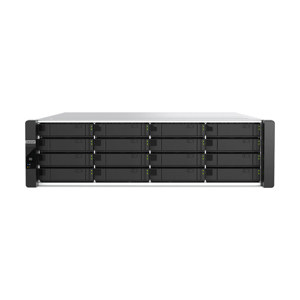
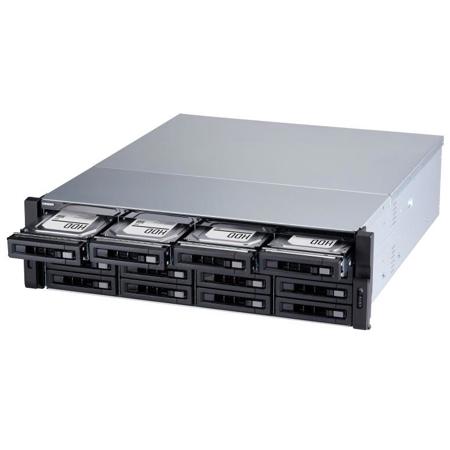
Ryzen-based rackmount NAS with up to 8 cores/16 threads and integrated dual 10GbE SFP+ ports to optimize system performance
Powered by AMD's powerful Ryzen processor, the TS-1677XU-RP is capable of boosting virtual machine performance with up to 8 cores/16 threads and Turbo Core up to 4.1 GHz. Four PCIe Gen.3 slots provides expandability to provide more potential applications and functionality for the TS-1677XU-RP. The TS-1677XU-RP also features a redundant power supply to ensure maximum system uptime.
Two 10GbE SFP+ ports provide higher bandwidth to empower applications like virtualization, 4K video editing and file sharing
PCIe expandability allows for installing 10GbE/40GbE adapters, PCIe NVMe SSD, graphics cards, USB 3.1 Gen 2 (10Gbps) cards, or wireless network cards
Supports AMD Radeon and NVIDIA graphics cards for video processing or GPU-passthrough to VMs
Qtier technology and SSD caching enable 24/7 optimized storage efficiency
Scalable storage supporting virtualization, containerized apps, centralized storage, backup, sharing, and disaster recovery
RAID 50/60 is recommended for NAS with over 6 disks to strike a balance between capacity, protection, and performance
Top-class hardware engineering with high I/O expandability
The hardware design of the TS-1677XU-RP provides exceptional system performance and expandability to fulfill diverse application requirements.
Multi-core AMD Ryzen processor
TS-1677XU-RP-1200-4G: Featuring a 4-core/4-thread Ryzen 3 1200 3.1 GHz processor with Turbo Core up to 3.4 GHz.
DDR4 2400 MHz memory
Supports four DDR4 dual-channel Long-DIMM memory (expandable up to 64GB).Includes 4GB/8GB/16GB RAM as standard.
2x 10GbE SFP+ ports
Fully supports 10GbE high-speed networks, ideal for running bandwidth-demanding applications.
USB 3.0/ 3.1 ports
Supports external hard drives, printers and UPS. USB 3.1 provides speeds up to 10Gb/s to greatly boost data transfer performance.
2x Gigabit Ethernet ports
Ideal for service binding, port trunking and MPIO configurations.
4x PCIe expansion slots
Supports 10GbE/40GbE network cards, QM2 M.2 SSD/10GbE PCIe cards, or wireless network cards for greater application potential.
4x 9.2cm System fans
Monitors system temperatures and automatically adjusts fan speeds accordingly.
2x 500W Power Supply Units
Redundant power supplies are provided on both new models to ensure continuous system up-time
Absolute performance with AMD Ryzen and up to 64GB RAM
Powered by a high-performance AMD Ryzen 7 2700, AMD Ryzen 5 2600 or AMD Ryzen 3 1200 processor with AES-NI encryption acceleration and up to 64GB DDR4 RAM, the TS-1677XU-RP delivers aggressive yet power-smart performance to meet your multitasking demands. For resource-demanding business applications such as VDI, R&D, private cloud, and server virtualization, look no further than the TS-1677XU-RP.
NAS: TS-1677XU-RP-2600-8G with QTS 4.3.4
Volume type: RAID 5; SSDSC2BB240G4 16 (RAID 5)
Client PC: Intel Core i7-6700 3.40GHz CPU; 64GB RAM; MLX CX3 10GbE NIC; Windows 10 64-bit; IOmeter 1.1.0 20 workers 1 outstanding, SMB throughput, 64KB, 30S ramp up time, 3M run time.
Dual-channel Memory to deliver power-smart performance
The TS-1677XU-RP supports dual-channel DDR-4 memory and four Long-DIMM slots. When using paired memory modules, the TS-1677XU-RP can leverage the power of dual-channel architecture to boost performance. You also customize the memory configuration (supports up to 64GB RAM) of the TS-1677XU-RP, making it the most ideal and cost-efficient storage solution for environments like virtualization that contain dynamically-changing workloads.
Extend NAS functionality with PCIe slots
The TS-1677XU-RP features four PCIe slots that allow for installing 10GbE/40GbE network cards, QM2 M.2 SSD/10GbE PCIe cards, or compatible wireless network cards for greater application potential.
10GbE/ 40GbE adapters
Install 10GbE/40GbE adapters to support lightning-fast throughput for bandwidth-demanding tasks such as virtualization and fast backup/restoration for an ever-growing amount of data.
QM2 card with M.2 SSD/10GbE support
Install QNAP's innovative QM2 card to add M.2 SSD caching or 10GbE (10GBASE-T) connectivity to the NAS to enjoy optimal performance.
Wireless network cards
Install QNAP's wireless network card (QWA-AC2600) to work with WirelessAP Station to transform the NAS into a convenient wireless base station, allowing network resources of the NAS to be shared with multiple devices.
Fuel GPU-accelerated computing with a 500W power supply
Graphics cards are optimized for graphical calculations and transformations, but require significantly more power compared to other hardware. The TS-1677XU-RP offers PCIe slots to support an AMD Radeon or NVIDIA graphics card and features a 500 watt power supply that provides a 8-pin (6+2) power connector and a 6-pin power connector to power a graphics card for boosting imaging processing in QTS and performance of virtual machines via GPU passthrough.
Note:
GPU support for QTS only applies to NVIDIA graphics cards. GPU Passthrough for VM is supported by AMD and NVIDIA graphics cards
When Virtualization Station uses graphics cards, the NAS will temporarily stop hardware transcoding acceleration for QTS (and vice versa)
The TS-1677XU-RP supports graphics cards with dimensions ( L x W x H) up to 214 x 38.5 x 111 mm
Consult the Compatibility List for information on supported NAS and graphics cards
Users are advised to install graphics card in Slot 3, as it can provide the bandwidth of PCIe Gen.3 x8 when slot 4 is not in use
Run multiple graphics cards in your TS-1677XU-RP to unleash greater potential
Featuring four PCIe slots, the TS-1677XU-RP allows you to insert up to two high-end graphics cards that work cooperatively to deliver incredible computing performance over a single graphics card. It helps lead to greater potential for accelerating NAS video processing and GPU computing, empowering data-intensive AI machine learning, and realizing GPU-passthrough to VMs.
Note: The support for multiple graphics cards will be available from QTS 4.3.5 (coming soon).
GPU-accelerated NAS for AI machine learning
The TS-1677XU-RP provides cutting-edge capabilities to help organizations develop cost-efficient AI-oriented Big Data storage solutions. Combined with a high-end graphics card and QNAP's "QuAI" AI developer package, the AMD Ryzen-based TS-1677XU-RP can be leveraged to quickly build, train, and optimize AI model-based services, beneficial for exploring intelligent services and greater business value.
SSD caching and auto tiering enable 24/7 optimized storage efficiency
The TS-1677XU-RP provides four PCIe slots that allow for installing QNAP's innovative QM2 cards to add M.2 SSD applications ,such as SSD caching, to the NAS. Using an SSD cache boosts overall system performance, and is perfect for improving the overall workflow of random IOPS demanding applications such as virtualization. Qtier Technology empowers the TS-1677XU-RP with auto tiering that further helps continuously optimize storage efficiency across M.2 SSD, SSD, high-capacity SATA drives, and the optional PCIe NVMe SSD with around-the-clock acceleration. The new Qtier 2.0 features IO-awareness that empowers SSD tiered storage with a cache-like reserved space to handle burst I/O in real time, greatly maximizing the advantages of SSD.
Note: M.2 SSD sold separately. M.2 SSD operations can easily generate excessive heat, and it is recommended to install a heatsink (from QNAP or a third-party provider) on M.2 SSD.
Performance & reliability. Your wise choice.
The TS-1677XU-RP supports advanced business features to provide maximized efficiency, performance, and to ensure round-the-clock services.
RAID 50/60
When using a NAS with over 6 disk bays, RAID 50/60 not only provides greater data protection and random write performance than a single RAID 5/6, but also maximizes usable storage compared to RAID 10.
USB 3.1
USB 3.1 Gen 2 (10Gbps) provides speeds up to 10Gb/s (double the speed of USB 3.0) to greatly boost data transfer performance. The TS-1677XU-RP comes with a USB 3.1 10Gbps Type-C and a Type-A port, providing greater flexibility and ensuring future-proof compatibility with new USB devices.
Central management
Designed for IT administrators, QRM+ provides a single-point solution to discover, map, monitor and manage all Windows, Linux and IPMI devices in your network, and facilitates device discovery with a graphical topology diagram.
Optimized performance for VMware Virtualization with iSER
With the built-in dual 10GbE ports that natively features Mellanox ConnectX-4, the TS-1677XU-RP supports the iSCSI Extensions for RDMA (iSER) protocol to boost data transfer performance of the TS-1677XU-RP as VMware ESXi storage and to reduce the CPU load of the ESXi server. iSER can provide a significant increase in performance, providing an essential tool to optimize demanding virtualization applications.
Note: To create an iSER connection with VMware ESXi, both the server and NAS require compatible Mellanox NICs and switches compatible with Mellanox or supporting PFC (Priority Flow Control) configuration.