This item is no longer available.
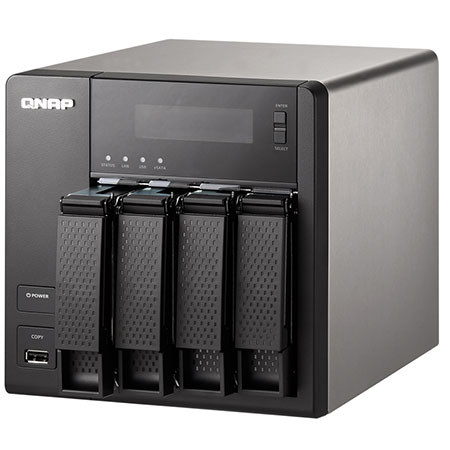
The Qnap TS-421 1GB is a powerful yet easy to use network storage center for data storage, backup, synchronization, remote access and home entertainment. As your personal cloud, you will always be connected to your files and your files are always under your control.
Easier Operations on QTS 4.0 Desktop
The QTS 4.0 Desktop including quick Main menu, graphic dashboard, drag-and-drop icons, multiple desktops, personalized wallpapers and the smart toolbar making system operations much easier. In addition, multi-tasking is supported which allows multiple windows to be open to access multiple applications concurrently.
Centralize and Protect your Data
The TS-421 is a high-performance cross-platform storage with many friendly storage and backup options that centralizes and protects all your important files on one single device. Time Machine is fully supported to help Mac OS X users create a more efficient and convenient backup solution. The TS-421 works with Time Machine wirelessly over the same network so you no longer need an external drive. Netbak Replicator is the license-free backup software which allows you to back up your files in multiple Window client PCs in schedule or real time. You can also gain a disaster recovery solution with the RTRR (Real Time Remote Replication) feature by replicating data in multiple shared folders from one NAS to another NAS over the network to ensure the safety of your important data. Besides, the data can also be backed up to another FTP server, external disk or to online cloud storage services.
Data Security
All your digital files stored can be managed to share with your family and friends. User accounts, user groups, shared folder access right and user quota can be flexibly and easily set up by yourself. A comprehensive list granting proper access from different users based on IP address can be established to authorize or deny access to the TS-421. The TS-421 has a built in anti-virus feature to detect and protect against viruses, malware, worms and Trojan horses. SSH remote login, SSL security (HTTPS), Secure FTP and encrypted remote replication are supported. Detail logs of file-level access to the TS-421 via different file transfer protocols and services accessed by online users can all be recorded.
Freely Access your Cloud Anywhere
All of your content is available on the go! Through any Web browser or the free app for tablets and smartphones the TS-421 becomes your personal cloud so you are always connected to your data. Take advantage of the myQnapcloud service, which allows you to remotely access your TS-421 wherever you are. Instantly stream or share your multimedia contents and share them with your friends.
Synchronize and Share
Qsync is a new feature that allows you to sync all your devices on the go. It can be synced literally anywhere- on the web, at your home, in the office and on the go. Q sync makes your TS-421 a team sharing device- allowing you to share and edit files among your teammates with automatic updates on the files your team is working on. Qsync provides the function of file synchronization like Dropbox service and brings forth a cost-effective way to share files across groups and communities.
Photo Albums on the Cloud
The TS-421 acts as your photo vault for you to back up your favorite photos. The Photo Station makes photo sharing simple and you can designate your own access right controls. Simply upload your photos to the TS-421 to create and organize your photo albums through a web browser to share with your family and friends. Your mobile devices are useful too, with the Qfile mobile app in your iOS or Android devices you can instantly upload photos to the TS-421. View photo slideshow with background music, Display photo details from EXIF: Date, exposure time, aperture, etc. Can publish photos in a few clicks to social networking sites such as Facebook, Google+, Twitter, MySpace and more. Also Share photos with your friends and family via email. Browse photos via the Qfile app on iPhones, iPads and Android devices
Build your Home Music Library and Enjoy Music Anywhere
The Music Station helps categorize your music collection and displays album covers to easily organize your personal playlists. Through the music station web player, you can enjoy your music anywhere, anytime with a few clicks. Thousands of local and global online Internet radio programs are built-into Music Station for you to enjoy. You can listen to your favorite MP3 songs streamed from iTunes Server or play music by web browsers on your PC. With SBS (Squeezebox Server) app plugin, you can efficiently manage and play them with Logitech music players without even turning on the PC. Stream music to your UPnP Hi-Fi system and indulge in high-quality sound experience. Listen to your music on mobile devices through Qmusic app.
Interact Through your Favorite Social Media Sites
Many applications on the TS-421 are designed with friendly options allowing you to share and connect with your social media communities. When you use Photo Station or Video Station, you can pick and share photos and video links directly to your Facebook. DJ Station allows you to stream and share your music playlist with your friends and family on your social media platforms.
Enjoy your Videos via AirPlay
The TS-421 supports Apple AirPlay. You can enjoy video and multimedia contents on AirPlay supported devices with the QAirplay application or the Qfile mobile app. Available in the App Center, QAirplay allows you to steam your media content directly on TV via AirPlay-enabled devices such as Apple TV. The media contents are streaming on Apple TV, bypassing your mobile device, thus saves the energy of your mobile device. Alternatively, the Qfile mobile app allows you to browse videos and photos stored on the TS-421 and play on the TV via AirPlay-enabled devices such as Apple TV. It is just that convenient to enjoy multimedia entertainment through the wireless experience.
A Sharing Center for your Home Theater
The TS-421 is an ideal video storage center for you to store your movie and home video collection. It features high-speed data transfer, fast enough to support multiple 1080p HD streams. The quiet operation design brings you the best cinema-grade home theater experience right to your living room. Qnap DLNA Media Server supports wireless streaming of all the videos, photos and music stored in the Media Library to any DLNA certified devices, such as PS3, Xbox360 and so on. It supports thumbnails shown on the DLNA devices for identifying the content quickly. TwonkyMedia DLNA Server is also supported to share and stream media contents in the multimedia folder of the TS-421. Use the TS-421 as a PLEx media server and enjoy your content through any Plex client or Smart TV. The TS-421 can work with different media players through SMB/CIFS or other standard protocols.
HappyGet
HappyGet is a handy third-party tool that allows you to download HD videos to the TS-421. By installing the HappyGet plug-in on the Chrome Web Store, you can select your preferred playlist and download an array of videos all at once with the embedded HappyGet button.
24/7 Download Center
The TS-421 is a perfect download center for high speed BT, Magnet, PT (Private Trackers), eMule, FTP and HTTP download. After the download tasks are set ready, you can turn off the computer and the TS-421 will download as many HD videos as you want. With the QGet utility you can manage your download tasks on multiple NAS devices remotely on the local network or the Internet. The TS-421 also supports continuous NZB download and eMule download by installed App Center apps without turning on a PC. Now, it also supports RSS download (broad catching) for automatic BT download.
App Center with rich apps to install on demand
The App Center centralizes various apps developed by Qnap and third-party developers. Popular apps such as Google Drive, Plex media server, NZBGet, Python and more are available in the App center for you to enhance your TS-421 experience. Installation is virtually immediate, with just one click the App will start installing onto the NAS.
Surveillance Station Pro - Protect your Home and Valuables
The TS-421 uses renowned Qnap VioStor NVR software. The TS-421 becomes a professional surveillance station to view IP cameras from your web browser and mobile devices. Supporting over 1,000 IP camera advance features are also included with the Surveillance Station Pro software, such as real-time monitoring, recording and playback. With the user-friendly interface and the expandable IP camera channel licenses, Surveillance Station Pro builds a professional surveillance center for you to monitor your things that you value easier.
Access, Use, Sync and Enjoy with your Tablets and Smartphones
The TS-421 is your private cloud storage that virtually enlarges the capacity of your smart mobile devices. Qfile allows you to access, upload, download, manage and share stored files easily as if you are carrying tons of files in your pocket. Music, photos and videos can be streamed, enjoyed and shared anytime, anywhere. Qmanager lets you monitor and manage the TS-421 remotely and efficiently without turning on a PC.
Expandable Storage
The TS-421 supports large storage capacity, fulfilling the increasing demand for storage. It supports comprehensive RAID management management and online RAID capacity expansion appropriately storing important data and reducing risks of data loss.