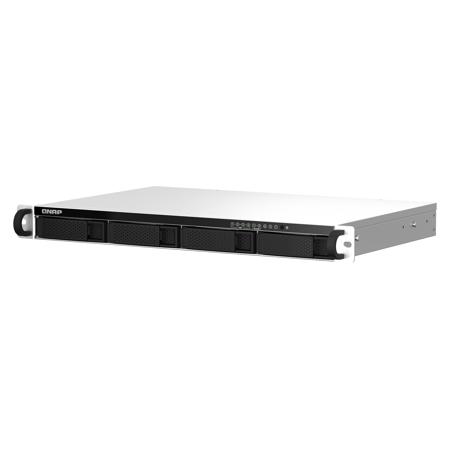
QNAP TS-464eU 4-Bay 1U Short-Depth Rackmount NAS/iSCSI IP-SAN Enclosure, Single PSU
SKU: QNTS464EU4G
This item is no longer available.
Recommended Alternatives
Share:
Overview
Compare
Specs
Protection







About QNAP TS-464eU
The TS-464eU is powered by Intel Celeron N5095/5105 quad-core processor (burst up to 2.9 GHz). The space-efficient short depth design makes it easy to install in small media cabinets or places with a lot of cabling. With expandable storage capacity and feature-rich apps, the TS-464eU surpasses the previous generation.
2.5GbE connectivity
Up to 5 Gbps transfer speeds can be achieved by setting port trunking with the two built-in 2.5GbE ports.
HDMI Output
Supports 4K media playback and real-time transcoding.
NVMe SSD application
Two M.2 PCIe NVMe SSD slots support Qtier auto-tiering technology and SSD caching.
USB interface
Two USB 3.2 Gen 2 10Gbps ports for faster data transfer.
Backup and data recovery
Protects PC/Macs, virtual machines, software containers, cloud data, and SaaS services.
Hybrid cloud applications
Cloud storage gateways realize hybrid cloud applications by working with the cache space reserved on NAS.
Quad-core Processor, burst up to 2.9 GHz with Memory Upgradable to 8 GB
The TS-464eU is powered by Intel Celeron N5095/N5105 quad-core processor (burst up to 2.9 GHz) with 4 GB DDR4 memory which is upgradable up to 16 GB. With Intel AES-NI encryption engine, the TS-x64eU provides unmatched encryption performance with AES-256 bit encryption acceleration, boosting system performance while ensuring the safety of sensitive business data stored in the NAS.
Virtualization Certifications Supported by TS-464eU
Build a High-Speed 2.5GbE Network Environment
QNAP offers comprehensive, budget-friendly storage and networking solutions that provide an array of connectivity possibilities. Easily and flexibly upgrade your workplace or home network now to handle bandwidth-hungry applications.
A fast 2.5GbE NAS
A QNAP NAS featuring one or more 2.5GbE ports, and Port trunking allows you to combine multiple ports for greater bandwidth potential.
Upgrade computers and servers
Servers and desktops can install PCIe-based QNAP network cards that support 10G/5G/2.5G/1G/100M Multi-Gig.
Add a 5GbE port to laptops
Laptops and upgrade-limited computers can use QNAP's portable USB 3.2 Gen 1 to 5GbE adapter that allows you to connect to 5G/2.5G/1G/100M networks via USB.
A switch that supports 2.5GbE+
QNAP's 10GbE/NBASE-T switches support 10G/5G/2.5G/1G/100M and allow connecting multiple workstations and devices for high-speed collaboration in device-dense environments.
Future-proof your IT infrastructure for high-speed networks
The TS-464eU is ideally matched with QNAP's managed and unmanaged 2.5GbE/10GbE switches to form high-speed, secure, and scalable network environments without going over budget. QNAP also provide 2.5GbE/5GbE/10GbE PCIe cards and USB 5GbE adapters for Windows/Linux workstations, allowing you to easily build a high-speed network environment for productive team collaboration.
Enhance productivity with multiple USB ports
With two USB 3.2 Gen 2 (10Gbps) ports and two USB 2.0 (480Mbps) ports, you can quickly backup and transfer large files to/from the TS-464eU. UPS, and other compatible USB devices can also be connected for greater functionality and application potential.
Accelerate AI-powered image recognition and caching with TPU and PCIe expansion M.2 PCIe Gen 3
The TS-464eU has two M.2 PCIe Gen3 slots, enabling cache acceleration or SSD storage pools for improved performance, or Edge TPU for AI image recognition.
NVMe 2 SSDs for cache acceleration or efficient tiered storage
The TS-464eU supports SSD caching and features two M.2 slots that support M.2 PCIe NVMe SSDs with 2280 form factors (sold separately) for boosting overall NAS performance. Qtier technology can also be used to empower the TS-464eU with auto tiering that helps continuously optimize storage efficiency across all installed storage devices.
Accelerate AI-powered image recognition with TPU
By leveraging a Google Edge TPU to QNAP AI Core (the AI-powered engine for image recognition), the TS-464eU can perform high-speed face and object recognition. Google Edge TPU enables QuMagie to quickly process thousands of photos with high-speed AI Image recognition and classification, and QVR Face to analyze real-time video for instant facial recognition.
Faster image identification with integrated Intel OpenVINO AI engine.
With integrated Intel OpenVINO AI computing resources, the TS-464eU accelerates AI image recognition performance without impacting other applications or services. QNAP AI Core primarily works with the QuMagie application.
QuMagie photo management
Easy-to-use photo management solution that integrates AI image recognition and intelligent classification for your collection.
With GPU acceleration 41.7% Performance boost
Direct 4K HDMI output for multimedia and virtual machine display
The TS-464eU features Intel UHD Graphics that supports dual-channel hardware decoding and real-time transcoding. The HDMI 1.4b output supports up to 4K @30Hz, providing great benefits for applications like video production/editing or industrial design that demands high resolution and color realism as well as intensive media storage, transfer, and display. By connecting the TS-464eU to an HDMI display, you can directly watch multimedia content saved on the NAS, or use the TS-464eU as a versatile workstation by directly outputting virtual machines from Virtualization Station or Ubuntu Linux Station.
QTS 5, Fast, smooth, and easy-to-use!
The TS-464eU comes with the QTS 5 operating system as standard, providing a next-generation usage experience with an updated system kernel, optimized user interface, and advanced security features.
Brighter. Smoother. You'll like it.
When navigating QTS 5, you will notice a finer attention to detail for a superior browsing experience. Enjoy a smoother NAS experience, comfortable visual design, and find your favorite apps quicker.
Get started with the notice board
When performing first-time installation, the notice board guides you through the setup process. Simply follow the step-by-step instructions for a quick and easy setup.
Smooth and reactive user interface
Whether clicking buttons, switching between apps, expanding/collapsing windows - every action is much smoother. The search bar in the main menu also assists in quickly finding desired apps.
Comprehensive backup and disaster recovery solution
The TS-464eU supports various apps that cover all your backup needs. Practice safe IT habits by regularly backing up files and device content, allowing them to be easily restored when needed.
PC/Laptop backup
For Windows, install NetBak Replicator to back up your PC to QNAP NAS. In macOS, just set up the built-in Time Machine to secure your data.
Remote backup for NAS
Hybrid Backup Sync makes it easy to back up data from a TS-464eU to another QNAP NAS or remote server to fulfill your 3-2-1 backup strategy.
VM backup
Enjoy license-free VMware and Hyper-V VM backup with source-side incremental backup, global deduplication, and recovery compression.
SaaS backup
Safeguard enterprise cloud data by backing up/syncing files, emails, calendars, and contacts from Google Workspace and Microsoft Office 365 to the NAS.
Cloud backup for NAS
Hybrid Backup Sync supports mainstream cloud storage for NAS data backup. For backup to object cloud storage, VJBOD Cloud is especially useful to reduce bandwidth usage and backup time.
QuDedup technology
Hybrid Backup Sync eliminates redundant data at the source and then backs up the deduplicated data, helping to save time and storage costs while providing efficient multi-version backups.
Multi-version snapshots mitigate ransomware threats
The TS-464eU supports block-based snapshots that record the state of the system at any time. It helps protect data, which can be restored back to a specific point of time, greatly helping in mitigating the threat of ransomware.
Volume and LUN snapshots
Take snapshots in seconds and revert the entire volume/LUN back to a specific point in time to prevent loss of important data.
Instantly restore snapshots
Snapshot content can be quickly restored to a local NAS, or restored on a folder/file basis to a local/remote NAS or cloud storage. You can also conveniently view and restore snapshots from the client side.
Back up snapshots
Multiply data protection by backing up snapshot files! Replicate volume/LUN snapshots in the TS-464eU to a remote NAS (Snapshot Replica) by copying only the changes made. This helps save time & bandwidth, and can be run manually or on a scheduled basis.
The best file storage and collaboration center
The TS-464eU integrates rich apps for storing, managing, synchronizing, searching, and archiving files. It supports SMB/CIFS, AFP, and NFS protocols for streamlined file sharing across Windows, Mac, and Linux/UNIX, and provides the smartest NAS solution for professionally managing your files.
File Station
Manage, access, and share all the files in the TS-464eU and view snapshots files - all from your web browser. You can also easily mount remote NAS folders and cloud storage.
Qsync
Make any file uploaded to a TS-464eU available to linked devices, such as computers, laptops and mobile devices. You can sync shared folders and team folders for group file sharing to enhance the flexibility of team projects and collaboration.
QNAP TS-464eU Features
- Intel Celeron N5105/N5095 4-core/4-thread processor, burst up to 2.9 GHz Processor
- 4 GB SO-DIMM DDR4 (1 x 4 GB) System Memory
- 16 GB (2 x 8 GB) Maximum Memory
- 2.5 Gigabit Ethernet Port: 2
- M.2 SSD Slot: 2 x M.2 2280 PCIe Gen 3 x 1 slots
- 4 x 3.5" SATA 6Gb/s, 3Gb/s Drive Bay