Orders placed during Passover Holiday (Wed 4/1 after 4PM ET – Thurs 4/9) will ship Fri 4/10. View our holiday shipping schedule.
This item is no longer available.
Review Summary
14 nm Intel Celeron N3150/N3160 1.6GHz quad-core processor
Yes
Yes (AES-NI)
8th generation Intel HD Graphics
4GB (2x 2GB)
2x SODIMM DDR3L-1600
Up to 8GB
512MB
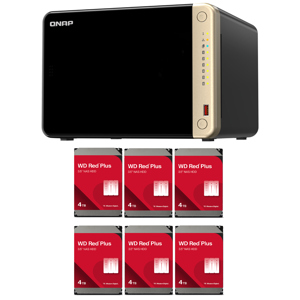
6
Hot-swappable 3.5" or 2.5" SATA 6Gb/s, SATA 3Gb/s hard drive or SSD
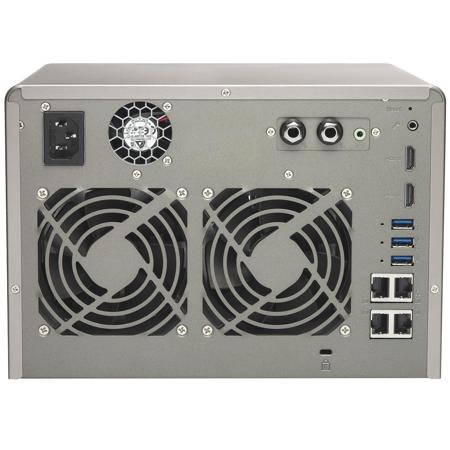
4x Gigabit RJ-45 Ethernet port
4x USB 3.0 port (Front:1, Rear:3)
Support USB printer, pen drive, and USB UPS etc
2x HDMI, up to 4K 2160P Ultra HD support
2x 6.3mm microphone jacks (dynamic microphones only)
Line Out Jack (for amplifier or headphone amplifier)
Status, USB, HDD 1-6
Mono-LCD display with backlight
System: Power button, USB one-touch-backup button, Reset button
Yes, Support QNAP RM-IR002, RM-IR003 and MCE-compatible Remote Control
Kensington security slot, console port (system maintenance)
System warning
Tower
System Sleep Mode: 1.7W
HDD Standby: 32.02W
In Operation: 51.16W
Sound pressure (LpAm): 21.0 dB(A)
0 to 40 deg. C (32 to 104 deg. F)
5-95% RH non-condensing, Wet bulb: 27 deg. C (81 deg. F)
ATX 240W, 110-240V AC, 50-60Hz, 5A
2x 9cm quiet cooling fan (12V DC)
QTS 4.2 (embedded Linux)
Windows 7 (32/64-bit), Windows 8 (32/64-bit), Windows Server 2003/2008 R2/2012/2012R2
Apple Mac OS X
Linux & UNIX
Microsoft Internet Explorer 10+
Mozilla Firefox 8+
Apple Safari 4+
Google Chrome
Chinese (Traditional & Simplified), Czech, Danish, Dutch, English, Finnish, French, German, Greek, Hungarian, Italian, Japanese, Korean, Norwegian, Polish, Portuguese (Brazil), Romanian, Russian, Spanish, Swedish, Thai, Turkish
Internal Hard Drive: EXT4
External Hard Drive: EXT3, EXT4, NTFS, FAT32, HFS+
TCP/IP (IPv4 & IPv6: Dual Stack)
Gigabit NICs with jumbo frame (failover, multi-IP settings, port trunking/NIC teaming)
Service binding based on network interfaces
Squid Proxy server
Proxy client
DHCP client, DHCP server
Protocols: CIFS/SMB, AFP (v3.3), NFS(v3), FTP, FTPS, SFTP, TFTP, HTTP(S), Telnet, SSH, iSCSI, SNMP, SMTP, and SMSC
UPnP & Bonjour Discovery
USB Wi-Fi Adapter Support
Network access protection with auto-blocking: SSH, Telnet, HTTP(S), FTP, CIFS/SMB, AFP
CIFS host access control for shared folders
FIPS 140-2 validated AES 256-bit volume-based and shared folder data encryption
AES 256-bit external drive encryption
Importable SSL certificates
Instant alerts via email, SMS, beep, push service, and LCD panel
2-step verification
Storage Space Utilization monitoring
QNAP flexible Volume/LUN with thin provisioning and space reclaim
Disk volume types: RAID 0,1, 5, 6, 10, + hot spare, JBOD single
Supports storage pools
Supports volume/LUN snapshots: Snapshot clone, Snapshot vault, Snapshot replica, Snapshot agent for Microsoft Windows and VMware vSphere
Online volume expansion
Online storage pool expansion
Online RAID capacity expansion and online RAID level migration
SMART data migration
Storage expansion via a QNAP UX-500P/UX-800P expansion unit
JBOD enclosure roaming
SSD read-only/read-write cache
Bad block scan and hard drive S.M.A.R.T.
Bad block recovery & RAID recovery
Bitmap support
FTP over SSL/TLS (Explicit)
FXP support
Supports mounting cloud drives (such as Google Drive, Dropbox, Microsoft OneDrive, Amazon Drive, Yandex Disk and Box)
Supports mounting remote shared folders through FTP, WebDAV or Microsoft networking (SMB/CIFS)
Supports opening documents via Office Online, Google Docs or Chrome Extension (Edit Office files in Google Docs, Sheets, and Slides)
Supports ISO Mounting (Up to 256 ISO Files)
Supports sharing download links and upload links
Drag-n-drop Files via Chrome and Firefox Browsers
Photo, music, and video preview and playback with hardware-accelerated transcoding
File Compression (ZIP or 7z)
Creation of and sending download links for sharing public files with expiration date and password protection
Supports displaying subtitles (.SRT, UTF-8 format) - Supports slideshow playback in media viewer
Mobile App: Qfile for file browsing and management
Transcode video files to 240p, 360p, 480p, 720p and 1080p resolution
Automatic video transcoding for watched folders
Hardware accelerated transcoding support
Embed subtitles into videos for background transcoding
Remote replication server (over rsync)
Real-time remote replication (RTRR) to another QNAP NAS or FTP server
Works as both RTRR server & client with bandwidth control
Real-time & scheduled backup
Backup versioning for RTRR
Snapshot support for RTRR/Rsync
Encryption, compression, file filter, and transfer rate limitation
Desktop backup with QNAP NetBak Replicator for Windows
Apple Time Machine backup support
Data backup to multiple external storage devices
Synchronizes with cloud storage: Amazon S3, ElephantDrive, Dropbox, and Google Drive
Third party backup software support: Veeam backup & replication, Acronis True Image, Arc serve backup, emc retrospect, Symantec Backup Exec, etc
Max number of printers: 3
Supports Internet Printing Protocol
Print job display and management
IP-based and domain name-based privilege control
Amazon S3
Amazon Glacier
WebDAV-based cloud storage
Microsoft Azure
OpenStack
Streams videos, photos and music from NAS to Apple TV or Chromecast via File Station, Music Station, Photo Station, Video Station or mobile app (Qfile, Qmusic, Qphoto or Qvideo)
Watch various online content such as Flickr, Picasa, Shoutcast, etc
Web browsers (Chrome, Firefox)
Supports international keyboards, input and mouse
Supports user login permissions
A variety of applications are available including Skype, Plex Home Theater, and more
Up to 7.1 channel audio pass-through is supported
Supports Virtual Machine (VM) creation to run operating systems such as Windows, Linux, Unix and Android
Supports VM import and export
Supports VM cloning & snapshots
Supports VM backup and restore
VM console can be displayed via HDMI output - QVM
HTML5-based shared remote console
Supports three different networking modes: Isolated, External-only and Bridged
Supports LXC and Docker
Download applications from the built-in Docker Hub Registry
Supports one-click installation, container export/import & console mode
Supports auto port forwarding
Supports auto-start containers
Supports downloading Docker certificates
Supports full-text search
Supports Near Real-time Search
Bar chart to show data distribution
Supports previews for photos, music, videos, Gmail, PDF etc
Show search results using thumbnails or a list
Supports search Chrome extension
Wake on LAN
Internal hard drive standby mode
Scheduled power on/off
Automatic power on after power recovery
USB and network UPS support with SNMP management
System sleep mode (S3)
Batch users creation
Import/Export users
User quota management
Local user access control for CIFS, AFP, FTP, and WebDAV
Application access control for Photo Station, Music Station, Video Station, and File Station
Subfolder permissions support for CIFS/SMB, AFP, FTP, and File Station
Microsoft Active Directory (AD) & Domain Controller support
LDAP server, LDAP client
Domain users login via CIFS/SMB, AFP, FTP, and File Station
Private cloud storage and sharing
Free host name registration (DDNS)
Optional myQNAPcloud SSL certificates (DDNS)
Auto router configuration (via UPnP)
Web-based file manager with HTTPS 2048-bit encryption
CloudLink for remote access without any complicated router setup
myQNAPcloud connect for easy VPN connection (Windows VPN utility)
Sync files across multiple devices with SSL secure connection
Selective synchronization for only syncing specific folders
Use team folders as a file center for greater team collaboration (maximum sync tasks: 32)
Shares files by links via e-mail
Policy settings for conflicting files and file type filter support
Version control: Up to 64 versions
Unified privilege management
Unified configuration management
Supports central configuration mode
Supports remote erase/restore
Supports shared folders sync
Supports Windows & Mac OS
Multi-window, multi-tasking based system management
Smart toolbar and dashboard for neat system status display
Dynamic DNS (DDNS)
SNMP (v2 & v3)
Resource monitor
Network recycle bin for file deletion via CIFS/SMB, AFP, and File Station: Automatic Cleanup, File Type Filter
Comprehensive logs (events & connection)
Syslog client/server
System settings backup and restore
Mobile app: Qmanager for remote system monitoring & management
File sharing across Windows, Mac, and Linux/UNIX
Windows ACL
Advanced folder permissions for CIFS/SMB, AFP, FTP
Shared folder aggregation (CIFS/SMB)
Creating and mapping shared folders by QNAP Windows Qfinder Pro
Creation of and connection to iSCSI target/LUN
iSCSI target with multi-LUNs per target (Up to 256 targets/LUNs combined)
Supports LUN mapping & masking
Online LUN capacity expansion
Support for SPC-3 persistent reservation
Supports MPIO & MC/S
iSCSI LUN backup, one-time snapshot, and restoration
iSCSI connection and management by QNAP Windows Qfinder Pro
Virtual disk drive (via iSCSI initiator)
Stack chaining master
Max No. of virtual disk drives: 8
Supports over 3,000 IP cameras
Includes 4 free camera licenses, up to 40 camera channels by purchasing additional licenses
Instant playback to check recent events
Visual aid by e-map
Playback and speed control using the shuttle bar
Video preview on playback timeline
Intelligent video analytics (IVA) for advanced video searching
Surveillance client for Mac
Mobile surveillance app: Vmobile (iOS and Android)
Mobile recording app: Vcam (iOS and Android)
Secure remote access: PPTP, L2TP/IPsec & OpenVPN VPN services
Max number of clients: 30
Supported VPN protocols: PPTP & OpenVPN services
PPTP Authentication: PAP, CHAP, MS-CHAP, MS-CHAPv2
PPTP Encryption: No, AES 40/128 bit, AES 256 bit
OpenVPN Encryption: No, AES 40/128 bit, AES 256 bit
Transmission package monitor
OpenVPN port control
OpenVPN link compression
Supports DLNA/UPnP TVs and players such as PlayStation 4 and Xbox One
Supported audio formats: AIFF, APE, DSD (DSF, DFF), FLAC, M4A, M4A Apple Lossless (ALAC), MP3, Ogg Vorbis, WAV (PCM, LPCM), WMA, WMA PRO, WMA VBR
Support CUE indexing file for APE, FLAC audio format
Video and Audio On-the-fly Transcoding
Multiple NAS monitoring
Utilization history reports
Unified configuration management
Visual display reports
Monitor NAS behind NAT routers with Q'center Assistant
Virtual appliances supported by Microsoft Hyper-V and VMware ESXi
Use the NAS as a karaoke machine
Display songs by artists, languages, and favorites
Enhance the experience with effects such as tuning echo, key, or applause
Control the playlist with a mobile app
Supports keyboard, mouse and remote control (RM-RF001/ RM-IR002)
Audio and video sharing for Windows & Mac iTunes
Over 100 official and community software add-ons such as Photo Station, Music Station, Video Station, Download Station, Notes Station, Signage Station
175 x 257 x 235mm (6.89 x 10.12 x 9.25")
5.2kg (11.46lbs)
885022009893
In response to the coming era of Internet of Things (IoT), the TS-653A innovatively supports the open-source Linux platform as a gateway for IoT solutions to other smart devices. The TS-653A allows users to directly utilize various feature-rich Linux apps, enjoying a private cloud combining storage and IoT applications and professional developers can develop and run IoT applications directly on the TS-653A. The secure, reliable TS-653A is packed with business-critical features such as Volume/LUN Snapshot - allowing files/folders to revert to a previous state in case of any corruption or file-loss.
Supports the Linux OS with direct output via HDMI
Dual HDMI output for switching between duplicated and extended desktop options
AES-NI hardware-accelerated encryption for efficient cryptographic performance up to 416MB/s
Supports 4K hardware decoding and transcodes 4K H.264 videos on-the-fly or offline
Quickly find files using a real-time, natural search with Qsirch 2.1
NAS and iSCSI-SAN unified storage solution for virtualization
Supports VMware, Citrix, Microsoft Hyper-V and advanced virtualization features
A hybrid approach to virtualization in one NAS: Virtualization Station & Container Station
Build a personal karaoke system with high-quality audio output with the new OceanKTV app
The TS-653A is powered by the latest quad-core Intel Celeron processor which allows users to enjoy 4K (H.264) video playback and 1080p/4K video real-time transcoding directly from the TS-653A to an HD/4K display.
QTS-Linux dual systems, geared for the IoT era
The TS-653A's QTS-Linux dual systems are based upon QNAP's advanced virtualization technologies. The revolutionary architecture of the TS-653A enables users not only to download rich apps from QTS App Center but also to develop or utilize IoT packages for Linux and display them using HDMI output. With the TS-653A, you can develop and install various IoT packages on demand and centrally store the data on the TS-653A, benefiting from a secure private storage and development solution. Simply plug in a keyboard, mouse and HDMI monitor to the TS-653A and use the Linux Station as if you were using a PC. You can also operate the Linux Station as a remote desktop via web browser for instant management.
Intel Celeron quad-core 1.6GHz CPU fulfills multi-tasking efficiency
Powered by the latest 14 nm Intel Celeron N3150/N3160 quad-core 1.6GHz processor, dual-channel 4GB DDR3L-1600 RAM (upgradable to 8GB), 4 Gigabit LAN ports and SATA 6Gb/s, the TS-653A delivers up to 416MB/s read speed and runs tasks smoothly and quickly. The TS-653A can automatically increase the processor's clock speed from 1.6GHz to 2.08GHz when performing CPU-intensive tasks. The TS-653A features Intel AES-NI hardware-accelerated encryption engine to drive transfer speeds of up to 416MB/s with AES 256-bit encryption for both full NAS volume and shared folders, boosting system performance & security while ensuring the safety of sensitive business data stored in the TS-653A.
Superior real-time and offline 4K video transcoding
Featuring advanced 8th-generation Intel HD Graphics, the TS-653A supports 4K (H.264) hardware decoding and delivers superior real-time 4K (H.264) and 1080p video transcoding to convert videos to universal formats that can be smoothly played on PCs, mobile devices and Smart TVs. With offline transcoding, even when you can only connect using a low-speed Internet connection, you can still enjoy smooth video playback via File Station, Video Station and the Qfile mobile app by selecting a pre-rendered lower resolution video. The TS-653A also allows you to set a dedicated folder for automatic video transcoding.
QTS 4.2 - Simple, convenient and efficient
Thanks to the intuitive user interface of QTS, your NAS experience is smarter, smoother and spectacular. Its modern flat design streamlines loading times and the intelligent desktop allows you to find desired functions quickly, create desktop shortcuts or group shortcuts, monitor important system information on a real-time basis and open multiple application windows to run multiple tasks concurrently, bringing greater working efficiency. QTS breaks the barriers of devices, platforms and geography to bring optimized cloud experiences to you and incorporates more advanced features including volume/LUN snapshot, remote connection to public cloud services in File Station, multi-zone multimedia system and more.
Disaster recovery solutions brings peace of mind
The TS-653A offers various data recovery options. RTRR (Real-Time Remote Replication) supports real time or scheduled data backup to a remote QNAP NAS or FTP server and synchronizes files to a remote folder from a local folder with better backup efficiency. You can enjoy backup versioning to preserve a certain amount of versions, with options of simple versioning to schedule how many versions should be retained and for how long or smart versioning with a rotation scheme that automatically replaces earlier backup versions. The TS-653A also supports the rsync protocol to back up data to another remote server on a scheduled basis. Data can also be backed up to and restored from a range of cloud storage services, including Amazon S3, Amazon Glacier, Microsoft Azure, Elephant Drive, Dropbox, Google Drive, Google Cloud Storage and more.
Restore files with Snapshot
QTS Storage Manager adds an easy-to-use web-based snapshot tool for you to easily backup and restore data on the TS-653A back to any point of time in case you lose any important data. You can take snapshots for both volumes and LUN (up to 256 snapshots per volume or LUN and maximum 1024 snapshots per NAS), efficiently replicate volume/LUN snapshots via Snapshot Replica to remote servers by copying only the changes made and quickly clone a volume /LUN snapshot as a local volume without interrupting the current system operation. You can even set up the system to automatically take a snapshot of the volume before backup via RTRR/rsync, even when the file is opened.
Qsirch - a smarter, faster way to search
The TS-653A supports Qsirch, a proprietary near real-time search tool for quick file searching. In addition to thumbnail previews, Qsirch now allows you to find and preview Gmail emails that are backed Upon the TS-653A. Qsirch even remembers your search history allowing you to quickly navigate to files you've previously searched for. Qsirch is a huge productivity boost that greatly reduces the time spent looking for files on the NAS, allowing you to focus on other tasks. The revamped Qsirch 2.1 adds a Google Chrome Extension that allows you to search for files on your NAS when you use Google Search.
Datastore for virtualized environments
The TS-653A is also an iSCSI/ IP-SAN storage that supports VMware and Citrix and is compatible with Microsoft Hyper-V and Windows Server 2012, benefiting flexible deployment and management in virtualization environments. The TS-653A supports VMware VAAI and Microsoft ODX to increase performance by offloading server loading for ESXi server and Hyper-V respectively and supports QNAP vSphere Client plug-in and QNAP SMI-S provider with enhanced operational efficiency and management in virtualization applications.
Born for server virtualization
Virtualization Station allows you to host virtual machines (VM) on the TS-653A and access them via a web browser or VNC. Virtualization Station supports multiple operating systems, fast VM creation, VM backup & restoration, VM import/export, snapshot and Device Management for centrally managing VM. Virtualization Station uses SDN (Software-defined Networks) and allows the TS-653A and VMs to share the same LAN port. No longer constrained by physical network performance, high-speed Virtual Switches greatly increases data transfer between VMs as well as between VMs and NAS through the internal interface. You can also download VMs on demand from online VM markets and import them to the TS-653A without any complex procedures.
Cross-platform file sharing, centralized data storage
The TS-653A supports SMB/CIFS, NFS and AFP protocols for file sharing across Windows, Mac, Linux/UNIX networks. Data, logs and ISO images of CDs and DVDs can be centrally stored on the TS-653A and protected by an integrated antivirus solution. The Windows AD and LDAP services enable system administrators to configure user permissions by using an existing Windows AD server, LDAP server or built-in LDAP service. The TS-653A supports SAMBA v4 and can act as a Windows domain controller to manage privilege settings.
Well-rounded backup solutions to secure data
QNAP NetBak Replicator supports real-time and scheduled data backUpon Windows including Outlook email archiving. Apple Time Machine is also supported to provide Mac OS X users with a solution to effortlessly back up data to the TS-653A. The front-panel USB 3.0 port of the TS-653A features a one-touch-copy function for you to instantly back up data from external drives to the TS-653A with just one click or alternatively to back up data from the TS-653A to external drives. A wide range of third-party backup software such as Acronis True Image and Symantec Backup Exec are also supported.
Comprehensive security options
In open network environments, business data may be exposed in a potential hack. The TS-653A provides numerous security options, such as encrypted access, IP blocking and more. IT administrators can also control the access rights of each user to different folders, preventing unauthorized access to important files.