This item is no longer available.
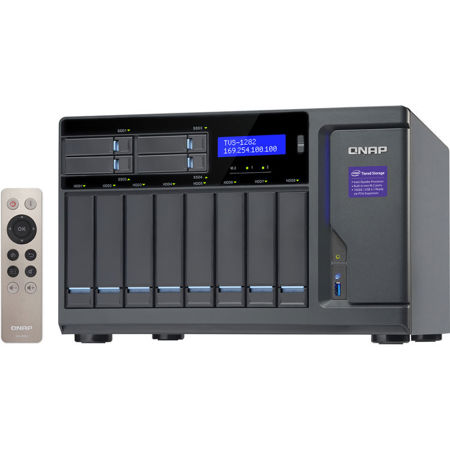
TVS-1282 - High-performance NAS: tiered storage, application-based partitioning and network traffic distribution
The TVS-1282 features advanced hardware by adopting 7th Generation Intel 14nm multi-core processors and was designed around the concept of tiered storage, application-based partitioning and network traffic distribution. Featuring PCIe Gen.3 slots that can support 10GbE/40GbE NIC, PCIe NVMe SSD, graphics cards, and USB 3.1 expansion cards, the TVS-1282 also supports smooth 4K @30Hz video transfer, cross-platform file sharing, comprehensive backup and disaster recovery, iSCSI & virtualization and more business applications. Incorporating reliability and security, the TVS-1282 presents an ideal choice for a complete business-ready storage solution.
7th Generation Intel processors, extraordinary performance
The TVS-1282 is powered by high-performance 7th Generation Intel multi-core processors with options including Core i3, Core i5, and Core i7, increasing system performance by 20% - 30% compared with previous generations. It greatly enhances the efficiency of CPU-demanding applications such as virtualization, real-time 4K @30Hz video playback, and serving large numbers of simultaneous connections.
Advanced hardware for greater efficiency
High-performance hardware, well-designed application functionalities and thoroughly-planned usage scenarios are three distinctive cornerstones for achieving optimum performance.
M.2 SATA 6Gb/s SSD & 2.5" SSD cache
The TVS-1282 provides 4 SSD slots dedicated for caching to increase IOPS performance, and provides higher transfer speeds and reliability with the compact, energy-efficient M.2 SSD. Using an SSD cache boosts overall system performance, and is perfect for improving overall workflow of random IOPS demanding applications such as virtualization. The TVS-1282 combines M.2 SSD, 2.5" SSD and HDD in one box to effectively realize tiered storage for exceptional application performance and lower TCO of storage at the same time.
Perfect storage trio: tiered storage, application-based partitioning & network traffic distribution
The advanced hardware design of TVS-1282 can facilitate optimized storage deployment based on different usage scenarios.
Tiered Storage
QNAP's Qtier Technology empowers the TVS-1282 with Auto Tiering that helps continuously optimize storage efficiency across PCIe NVMe SSD, M.2 SSD, SSD and SATA drives. With Auto Tiering, the TVS-1282 can automatically move frequently-used "hot" data to high-performance storage tiers and less-accessed "cold" data to lower-cost, higher-capacity drives, making the TVS-1282 an extremely efficient shared resource. Businesses will no longer have to invest heavily in expensive Flash technology, but can still enjoy exceptional application performance and cost efficiency from Auto Tiering with the TVS-1282.
Application-based Partitioning
Every application requires different performance. For example, Surveillance Station requires higher-priority access to storage to ensure the integrity of recordings, while normal transmission speeds are sufficient for file sharing. However, when multiple applications are running on the same storage media, the required throughput level cannot be guaranteed as the storage media is busy handling I/O requests from all of them. The TVS-1282 supports three different types of storage media: M.2, SSD and SATA hard drives, and they can be configured as independent partitions for different applications, ensuring a sufficient throughput level for every application.
Network Traffic Distribution
With four 1 Gigabit Ethernet ports, the TVS-1282 allows applications to use dedicated interfaces to meet network traffic distribution requirements. Network interfaces can also be easily managed with the Network & Virtual Switch app, which enables optimized network resources for TVS-1282, virtual machines and containerized apps. No matter if they are business organizations or individual users, they can effortlessly manage network connections by using the Network & Virtual Switch.
Three HDMI outputs - switch between HD Station and Linux desktop
The TVS-1282 comes with three HDMI outputs for using three monitors in either "duplicated" or "extended" desktop configuration. Duplicating will display the same content on every display, and extended desktop mode allows users to display applications across the displays for improved multitasking convenience and productivity. When displaying content using HDMI, you can use the TVS-1282 as an amazing multimedia player by using HD Station to enjoy rich apps including Plex Home Theater, Google Chrome, Mozilla Firefox, and more. Alternatively, you can choose to output the Linux operating system desktop to use the TVS-1282 as a PC.
Note: To use Linux Station, please install it from the App Center from firmware QTS 4.2.1.
Seamless capacity expansion via SAS or USB interface
The TVS-1282 supports online capacity expansion by connecting multiple high-performance SAS-enabled QNAP RAID expansion enclosures or economical USB 3.0 expansion units to meet the needs of growing business data. The total storage capacity of the TVS-1282 can be gradually expanded and easily managed by the QTS Storage Manager, being useful for large data applications such as video surveillance, data archiving, and TV broadcast storage, and more.
Use NAS to expand NAS capacity with Virtual JBOD
Besides using physical storage expansion enclosures, there is an additional option to expand NAS storage capacity. QNAP VJBOD (Virtual JBOD) is network-based JBOD, allowing you to expand storage of your QNAP NAS with multiple QNAP NAS units. You can mount iSCSI LUNs from a QNAP NAS to the TVS-1282 as local disks, and create virtual storage pools and volumes for operating NAS functionalities, such as creating and reverting snapshots, indexing multimedia files into the media library, and even further creating iSCSI LUNs. With VJBOD, you can centrally utilize the storage space from multiple QNAP NAS units and manage it with the interface on the local NAS. VJBOD supports 10GbE/40GbE Ethernet connection interface and port trunking (link aggregation with multiple LAN ports) that increase the performance and reliability of your VJBOD storage.
Upgrade your IT environment with QNAP's fast and affordable 10GbE Switch!
QNAP 10GbE/NBASE-T unmanaged switches allow you to instantly upgrade your network environment at a cost-effective price. With a 10GbE network you can enjoy blazing-fast transfer speeds, empower bandwidth-demanding tasks like virtualization, and enable simultaneous real-time access to large NAS-based files using multiple workstations (ideal for video editing and multimedia). QNAP also provide a 10GbE PCIe network expansion card for the TVS-1282 and Windows/Linux PCs to take advantage of high-speed LAN environments.
QTS - simple and powerful
The intuitive QTS features a modern flat design to streamline loading times, and its intelligent desktop allows you to find desired functions quickly, monitor important system information on a real-time basis, and open multiple application windows to run multiple tasks concurrently, bringing greater operating efficiency.
QRM+: Centralized management solution for networked computing devices
QRM+ is QNAP's Centralized Management Solution, designed for IT teams, for networked computing devices. It provides a single-point solution to discover, map, monitor and manage all of the critical computing devices (including servers, PCs, and thin clients) in your network, and facilitates device discovery with the graphical topology diagram. QRM+ supports IPMI 2.0, provides remote KVM (Keyboard, Video, Mouse) for certain IPMI devices, and supports tracking every action using KVM recording and playback. Simply install QRMAgent on your Windows and Linux devices and you will see their system status on the QRM+ management interface. With centralized management using QRM+ on the NAS, IT infrastructure and device security is enhanced while troubleshooting and network resource performance analysis is greatly simplified.
QmailAgent: a mailroom center for your private cloud
QmailAgent is an online email client that helps you manage multiple email accounts, allowing you to access all of your emails and to easily switch between different accounts. It provides complete functionality for composing, reading and organizing emails. You can even attach files, photos and documents from the TVS-1282 when composing emails. Qmail also allows iOS and Android users to quickly check multiple email accounts with mobile devices, and to browse & send emails using the QmailAgent on their TVS-1282.
Storage for hosting virtual machines and containerized applications
Virtualization Station allows you to host virtual machines (VM) on the TVS-1282 and access them via a web browser or VNC. Virtualization Station supports multiple operating systems, fast VM creation, VM backup & restoration, VM import/export, snapshot, and Device Management for centrally managing VM. Virtualization Station allows the TVS-1282 and VMs to share the same LAN port. No longer constrained by physical network performance, high-speed virtual switches greatly increases data transfer between VMs as well as between VMs and NAS through the internal interface. An AMD Radeon R7 Series or RX 480 graphics card can also be installed into the TVS-1282's PCIe slot for GPU passthrough to virtual machines, greatly boosting the computational and rendering power of virtualized applications.
The TVS-1282 also features Container Station, which integrates LXC and Docker lightweight virtualization technologies.